

Data Corruption Error when creating a Shipment

  • September 22, 2026
  • 4 replies
  • 75 views

Hello all,

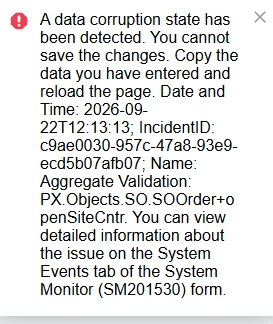
Recently we have begun to increasingly see the below error when we attempt to make a shipment. To resolve it we end up repeatedly trying to create a shipment until the error resolves on its own. Does anyone else experience this problem? Is there a known fix? We are on the latest build of 25R2 the screens involved are the shipment screen and sales order.



4 replies

rkenna
Captain II
Forum|alt.badge.img+5
  • Captain II
  • September 22, 2026

Hi ​@FHubsch, anytime I have seen a data corruption, it usually is with a Sales Order/Shipment relationship. Something took place at some point to cause the corruption. I have always had to open a ticket with Acumatica each time for them to go into the server on the backend and make a corruption fix. 

Cheers,

RJ


  • Author
  • Freshman I
  • September 22, 2026

Hi RJ, 

I should have probably added we are an onprem company so we have our own server… does that effect your advice?


Manikanta Dhulipudi
Captain II
Forum|alt.badge.img+16

​@FHubsch Can you refresh and check if this issue exist?

As per my knowledge, there is a permanent fix in 26r1


Steve Milner
Varsity III
Forum|alt.badge.img+4
  • Varsity III
  • September 22, 2026

@FHubsch RJ's route is still the right one, and being on-prem doesn't change it. It does give you two things to do first.

openSiteCntr is the number of warehouses on the order that still have open lines and no unconfirmed shipment. The check behind that error isn't reading your stored value. It compares the change one save makes to that counter against the change the order's warehouse rows (SOOrderSite) account for. Both have to move together, and creating a shipment moves both. When they disagree the save is refused, so it's a condition inside a single save rather than a flag sitting on the order. That fits a retry eventually going through.

First, open System Monitor (SM201530), System Events tab, and find the incident by the ID in that message. The event records the difference and the two values it compared. Support will ask for it.

Second, and this is the part on-prem gives you, check whether your stored counters are actually off. Read-only:

SELECT o.CompanyID, o.OrderType, o.OrderNbr, o.OpenSiteCntr AS Stored, ISNULL(s.Expected, 0) AS Expected
FROM SOOrder o
LEFT JOIN (
    SELECT CompanyID, OrderType, OrderNbr,
           SUM(CASE WHEN OpenShipmentCntr = 0 AND OpenLineCntr > 0 THEN 1 ELSE 0 END) AS Expected
    FROM SOOrderSite
    GROUP BY CompanyID, OrderType, OrderNbr
) s ON s.CompanyID = o.CompanyID AND s.OrderType = o.OrderType AND s.OrderNbr = o.OrderNbr
WHERE o.OpenSiteCntr <> ISNULL(s.Expected, 0)

Rows coming back is real data to fix, and you walk into the case with order numbers. Nothing coming back means the stored counters are fine and it's the save path, so try reproducing with your customizations and ISV products unpublished before you open it.


