Solved

Tracking Number to Big Commerce

  • September 19, 2024
  • 10 replies
  • 192 views

Forum|alt.badge.img

Hello,

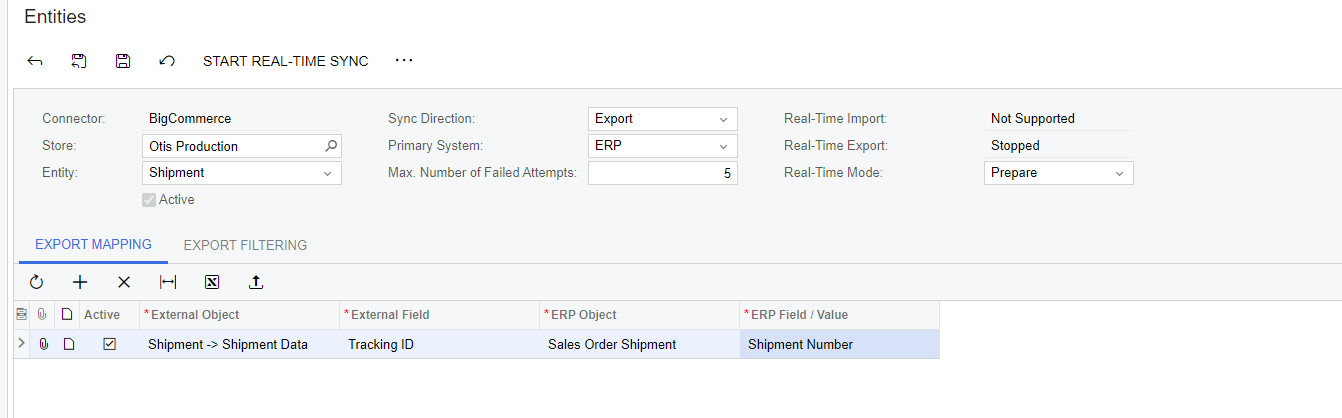
Does anyone know the setup in the Commerce module to allow for the tracking number to be sent back to BC from Acumatica? I am unsure if this setup is the correct setup, but I know we not currently having tracking IDs sent back to BC.


Best answer by Yuri Karpenko

@JReppard , exporting tracking numbers is mapped by default. If you’re not getting those tracking numbers in BigCommerce, there must be a problem with how that data is stored in Acumatica. Here what I would recommend:

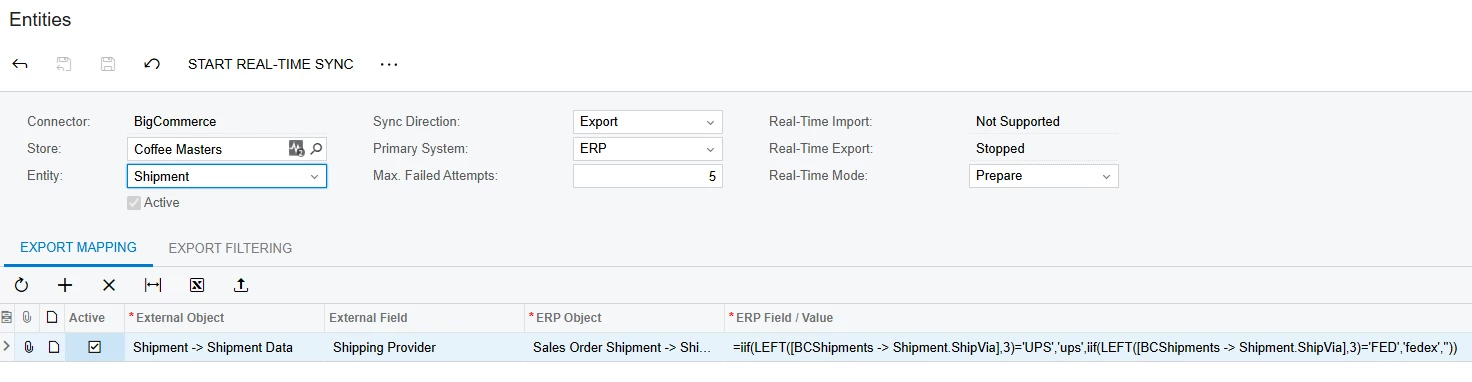
  1. Remove that custom mapping from the entities screen (the one that you shared in a screenshot)
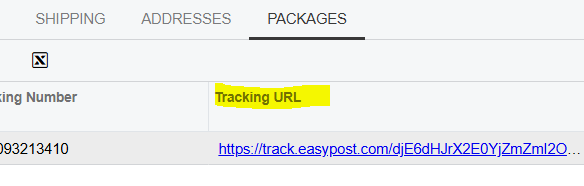
  2. Try to export a new shipment to BC. If the order changes the status to Shipped, but there is no tracking number, check where the tracking numbers are stored in Acumatica. Sharing screenshots of the Packages tab from a shipment in Acumatica would be helpful for further troubleshooting.

Thank you and have a good day!

10 replies

Yuri Karpenko
Captain II
Forum|alt.badge.img+7
  • Captain II
  • Answer
  • September 19, 2024

@JReppard , exporting tracking numbers is mapped by default. If you’re not getting those tracking numbers in BigCommerce, there must be a problem with how that data is stored in Acumatica. Here what I would recommend:

  1. Remove that custom mapping from the entities screen (the one that you shared in a screenshot)
  2. Try to export a new shipment to BC. If the order changes the status to Shipped, but there is no tracking number, check where the tracking numbers are stored in Acumatica. Sharing screenshots of the Packages tab from a shipment in Acumatica would be helpful for further troubleshooting.

Thank you and have a good day!


Forum|alt.badge.img
  • Author
  • Varsity I
  • September 24, 2024

Thank you. I did remove this and seems to work as needed. I appreciate the feedback. 


lauraj46
Captain II
Forum|alt.badge.img+9
  • Captain II
  • February 7, 2025

​@Yuri Karpenko  Do you know if there’s a way to map the Tracking URL from the Acumatica package to the Big Commerce Tracking ID?  

Thanks!


Yuri Karpenko
Captain II
Forum|alt.badge.img+7

​@lauraj46 , not that I know of. Technically, it’s possible to update the tracking link in BC. But the connector doesn’t give us that option OOTB. This would require some customization, on 2 levels: add ‘tracking_link’ to the available options for the External Field; expose Tracking URL field to the ERP Field / Value field. Shouldn’t be too hard to do - probably a weekend project for you, or for me :)


Evan Templin
Freshman II
  • Freshman II
  • February 10, 2026

In case anyone finds it helpful, reading through the code I found this:

Presuming that a valid carrier code is used, a tracking link is generated if either shipping_provider or tracking_carrier is supplied alongside a tracking number.

Providing only the tracking number will result in an unclickable text in the customer facing email.

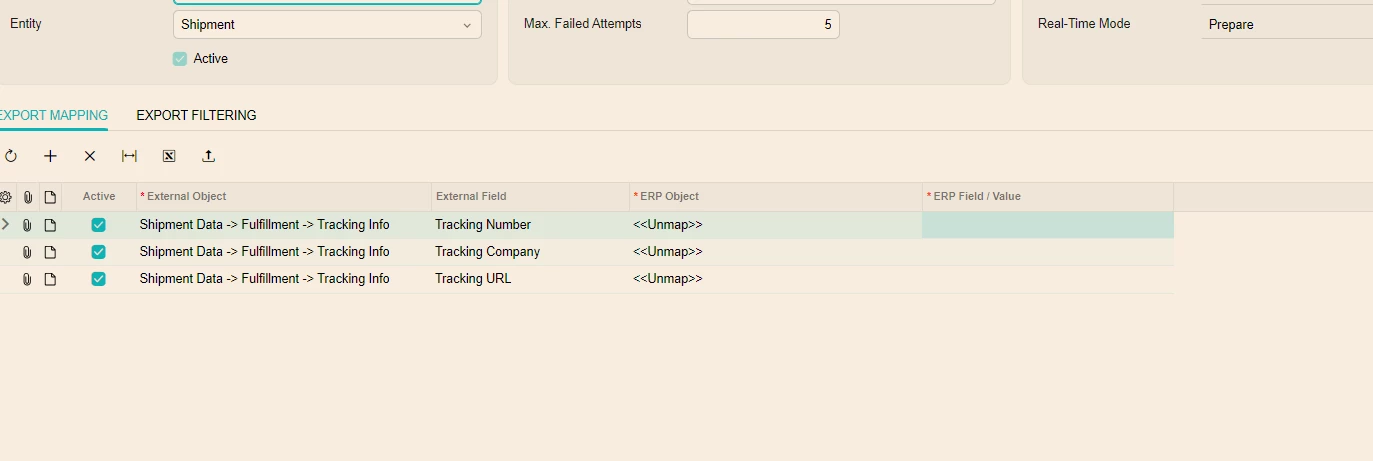
Acceptable values for shipping_provider include an empty string (""), auspost, canadapost, endicia, usps, fedex, royalmail, ups, upsready, upsonline, or shipperhq.

Acceptable values for tracking_carrier include an empty string ("") or one of the valid tracking-carrier values.


and I was able to confirm that this does work to send links out of BC:


Forum|alt.badge.img
  • Freshman I
  • October 1, 2026

​@lauraj46 , not that I know of. Technically, it’s possible to update the tracking link in BC. But the connector doesn’t give us that option OOTB. This would require some customization, on 2 levels: add ‘tracking_link’ to the available options for the External Field; expose Tracking URL field to the ERP Field / Value field. Shouldn’t be too hard to do - probably a weekend project for you, or for me :)

Hi Yuri - We have a shopify client - they want to unmap the tracking number as its overriding the tracking number on their shopify store. They are fulfilling the orders in shopify and just want to sync shipments as a confirmation for the store - but once we sync the shipment to shopify it blanks out the tracking on shopify store- so we unmap the tracking number ( please see my mapping) -  and it is still overriding or removing the tracking # assigned on the store. we are using the mapping below to unmap tracking # but its still blanking the tracking number on the shopify store please see below. How can we unmap the tracking #? 


mohammadnawaz51
Varsity I
Forum|alt.badge.img+8

​@mali94 You can disable the shipment sync if you dont want to update fulfilment status to Shopify from Acumatica.

Synchronize Shipments During shipment synchronization with BigCommerce, a separate shipment and tracking number are created in the online store for each box in the shipment


Forum|alt.badge.img
  • Freshman I
  • October 1, 2026

​@mali94 You can disable the shipment sync if you dont want to update fulfilment status to Shopify from Acumatica.

Thank you for getting back this is for shopify - however, client wants to sync shipments as they can check in Acumatica the order has been fulfilled in the shopify - is there a way to unmap tracking. 


mohammadnawaz51
Varsity I
Forum|alt.badge.img+8

Acumatica supports overriding standard export mappings, but I haven’t confirmed that your connector/version allows the tracking number to be suppressed using a blank value. Simply deleting or disabling a custom mapping does not necessarily stop the standard tracking export. 

If the field cannot be overridden, a connector customization may be required to exclude tracking details from the outgoing shipment while retaining the fulfillment update. let me know if you need a help with the customization review.


Yuri Karpenko
Captain II
Forum|alt.badge.img+7

​@lauraj46 , not that I know of. Technically, it’s possible to update the tracking link in BC. But the connector doesn’t give us that option OOTB. This would require some customization, on 2 levels: add ‘tracking_link’ to the available options for the External Field; expose Tracking URL field to the ERP Field / Value field. Shouldn’t be too hard to do - probably a weekend project for you, or for me :)

Hi Yuri - We have a shopify client - they want to unmap the tracking number as its overriding the tracking number on their shopify store. They are fulfilling the orders in shopify and just want to sync shipments as a confirmation for the store - but once we sync the shipment to shopify it blanks out the tracking on shopify store- so we unmap the tracking number ( please see my mapping) -  and it is still overriding or removing the tracking # assigned on the store. we are using the mapping below to unmap tracking # but its still blanking the tracking number on the shopify store please see below. How can we unmap the tracking #? 


​@mali94 , the behavior you describe seems weird. IF you already have an item marked as fulfilled in Shopify, nothing from outside will change that. we can look at the details of the API calls, what happens to orders and fulfillment orders in Shopify, but isn’t something that we can reliably do in the public section of the community. When you export a shipment from Acumatica it doesn’t UPDATE the existing fulfillment. It will try to override it or create a new fulfillment.