Answer

Template Item missing a required attribute

  • September 3, 2025
  • 9 replies
  • 97 views

Forum|alt.badge.img

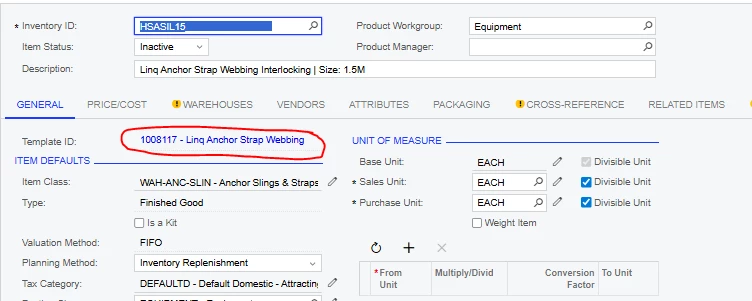
When our data was originally imported to Acumatica, some template items were imported with no value in some of the required attribute fields.  I now cannot do any maintenance on these items because I get the error “The value of the STYLE attribute must be specified” (in this case the item has no value in the attribute named STYLE.)

I have tried adding the attribute in the template and the updating matrix items. It does not work.

I have tried adding a value in the item itself and I cannot.

I have tried adding the value to the item using an import scenario.  It does not work.

Can anyone help me with this please?

Best answer by Yuri Karpenko

@RoslynRule , it’s probably a multi-step process. Disassociate stock / non-stock items from the template item; fix the template item; attach stock / non-stock items to the template item. Depending on the number of items that need to be fixed, you can either do it manually or work on a series of import scenario or even a custom software solution (through API access).

Let us know if we can help.

9 replies

JSpikowski
Jr Varsity II
Forum|alt.badge.img
  • Jr Varsity II
  • September 3, 2025

Do you have access to the DB?


Forum|alt.badge.img
  • Author
  • Freshman I
  • September 3, 2025

Im not sure what that means.  I have access to most stuff.  Does DB mean database?  How do I find that.  I search database and only got two inquiries.


Yuri Karpenko
Captain II
Forum|alt.badge.img+6
  • Captain II
  • Answer
  • September 3, 2025

@RoslynRule , it’s probably a multi-step process. Disassociate stock / non-stock items from the template item; fix the template item; attach stock / non-stock items to the template item. Depending on the number of items that need to be fixed, you can either do it manually or work on a series of import scenario or even a custom software solution (through API access).

Let us know if we can help.


JSpikowski
Jr Varsity II
Forum|alt.badge.img
  • Jr Varsity II
  • September 3, 2025

When stuff is working I like to make sure what is in the raw tables before assuming anything.


Forum|alt.badge.img
  • Varsity I
  • September 3, 2025

Is the attribute (type of combo) set as Variant in the Item Class configuration?


Forum|alt.badge.img
  • Author
  • Freshman I
  • September 3, 2025

@jib87 yes it is


Forum|alt.badge.img
  • Author
  • Freshman I
  • September 3, 2025

@Yuri Karpenko I cant seem to disassociate the matrix item from the template.  Full disclosure Im using MYOB Advanced that because MYOB Acumatica.  Could that be the difference.


Forum|alt.badge.img
  • Varsity I
  • September 3, 2025

Not sure if there is update for this one, but I think the customization package to enable the associating/disassociating matrix and template, mentioned here works for us the last time.


kkeating24
Varsity III
Forum|alt.badge.img+1
  • Varsity III
  • September 3, 2025

Not sure if there is update for this one, but I think the customization package to enable the associating/disassociating matrix and template, mentioned here works for us the last time.


Yes - you will need to install this customization in order to be able to uncouple the item from the template, then as ​@Yuri Karpenko said you can make the changes.