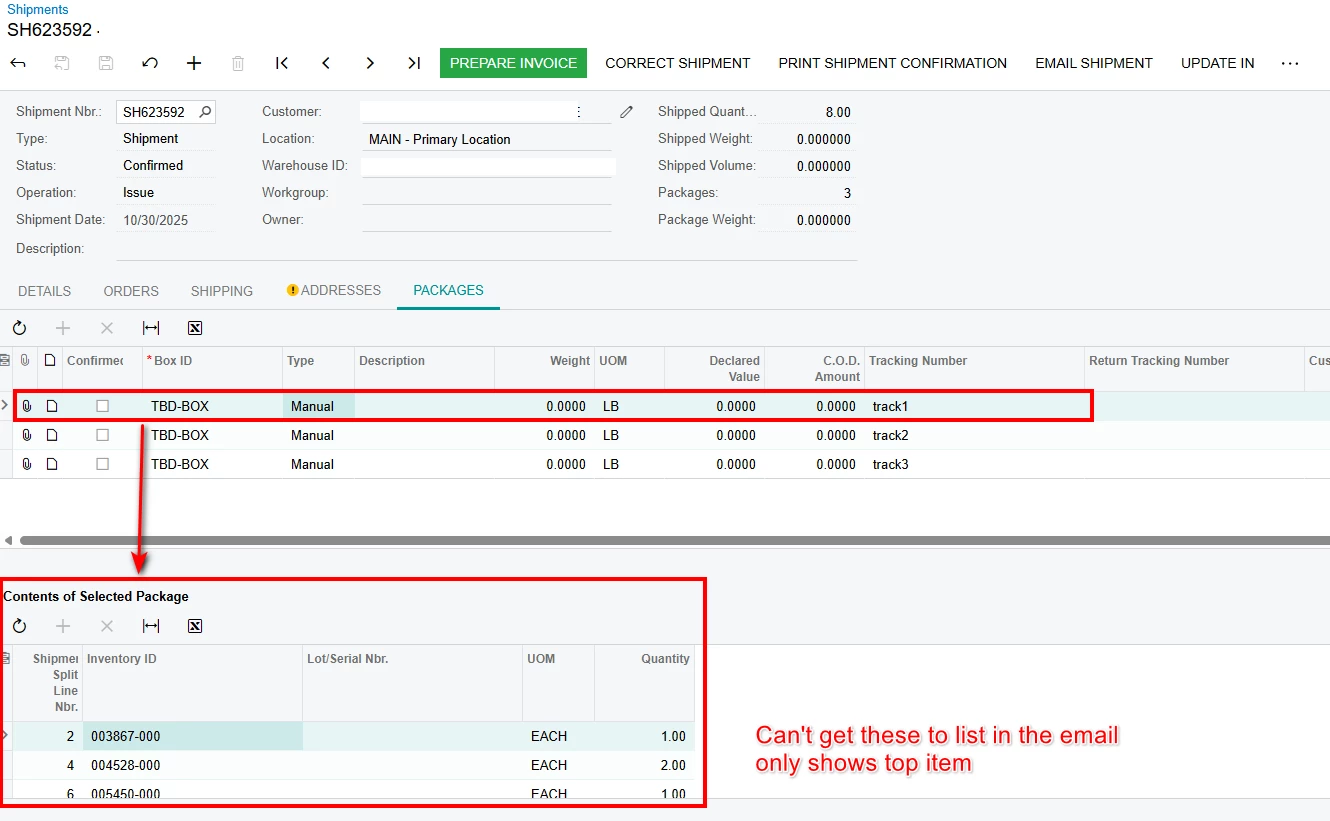
Goal: To send an email out once a shipment is confirmed to the customer. The email should have a list of packages, each package with its tracking number. I also want to show what item(s) are in each package
I spent quite a bit of time researching this and couldn’t come up with a solution. It seems that a nested <foreach> won’t actually loop through, only the top item in the package is being printed, if there is more than one item in a package is never shows up in the email. I also found a lot of references saying don’t use the view=”” in the foreach, but the email failed anytime I took out the view.
The code below gets close, it will list the package #, tracking #, and first item in the package.
Unfortunetly, it still shows <foreach view="PackageDetailSplit"> in the email, which tells me the view name isn’t correct, but that is what shows up on element properties
<foreach view="Packages">
Package #                     Tracking #
((Packages.LineNbr)) - ((Packages.TrackNumber))
<foreach view="PackageDetailSplit">
InventoryID Description
((PackageDetailSplit.InventoryID)) ((PackageDetailSplit.InventoryID.Descr))
</foreach>
</foreach>
Acumatica 2024R2
Appreciate any input, thank you!