Solved

Remove TemplateID from a large number of stock items via import scenario

  • July 28, 2025
  • 6 replies
  • 100 views

Forum|alt.badge.img

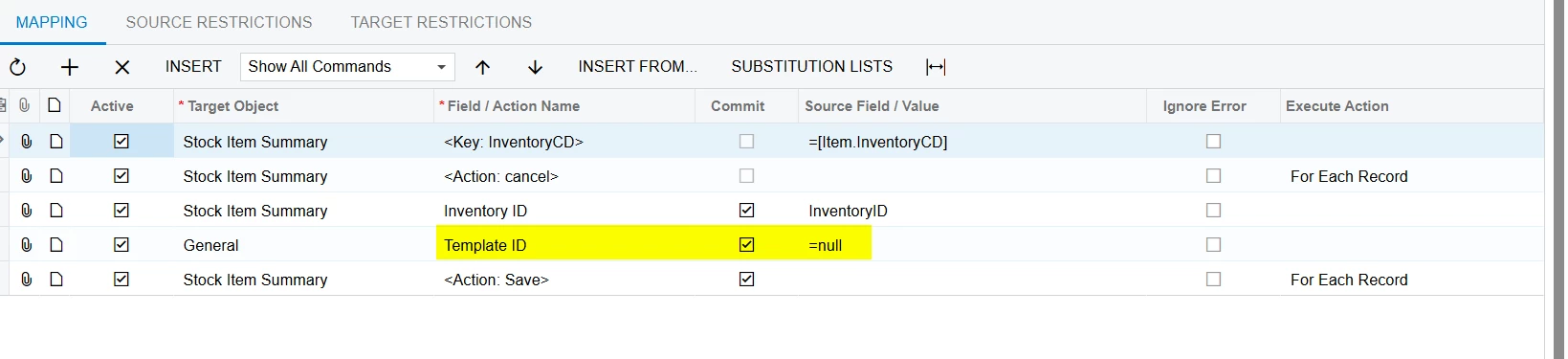
We are updating our products and would like to remove large groups of stock items from their associated template IDs, modify the Item Class and Template Items, and then re-attach the stock items to their updated TemplateIDs.  We understand how to associate products to the template IDs, but cannot determine how to delete the Template IDs from each Stock Item to remove them from their templates. We have tried setting the value of the Template ID = NULL, = (nothing) , and =String.Empty .  Does anyone have some pointers on how to remove these via import scenario? 

Patrick 
Best answer by mohammadnawaz51

@patrickACA 

Please Use following Mapping.


6 replies

kkeating24
Varsity III
Forum|alt.badge.img+1
  • Varsity III
  • July 28, 2025

have you tried = ‘’  (2 single quotes). 


Forum|alt.badge.img
  • Author
  • Jr Varsity II
  • July 28, 2025

Hi ​@kkeating24, I just did and got an error 


kkeating24
Varsity III
Forum|alt.badge.img+1
  • Varsity III
  • July 28, 2025

if i remember correctly, when you remove the template ID, you also have to pick an item class that is NOT matrixed so it will grey out the TEMPLATE ID field.   Does your import scenario do both of these things before you save?

or you might even be able to just change the item class. 


Yuri Karpenko
Captain II
Forum|alt.badge.img+6

@patrickACA , try using the Mass Update on the Stock Items GI. Paradoxically, it might work even better. I don’t have time to prototype it right now though.


mohammadnawaz51
Jr Varsity I
Forum|alt.badge.img+4

@patrickACA 

Please Use following Mapping.


Forum|alt.badge.img
  • Author
  • Jr Varsity II
  • July 29, 2025

Thanks All.  ​@mohammadnawaz51 that was the solution that worked.  Thanks very much!