Question

Multiple Lines on SO for same item

  • February 21, 2025
  • 11 replies
  • 165 views

Forum|alt.badge.img

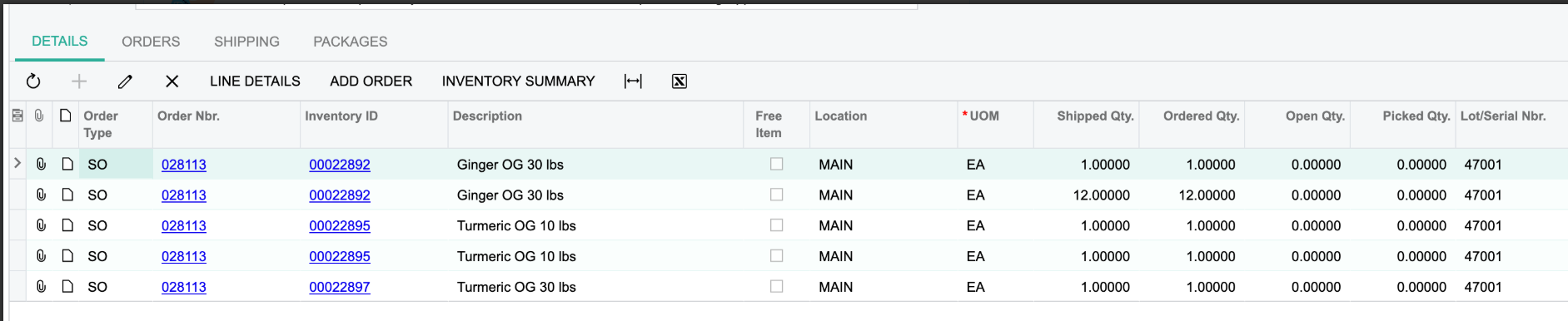
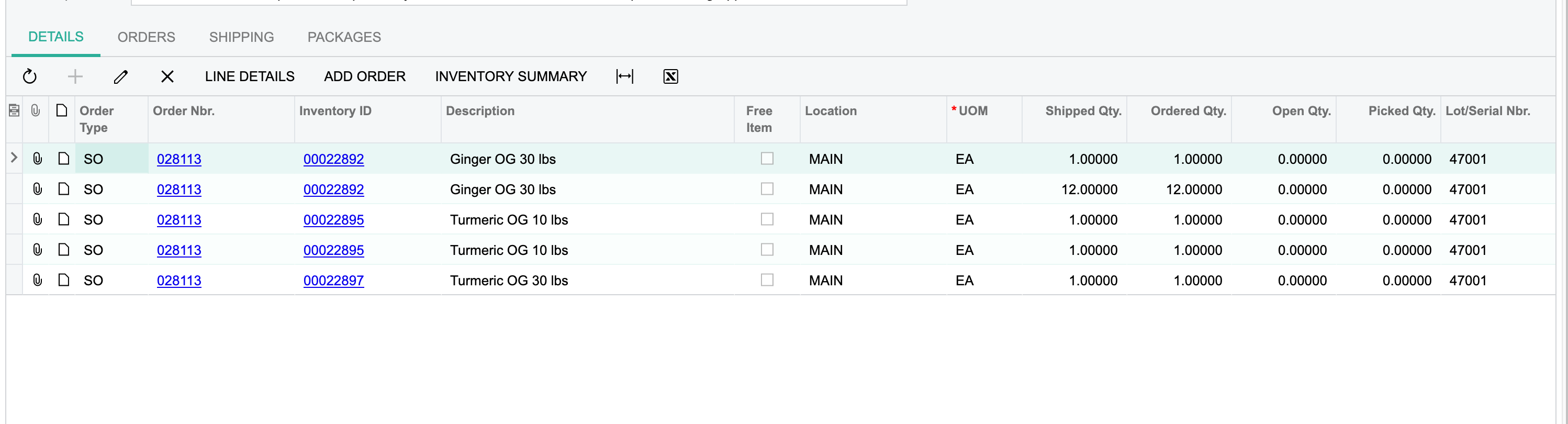
Can someone help me figure out why this SO is showing multiple lines for the same item? Usually when this happens it’s because ACU is needing to pull from a different location or use multiple lot numbers but as far as I can tell the line details are all the same :)



11 replies

Forum|alt.badge.img
  • Author
  • Varsity I
  • February 21, 2025

I apologize I need to reiterate. The SO only has 1 line per item but the shipment has multiple lines.


Manikanta Dhulipudi
Captain II
Forum|alt.badge.img+15

@SBaldwin May be the scenario belongs as described below 


riglesias
Acumatica Employee
Forum|alt.badge.img+2
  • Acumatica Employee
  • February 21, 2025

Hello ​@SBaldwin 

If you have multiple lines for the same item in your data provider, each line will be imported as a different line under details tab.

Could you export the scenario to XML and attach it here to review the mapping and data provider?


Forum|alt.badge.img
  • Author
  • Varsity I
  • February 21, 2025

@riglesias this isn’t an import or export scenario and I’m not sure how to export the XML file of a shipment :) 


Forum|alt.badge.img
  • Author
  • Varsity I
  • February 21, 2025

@SBaldwin May be the scenario belongs as described below 


Neither one of those scenarios seem to fit. We manufactured these items all in the same move transactions. It’s not a big deal it just makes things look less clean


Yuri Karpenko
Captain II
Forum|alt.badge.img+6
  • Captain II
  • February 21, 2025

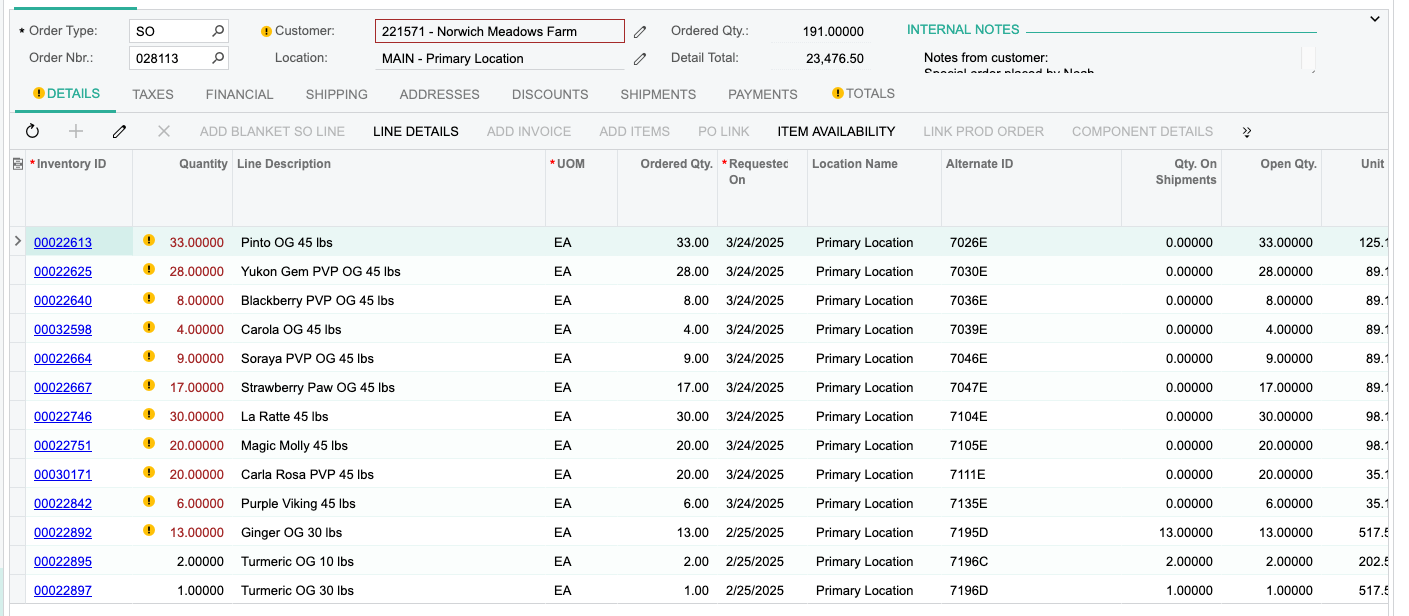
@SBaldwin , I wouldn’t completely abandon the idea that something might have been set up on the sales order side that caused this behavior. If you go to SO 028113, can you please send us:

  1. Screenshot of the Details tab?
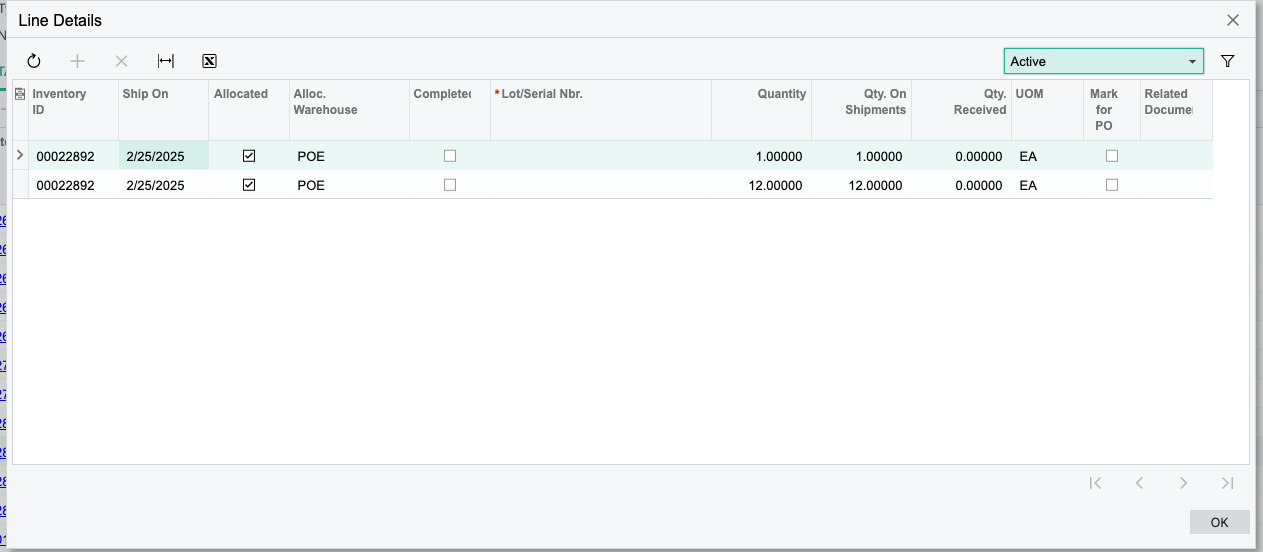
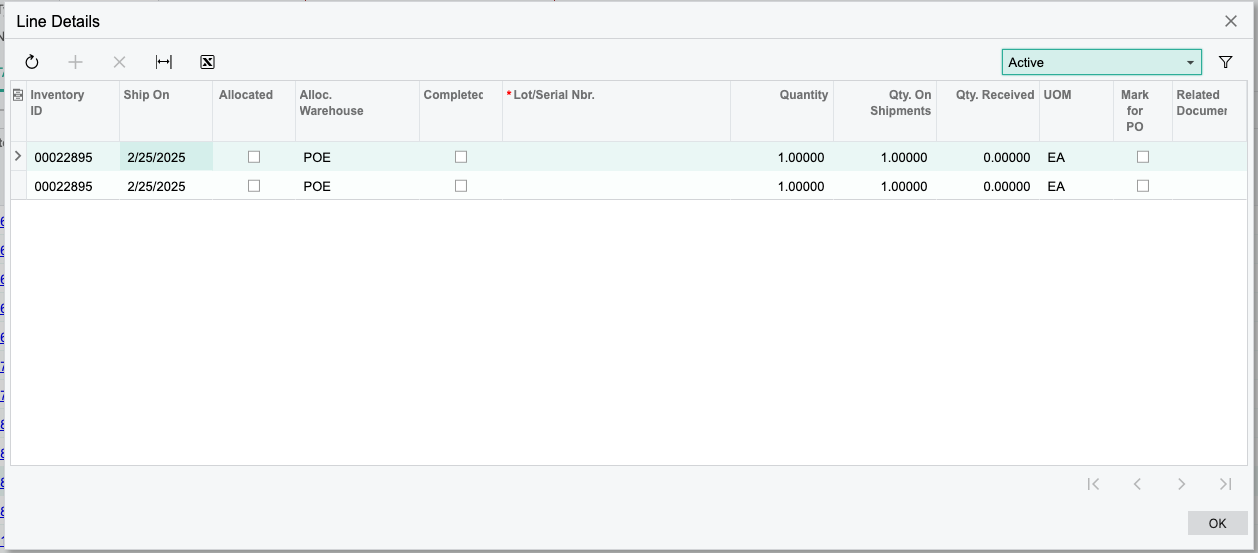
  2. Screenshots of Line Details for items 00022892 and 00022895?

If those Details and Line Details have single lines for these items, then I would argue there must be a customization in place that does it - for whatever reason. Another thing to look at - if you create the same order (from scratch, not by using Copy order) - do you have the same behavior on the Shipment?

If you want, PM me and I can jump on a screenshare call with you to look at this.

Have a great weekend!


Forum|alt.badge.img+12
  • Acumatica Support Team
  • February 24, 2025

Hi ​@SBaldwin 

I cannot think of an Acumatica setting leading to this. You did mention that there is only one line on the SO. What is the Order quantity for the first line reflected below? Is the order quantity 13?

Check if there are any customizations published impacting SO and Shipment document. You may test the process by unpublishing them to isolate the impact of customization. 

You may let us know the result. 

Regards,


Forum|alt.badge.img
  • Author
  • Varsity I
  • February 24, 2025

@SBaldwin , I wouldn’t completely abandon the idea that something might have been set up on the sales order side that caused this behavior. If you go to SO 028113, can you please send us:

  1. Screenshot of the Details tab?
  2. Screenshots of Line Details for items 00022892 and 00022895?

If those Details and Line Details have single lines for these items, then I would argue there must be a customization in place that does it - for whatever reason. Another thing to look at - if you create the same order (from scratch, not by using Copy order) - do you have the same behavior on the Shipment?

If you want, PM me and I can jump on a screenshare call with you to look at this.

Have a great weekend!

Hey there! Here are the screen shots requested. It does look like in the line details there are 2 lines for these items which is odd but gives a starting point at least!


Forum|alt.badge.img
  • Author
  • Varsity I
  • February 24, 2025

@Yuri Karpenko after having all of the columns visible I noticed that the 2 line items have different Allocation IDs. I’m looking into what this is exactly and I hope to have my answer before you reply but just in case, are these given when we run the “Manage Sales Allocation” process?


Yuri Karpenko
Captain II
Forum|alt.badge.img+6
  • Captain II
  • February 24, 2025

@SBaldwin , the two screenshots above explain it all. As far as why you have 2 lines per SKU in the Shipments screen. Now we have a new question: why we have double allocations for those two items. If you use the Manage Sales Allocation process, then it definitely has an impact on this, but without seeing all columns I can’t understand WHY it decided to create 2 separately allocations. Is there anything different between two lines (within a SKU), other than the allocation ID? Could it be that the order was modified, where you had a qty for each line, ran allocation, and then modified the order to include more qty? That would probably explain 2 separate allocations, even if the lot number is the same.


Chris Hackett
Community Manager
Forum|alt.badge.img
  • Acumatica Community Manager
  • May 27, 2025

Hi ​@SBaldwin were you able to find a solution? Thank you!