Question

Can we map Tracking URL fields from Acumatica to Shopify?

  • April 22, 2026
  • 17 replies
  • 103 views

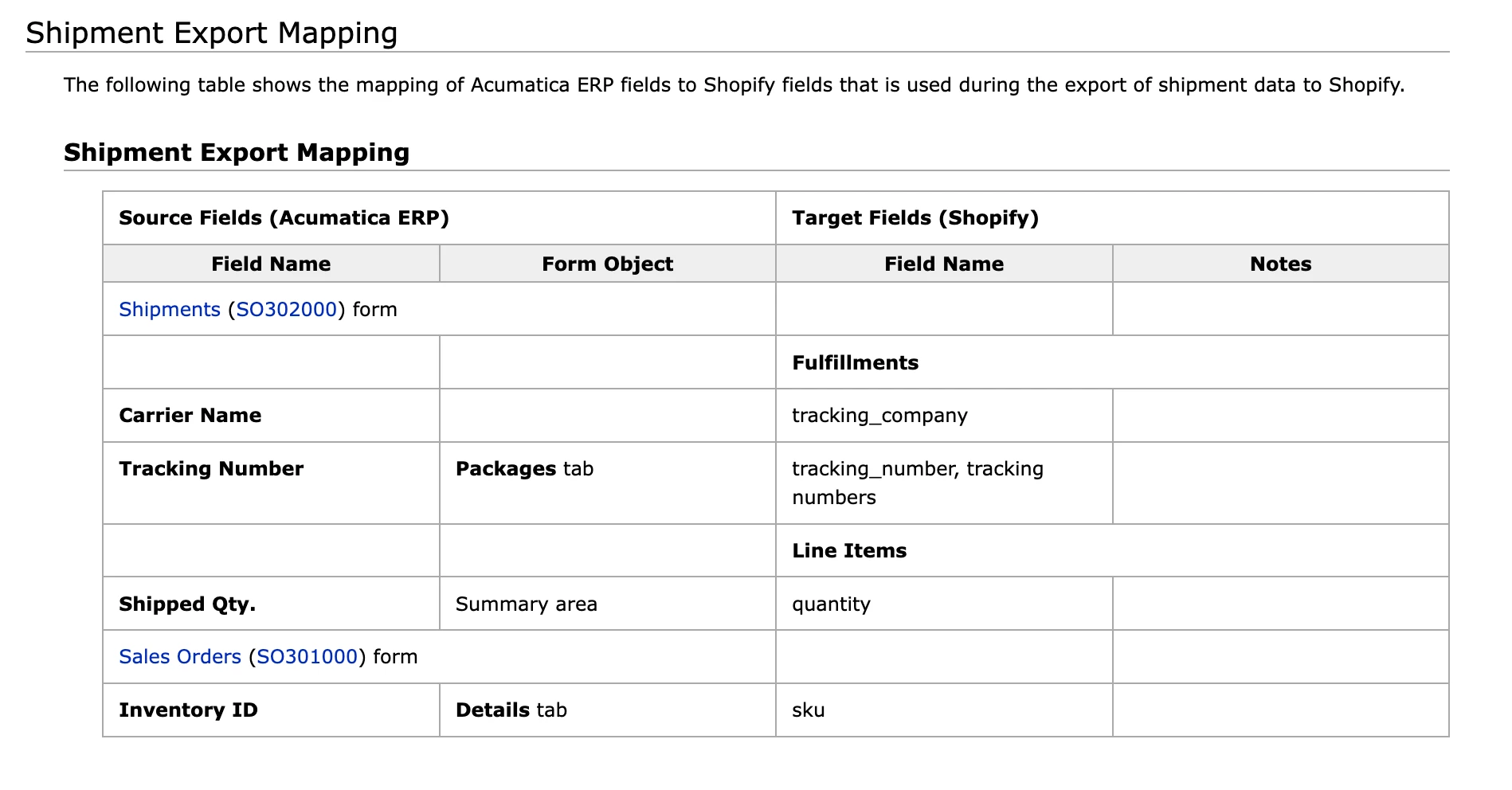
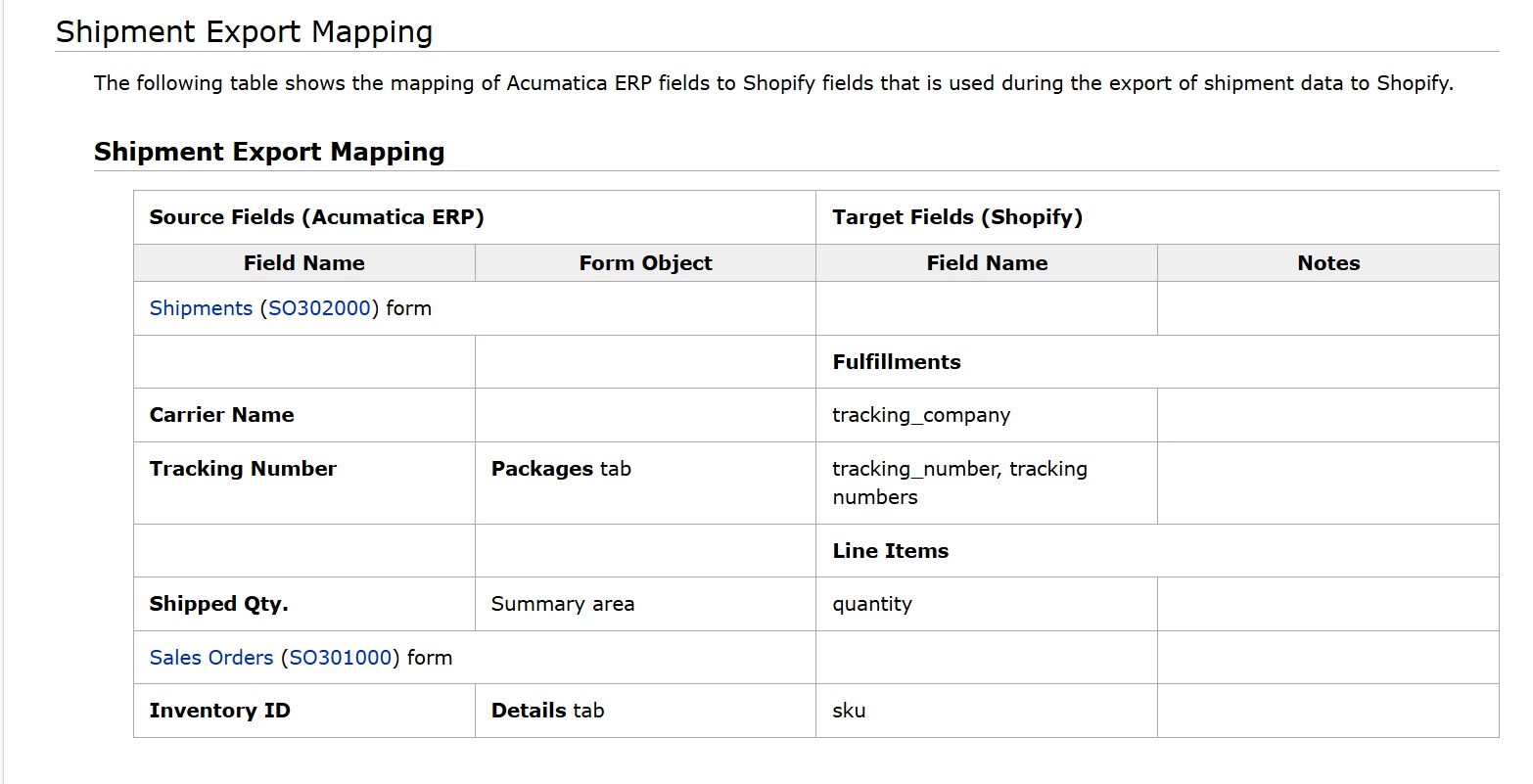
Is there a way to map Tracking URL field on the PACKAGES tab of a Shipment to Shopify Tracking URL field?

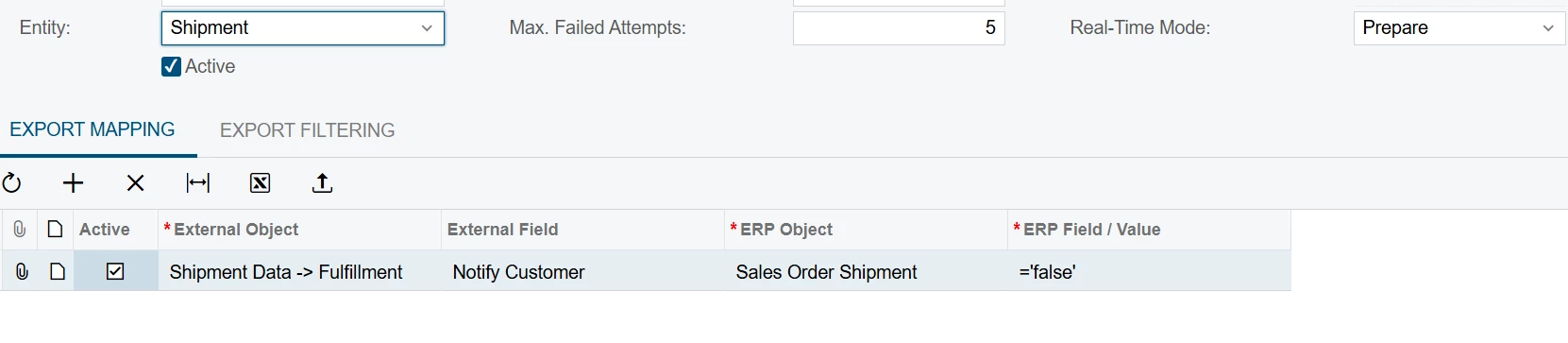
I see this field in the mapping:
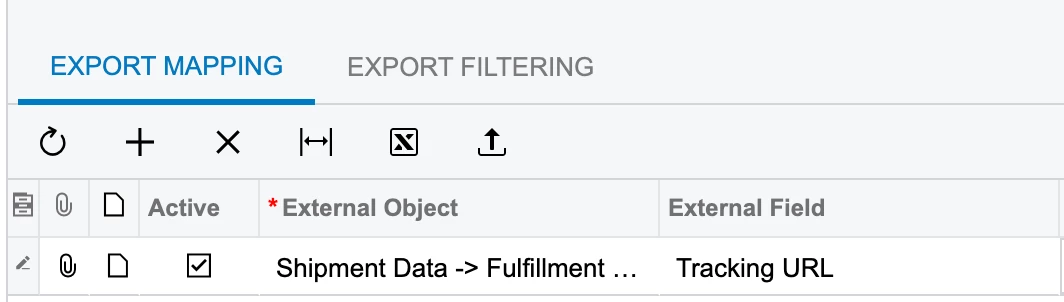
 

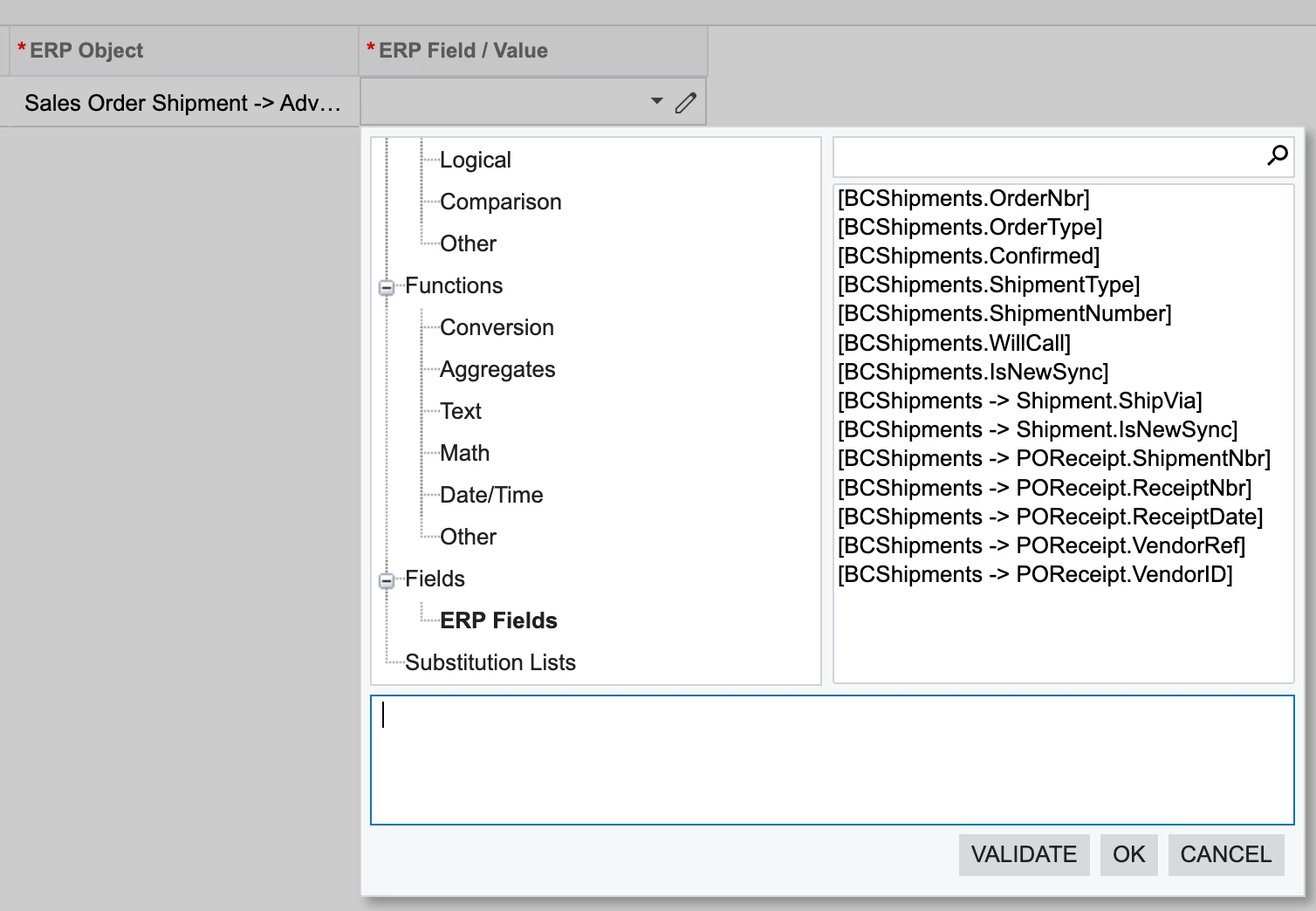
However, in the ERP Object / ERP Field / Value, I don’t see anything representing this field:
 

17 replies

bwhite49
Captain II
Forum|alt.badge.img+12
  • Captain II
  • April 22, 2026

The shipments syncing back to Shopify should be doing this already. Do you have shipment syncing turned on?


abdulkariyn
Freshman I
  • Freshman I
  • April 22, 2026

Hi Yuri,

Great question! Mapping the specific Tracking URL (rather than just the Tracking Number) ensures a smoother post-purchase experience for the customer.

In Acumatica, the Shopify Connector (BC201000) handles fulfillment data via the Shipment entity. To ensure the URL is passed correctly, follow these technical steps:

  1. Verify Source Data: First, ensure that the tracking URL is actually being generated in the Shipments (SO302000) form under the Packages tab. If the Tracking URL column is empty here, the connector will have no data to pull. This usually requires an active Carrier Integration (UPS, FedEx, etc.).

  2. Adjust Entity Mapping:

    • Navigate to the Shopify Connector (BC201000) and select your Store.

    • Go to the Entities tab and select the Shipment entity.

    • Switch to the Export Mapping tab.

    • You will need to map the Acumatica source field Packages -> Tracking URL to the Shopify target field Fulfillments -> Tracking URL.

  3. Check Sync Sequence: Ensure you have Prepared and Processed the Shipment entity after the shipment was confirmed in the ERP.

    • Note: The Customer and Sales Order entities must be successfully synced/linked before the Shipment sync can successfully attach fulfillment data in Shopify.

Troubleshooting Tip: If the field does not appear in the mapping dropdown, click Restore Default Hosting or Fetch Schema to ensure the connector recognizes the latest Shopify API fields. If you are using a third-party shipping tool (like ShipStation) that writes back to Acumatica, ensure it is populating the SOPackageDetail.TrackingURL field specifically.

Hope this helps! Let us know if you encounter any "Failed" statuses in the Sync Monitor (BC401010) and we can dig deeper into the error logs.


Yuri Karpenko
Captain II
Forum|alt.badge.img+7

The shipments syncing back to Shopify should be doing this already. Do you have shipment syncing turned on?

Of course, we do have that turned on. However, I don’t think the URL is part of the sync though:

Instead, the integration relies on Shopify to ‘build’ the tracking URL, based on the Carrier.


bwhite49
Captain II
Forum|alt.badge.img+12
  • Captain II
  • April 22, 2026

It might be that you need to add the contents into the package for it to map to the correct line item In Shopify. Not confident on that. If shipments are syncing and contents are in the package, it should be sending over the tracking number without any mapping through entities.


mohammadnawaz51
Jr Varsity II
Forum|alt.badge.img+6

@Yuri K 


Yuri Karpenko
Captain II
Forum|alt.badge.img+7

Hi Yuri,

Great question! Mapping the specific Tracking URL (rather than just the Tracking Number) ensures a smoother post-purchase experience for the customer.

In Acumatica, the Shopify Connector (BC201000) handles fulfillment data via the Shipment entity. To ensure the URL is passed correctly, follow these technical steps:

  1. Verify Source Data: First, ensure that the tracking URL is actually being generated in the Shipments (SO302000) form under the Packages tab. If the Tracking URL column is empty here, the connector will have no data to pull. This usually requires an active Carrier Integration (UPS, FedEx, etc.).

  2. Adjust Entity Mapping:

    • Navigate to the Shopify Connector (BC201000) and select your Store.

    • Go to the Entities tab and select the Shipment entity.

    • Switch to the Export Mapping tab.

    • You will need to map the Acumatica source field Packages -> Tracking URL to the Shopify target field Fulfillments -> Tracking URL.

  3. Check Sync Sequence: Ensure you have Prepared and Processed the Shipment entity after the shipment was confirmed in the ERP.

    • Note: The Customer and Sales Order entities must be successfully synced/linked before the Shipment sync can successfully attach fulfillment data in Shopify.

Troubleshooting Tip: If the field does not appear in the mapping dropdown, click Restore Default Hosting or Fetch Schema to ensure the connector recognizes the latest Shopify API fields. If you are using a third-party shipping tool (like ShipStation) that writes back to Acumatica, ensure it is populating the SOPackageDetail.TrackingURL field specifically.

Hope this helps! Let us know if you encounter any "Failed" statuses in the Sync Monitor (BC401010) and we can dig deeper into the error logs.


@abdulkariyn , I see that this is your first response on the Community Site. Thank you for chiming in. However, the response is copy-pasted from an AI, and completely misses the mark. It refers to things like: “Packages → Tracking URL”, “Restore Default Hosting”, “Fetch Schema”. These fields / actions are not in Acumatica (including the latest 26R1 build). The AI hallucinated and assumed you were asking about an integration platform, which is clearly not the case here, based on the screenshot I have shared.

In any case, we welcome all ideas and feedback on the portal, especially if it’s based on human experience. :)

@Chris Hackett , tagging you just in case.


Yuri Karpenko
Captain II
Forum|alt.badge.img+7

@simonliang91 , can you please let us all know if Tracking URL is passed from Acumatica to Shopify? And if so, what conditions must be met? Of course, provided that Tracking URL is indeed on the Packages tab.

Thanks!


Jeff96
Captain II
Forum|alt.badge.img+5
  • Captain II
  • April 22, 2026

@Yuri Karpenko what issues do you have with Shopify building the tracking url?


bwhite49
Captain II
Forum|alt.badge.img+12
  • Captain II
  • April 22, 2026

I did review this. Orders that have contents in the package have a Shopify tracking number populated and orders that do not have contents do not receive a tracking number. On one site, we turn off the notification email as that is sent from Acumatica.


Yuri Karpenko
Captain II
Forum|alt.badge.img+7

@Yuri Karpenko what issues do you have with Shopify building the tracking url?

In this specific case, our client uses an external shipping integration, which does not override the Ship Via code. All shipments have the same, generic ship via code. But the Tracking URL IS provided by the external system. So we would like to simply push that URL to Shopify, regardless of what Shopify can build.


Yuri Karpenko
Captain II
Forum|alt.badge.img+7

I did review this. Orders that have contents in the package have a Shopify tracking number populated and orders that do not have contents do not receive a tracking number. On one site, we turn off the notification email as that is sent from Acumatica.


Yes, in this case, the package contents are empty, because of the external integration.

If the logic is that package contents must be filled out, then it’s a broken logic :)

We’ve had this issue in earlier versions, where Acumatica didn’t want to export even a tracking number if there were no contents on a package. Then, through collaboration between Acumatica devs, me, and I’m sure a couple other folks, we came to a better solution, where, in case of contents being empty, Acumatica will simply pick up the first package from the list, use that tracking number, and put all items on the shipment into that tracking number. I assumed that tracking URL should follow the same logic - there is no reason to exclude it from sync, while handling the tracking number sync… Unless, tracking URL is not mapped at all, which I believe is the truth.


Jeff96
Captain II
Forum|alt.badge.img+5
  • Captain II
  • April 22, 2026

We use an app called 17track in Shopify. You populate your most common carriers, and they will identify the carrier and update the URL. It does take you away from the main Shopify screen when tracking, but it is pretty good in my opinion. 


Yuri Karpenko
Captain II
Forum|alt.badge.img+7

We use an app called 17track in Shopify. You populate your most common carriers, and they will identify the carrier and update the URL. It does take you away from the main Shopify screen when tracking, but it is pretty good in my opinion. 


Thank you, Jeff! That’s a good idea, but we would like to avoid something like this, since the shipping solution already provides those links…

Will see what Acumatica comes back with.

P.S. This merchant has both, parcel and freight shipments - and the shipping solution already did a heavy-lifting on figuring out what the tracking URL should be.


Forum|alt.badge.img+1

Hi ​@Yuri Karpenko:

Currently, mapping tracking URl is not possible. We have a CR that is scheduled for 26R2 that will provide this ability in entities mapping.  


Yuri Karpenko
Captain II
Forum|alt.badge.img+7

Hi ​@Yuri Karpenko:

Currently, mapping tracking URl is not possible. We have a CR that is scheduled for 26R2 that will provide this ability in entities mapping.  

this answers my question…. thanks.


benviall
Freshman I
  • Freshman I
  • April 23, 2026

We ran into this same gap with a client and solved it through our Shopify-Acumatica integration, InSyncer. We support package-based shipping with both the tracking URL and tracking number flowing back to Shopify automatically once a shipment is confirmed in Acumatica. It's not enabled by default but it's a supported configuration - happy to answer any questions if anyone's looking for a solution here.


simonliang91
Acumatica Employee
Forum|alt.badge.img+1
  • Acumatica Employee
  • April 24, 2026

@Yuri Karpenko , as ​@tusharpandita74 mentioned, we cannot support the tracking URL now. 

If you want to have a solution for now, you can write a customization code to provide the tracking URL. The following code is an example only(2025R2 and above version).

[PXOverride]
public async Task MapBucketExport(SPShipmentEntityBucket bucket, IMappedEntity existing, CancellationToken cancellationToken, MapBucketExportDelegate baseMethod)
{
await baseMethod(bucket, existing, baseMethod);
ShipmentDataGQL shipmentToExport = bucket.Shipment.Extern;
if (shipmentToExport.FulfillmentGQLDataList.IsNullOrEmpty()) return;

//Provide the trackingUrl data first. The URL must be an RFC 3986 and RFC 3987-compliant URI string.
//For example, "https://www.myshipping.com/track/?tracknumbers=TRACKING_NUMBER" is a valid URL. It includes a scheme (https) and a host (myshipping.com).
string trackingUrl = "";
foreach (var item in shipmentToExport.FulfillmentGQLDataList)
{
item.TrackingInfo?.First().Apply(trackingInfo => trackingInfo.Url = trackingUrl);
//Or you can format the string with the tracking number
//item.TrackingInfo?.First().Apply(trackingInfo => trackingInfo.Url = string.Format(trackingUrl, trackingInfo.Number));
}
}