I’m currently testing exporting Customers from Acumatica to Shopify (as Companies for B2B) and had a couple of questions:
Is there a way to have the Company ID in Shopify match the Customer ID from Acumatica? Ideally, I’d like to keep them aligned for easier tracking and reconciliation.
I enabled “Import Company Contacts as Customers” along with bidirectional sync. This successfully creates customers in Acumatica when they’re assigned to company locations in Shopify.
However, I’m running into an issue with phone numbers:
Shopify always includes the country code (e.g., +1)
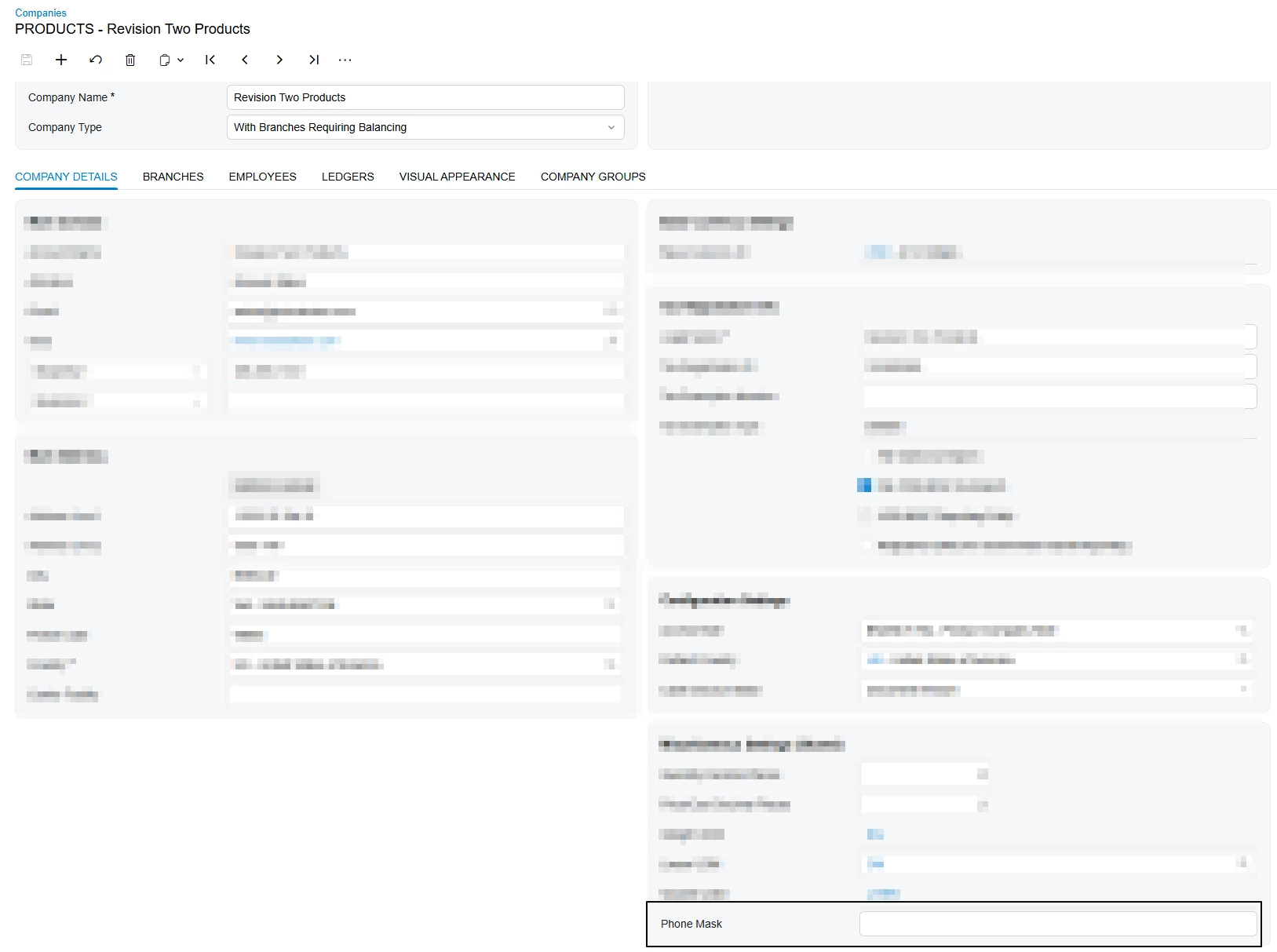
Acumatica’s phone input mask doesn’t accept this format
This results in an error during import: “Object reference not set to an instance of an object”
Has anyone dealt with this before?
Best answer by KEL
I’m currently testing exporting Customers from Acumatica to Shopify (as Companies for B2B) and had a couple of questions:
Is there a way to have the Company ID in Shopify match the Customer ID from Acumatica? Ideally, I’d like to keep them aligned for easier tracking and reconciliation.
I enabled “Import Company Contacts as Customers” along with bidirectional sync. This successfully creates customers in Acumatica when they’re assigned to company locations in Shopify.
However, I’m running into an issue with phone numbers:
Shopify always includes the country code (e.g., +1)
Acumatica’s phone input mask doesn’t accept this format
This results in an error during import: “Object reference not set to an instance of an object”
Has anyone dealt with this before?
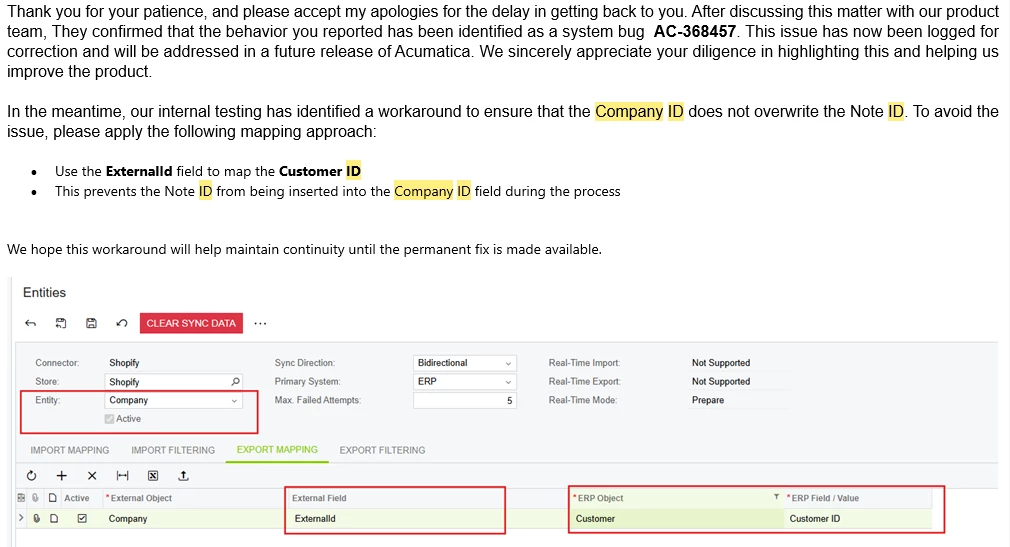
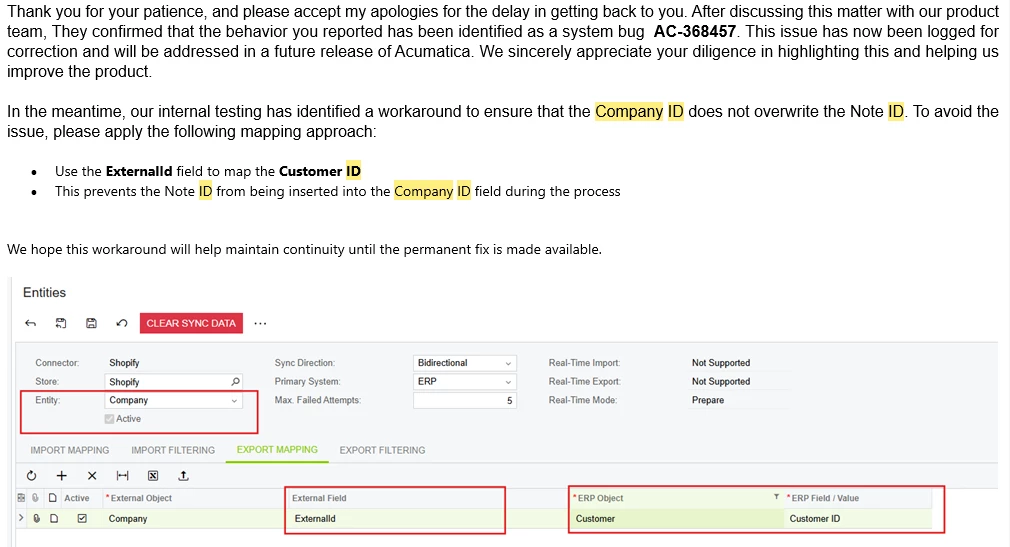
Can’t address the phone issue yet as we are trying to figure that one out, but the company ID issue we have this in place. We do not import anything from Shopify to Acumatica. The ERP is our source of truth. Real-time sync is off for companies at this time. But the following work around seems to keep the company ID the same in Shopify and Acumatica (so they both match Avalara which was the reason we absolutely needed the correct customer numbers/IDs in Shopify and not that ridiculous note ID).Hope this helps you.
No, you cannot change that mapping. Company ID is populated by the integration, and consists of 2 parts: first part is an integer (and I can’t figure out what it is) and the second part is the Ref Note ID from Acumatica. So, apparently, Acumatica populates that field, but with some technical data. I suppose you need to keep that data in place for future syncs.
Agree with @tusharpandita74 on his note. However, I doubt the issue is tied to the phone number. If you say that you create those customers in Shopify by exporting from Acumatica Contacts, it implies that you already have those contacts in Acumatica with phone numbers. If so, the phone numbers are presumably correct (conforming to Acumatica mask). It’s a speculation at this time, but I think the error you’re getting on the import is something else, not the phone number format.
No, you cannot change that mapping. Company ID is populated by the integration, and consists of 2 parts: first part is an integer (and I can’t figure out what it is) and the second part is the Ref Note ID from Acumatica. So, apparently, Acumatica populates that field, but with some technical data. I suppose you need to keep that data in place for future syncs.
Agree with @tusharpandita74 on his note. However, I doubt the issue is tied to the phone number. If you say that you create those customers in Shopify by exporting from Acumatica Contacts, it implies that you already have those contacts in Acumatica with phone numbers. If so, the phone numbers are presumably correct (conforming to Acumatica mask). It’s a speculation at this time, but I think the error you’re getting on the import is something else, not the phone number format.
Let us know if we can help further.
Actually you can get the company ID to match the Company ID in Acumatica. I had this same issue and had to fight for this but it has been working and no more changing of the company ID every time an order updated the company. (We do not use real-time sync on our companies at the moment). Here is what support finally came back to us with… hope it helps you too
I’m currently testing exporting Customers from Acumatica to Shopify (as Companies for B2B) and had a couple of questions:
Is there a way to have the Company ID in Shopify match the Customer ID from Acumatica? Ideally, I’d like to keep them aligned for easier tracking and reconciliation.
I enabled “Import Company Contacts as Customers” along with bidirectional sync. This successfully creates customers in Acumatica when they’re assigned to company locations in Shopify.
However, I’m running into an issue with phone numbers:
Shopify always includes the country code (e.g., +1)
Acumatica’s phone input mask doesn’t accept this format
This results in an error during import: “Object reference not set to an instance of an object”
Has anyone dealt with this before?
Can’t address the phone issue yet as we are trying to figure that one out, but the company ID issue we have this in place. We do not import anything from Shopify to Acumatica. The ERP is our source of truth. Real-time sync is off for companies at this time. But the following work around seems to keep the company ID the same in Shopify and Acumatica (so they both match Avalara which was the reason we absolutely needed the correct customer numbers/IDs in Shopify and not that ridiculous note ID).Hope this helps you.