



In 24R1, we had the Workspaces drop down list in all Generic Inquiries (GIs). After upgrading to 26R1, this is missing and it’s affecting GI behavior. Is this something that needs to be configured now?
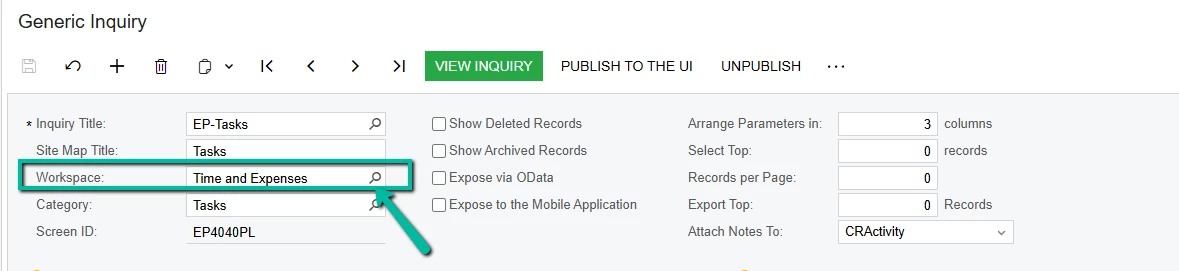
In 24R1, we had the Workspaces drop down list in all Generic Inquiries (GIs). After upgrading to 26R1, this is missing and it’s affecting GI behavior. Is this something that needs to be configured now?
Best answer by Steve Milner
@bpgraves Nothing to configure. In 26R1 the Workspace and Category boxes are gone from the summary area of the Generic Inquiry (SM208000) form. The summary now shows only Site Map Title and Screen ID. The values themselves didn't go anywhere. They were never part of the inquiry definition, they're site map data, and the upgrade carries them over.
To see or change them, click Publish to the UI on the form toolbar. That works on an inquiry that's already published. The dialog opens prefilled with the current Site Map Title, Workspace, Category, and Screen ID, plus an access rights option that defaults to copying from the inquiry itself. Change the workspace and click Publish. I tested this on a 26R1 instance: the inquiry keeps its screen ID and site map node, the role assignments don't change, and it just moves to the new workspace.
The other place is the Site Map (SM200520) form. Find the row by screen ID and edit the Workspaces and Category columns. Workspaces is multi-select there, so an inquiry can appear in more than one.
Don't use Unpublish to move an inquiry. It removes the site map node, clears the screen ID, and deletes the access rights, which breaks dashboards and pivot tables pointed at it.
Enter your E-mail address. We'll send you an e-mail with instructions to reset your password.


