There are times where my QA team allows a product to have the expiration date extended after testing, but once the expiry date is extended the original expiration date is gone from all of my current GIs. I want to build a report / GI that shows how many times a lot has had and extension and from what day to what day but I can't find a table that has that data.
Thanks for your help
Best answer by MichaelShirk
@kevind34 Did you see these articles? They might be helpful.
The audit history is not stored in a way that is at all easy to report on. (Presumably it’s structured to be as efficient as possible, since the table can grow quite large if field level audit is turned on for a lot of screens.)
If you’re not able to get the data you need in the structure you want, from the audit history tables, it would be a fairly simple customization to record these changes to a custom table, then you can report on that data. In that case you could either work with your VAR, or an independent contractor like @darylbowman if you’re not comfortable building this for yourself.
To track the history of lot expiration date changes, you'll need to utilize the audit history functionality in Acumatica. The data you're looking for is stored in the AUAuditHistory table, which captures field-level changes when audit tracking is enabled.
Here's how you can set up a Generic Inquiry to see this history:
Create a new GI using AUAuditHistory as your primary table
Add the following conditions:
TableName = 'INLotSerialStatus'
FieldName = 'ExpireDate'
Join to INLotSerialStatus to get the current lot information
This will allow you to see:
When each change was made
The original expiration date
The new expiration date
Who made the change
Note: Make sure audit history is enabled for the INLotSerialStatus table in your instance. Your system administrator can verify this in the database settings.
Let me know if you need help with the specific GI setup steps!
Joining the Audit History Table would help me with a similar problem I’m trying to solve, but like kevind34, I do not see that table either. I do have Field Level Audit turned on for most screens.
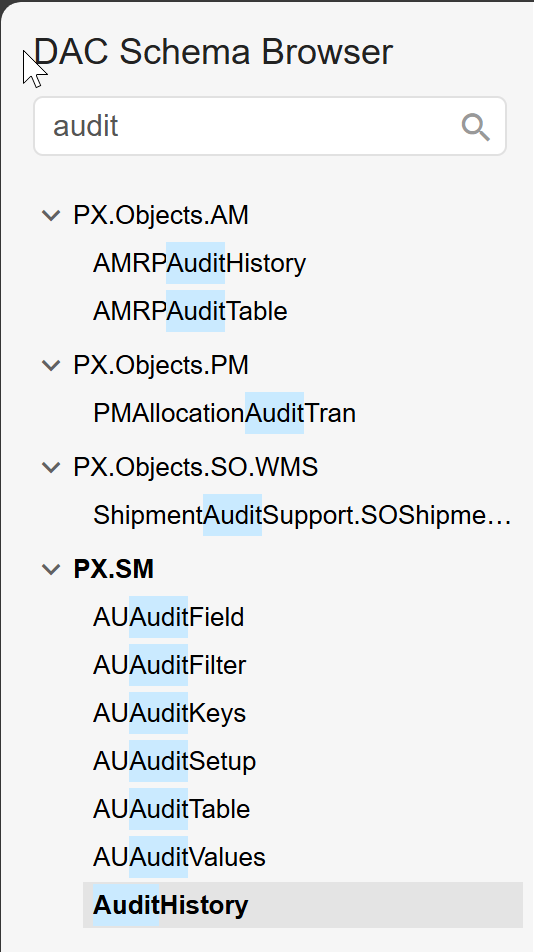
Thank you for sharing the screenshot of the DAC schema with the "audit"-related tables. Based on what you’ve shared, it looks like you’re exploring the tables that might store audit history data.
To clarify:
The AUAuditHistory table is the primary table in Acumatica that stores field-level changes when audit tracking is enabled for a specific table.
If you’re looking for historical changes to the expiration date (ExpireDate) in the INLotSerialStatus table, we’ll need to ensure that audit tracking is enabled for that table specifically.
Next Steps:
Verify Audit Tracking for INLotSerialStatus:
Go to System > Management > Database Settings > Audit History .
Check if INLotSerialStatus is listed and has audit tracking enabled.
If it’s not enabled, you can enable it now, but note that only future changes will be tracked.
Using the AUAuditHistory Table:
Once audit tracking is confirmed or enabled, you can proceed with building the Generic Inquiry (GI) as outlined in my previous response.
The GI will pull data from the AUAuditHistory table to show historical changes to the ExpireDate field.
If you’d like, I can guide you further on verifying or enabling audit tracking for the INLotSerialStatus table. Alternatively, if you have any other questions or need clarification, feel free to let me know!
@Md Kalim Ashraf thanks so much for the reply! To clarify, I believe I’m trying to achieve a similar result to @kevind34 but for my case the tables are different. I’m looking to reference old and new value for PromisedDate on the POLines table. I have Field Level Audit turned on for the Purchase Orders screen already. If I’m not understanding correctly what you’re explaining, please let me know. Thanks in advance!
The AI generated answer you provided contains a lot of incorrect information, and is very confusing.
ChatGPT and other LLMs can be very helpful for solving specific problems, but it is the user’s responsibility to understand the output, and to verify its accuracy.
Everyone has access to these LLMs and are hopefully using them as applicable. When attempting to help people find solutions to their questions, it is important to respect their effort and only respond within our personal areas of expertise to maximize the value that this forum provides.
The audit history is not stored in a way that is at all easy to report on. (Presumably it’s structured to be as efficient as possible, since the table can grow quite large if field level audit is turned on for a lot of screens.)
If you’re not able to get the data you need in the structure you want, from the audit history tables, it would be a fairly simple customization to record these changes to a custom table, then you can report on that data. In that case you could either work with your VAR, or an independent contractor like @darylbowman if you’re not comfortable building this for yourself.
Hi @Md Kalim Ashraf - Please note our policy on using AI to assist with replies to questions. This includes noting the use of it in your response, so the OP is aware. Thank you for your assistance with this.