Solved

Visible Expr for Contains conditions

  • March 9, 2026
  • 6 replies
  • 41 views

Forum|alt.badge.img

Regards,

I would like to know if there is a possibility to formulate the visible expr to show a Contains condition.

I'm looking for a way to only present me with the information when the ARInvoice.DocDesc Contains 'End-Period Plus contract' since it is the way in which I can filter the inroversion and it shows it correctly
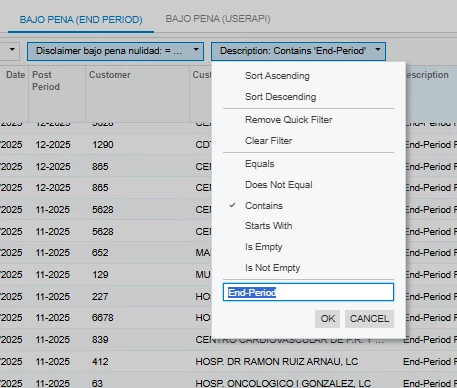
 

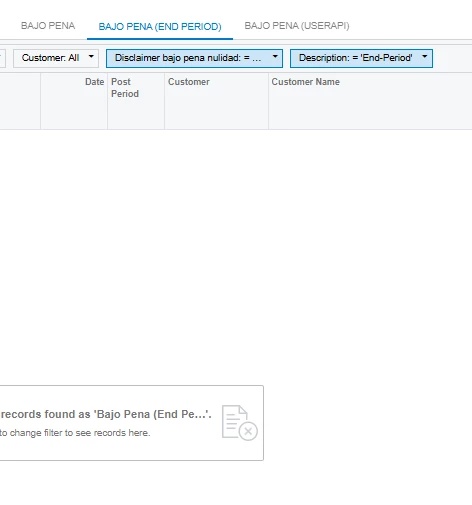
Because if I condition it by Equals it doesn't show me the information I'm looking for
 

Best answer by BenjaminCrisman

If the End-Period Plus Contract will always be at the beginning of the description then you can use =Left([ARInvoice.DocDesc], 24)=’End-Period Plus Contract’

If it’s always in the same place of the description then you can update the length or use Right instead. 

Try to put the function in the report =InStr([ARInvoice.DocDesc], 'End-Period') and see what the value is, then use that value in the expression. I expected a 1 in my testing, but it came up with 0.

=InStr([ARInvoice.DocDesc], 'End-Period')=0


6 replies

BenjaminCrisman
Acumatica Employee
Forum|alt.badge.img+4

@alejandradiaz68 Are you wanting to filter the whole GI or just as a quick filter? In your screenshots you’re using the Contains filter, so I’m a little confused on what you’re asking for. If the description doesn’t match exactly, then you can’t use Equals.

If you are trying to filter the whole GI you can use conditions in the GI or just make another filter tab if it’s a filter you’re going to use frequently.

If this is not helpful I think I need to understand what the current issue is when using Contains


Forum|alt.badge.img

Right now I'm looking to be able to apply it in report designer.

The goal is to be able to filter a signature so that it is only visible when [ARInvoice.DocDesc] Contains the description 'End-Period Plus Contract' since when applying [ARInvoice.DocDesc] = ‘End-Period Plus Contract’ is not working.


jhalling52
Jr Varsity I
Forum|alt.badge.img
  • Jr Varsity I
  • March 9, 2026

Right now I'm looking to be able to apply it in report designer.

The goal is to be able to filter a signature so that it is only visible when [ARInvoice.DocDesc] Contains the description 'End-Period Plus Contract' since when applying [ARInvoice.DocDesc] = ‘End-Period Plus Contract’ is not working.


Might be a cleaner way of doing it but try this formula in the results grid:  =IIF((InStr(IsNull([ARInvoice.DocDesc],''), 'End-Period'))=1,[ARInvoice.DocDesc],'')


Forum|alt.badge.img

@alejandradiaz68 Are you wanting to filter the whole GI or just as a quick filter? In your screenshots you’re using the Contains filter, so I’m a little confused on what you’re asking for. If the description doesn’t match exactly, then you can’t use Equals.

If you are trying to filter the whole GI you can use conditions in the GI or just make another filter tab if it’s a filter you’re going to use frequently.

If this is not helpful I think I need to understand what the current issue is when using Contains


Right now I'm looking to be able to apply it in report designer.

The goal is to be able to filter a signature so that it is only visible when [ARInvoice.DocDesc] Contains the description 'End-Period Plus Contract' since when applying [ARInvoice.DocDesc] = ‘End-Period Plus Contract’ is not working.


BenjaminCrisman
Acumatica Employee
Forum|alt.badge.img+4
  • Acumatica Support Team
  • Answer
  • March 9, 2026

If the End-Period Plus Contract will always be at the beginning of the description then you can use =Left([ARInvoice.DocDesc], 24)=’End-Period Plus Contract’

If it’s always in the same place of the description then you can update the length or use Right instead. 

Try to put the function in the report =InStr([ARInvoice.DocDesc], 'End-Period') and see what the value is, then use that value in the expression. I expected a 1 in my testing, but it came up with 0.

=InStr([ARInvoice.DocDesc], 'End-Period')=0


Forum|alt.badge.img

If the End-Period Plus Contract will always be at the beginning of the description then you can use =Left([ARInvoice.DocDesc], 24)=’End-Period Plus Contract’

If it’s always in the same place of the description then you can update the length or use Right instead. 

Try to put the function in the report =InStr([ARInvoice.DocDesc], 'End-Period') and see what the value is, then use that value in the expression. I expected a 1 in my testing, but it came up with 0.

=InStr([ARInvoice.DocDesc], 'End-Period')=0


Thank you, the =Left([ARInvoice.DocDesc], 24)=’End-Period Plus Contract’ work for me like I was looking for.