Hello,
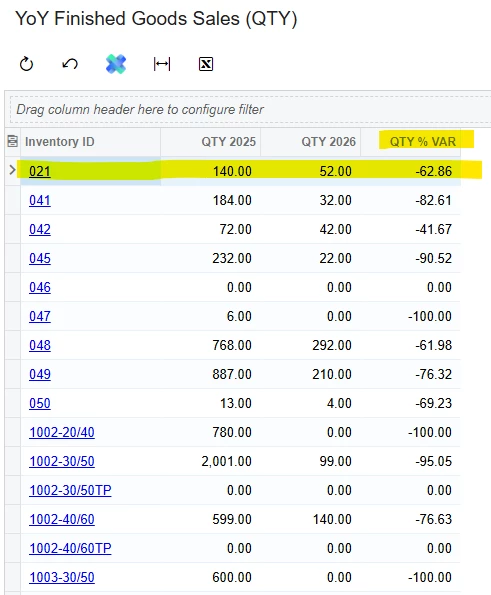
I created this year over year variance report for qty sold of a stock item. As you will see in the screen shot below, the calculations in the QTY % VAR column are correct. However, the manager would like to see it as follows:
Row 1 (for the 021 stock item) the % VAR shows -62.86 (round to 63). He would like to see it as 37% instead of -63%. Is there any way to accomplish this? Here is the formula used for the % VAR column:
=IIf( Sum(IIf(Year([ARTran.TranDate]) = Year(Today()) - 1, [ARTran.Qty], 0)) = 0, 0, (Sum(IIf(Year([ARTran.TranDate]) = Year(Today()), [ARTran.Qty], 0)) - Sum(IIf(Year([ARTran.TranDate]) = Year(Today()) - 1, [ARTran.Qty], 0))) / Sum(IIf(Year([ARTran.TranDate]) = Year(Today()) - 1, [ARTran.Qty], 0)) )*100