Question

Top 10 Sales By Quantity does not sort (descending) correctly

  • July 1, 2025
  • 4 replies
  • 63 views

Hi,

I am trying to create a GI for the Top 10 products sold by quantity based on a successful and similar one being Top 10 products sold by amount.

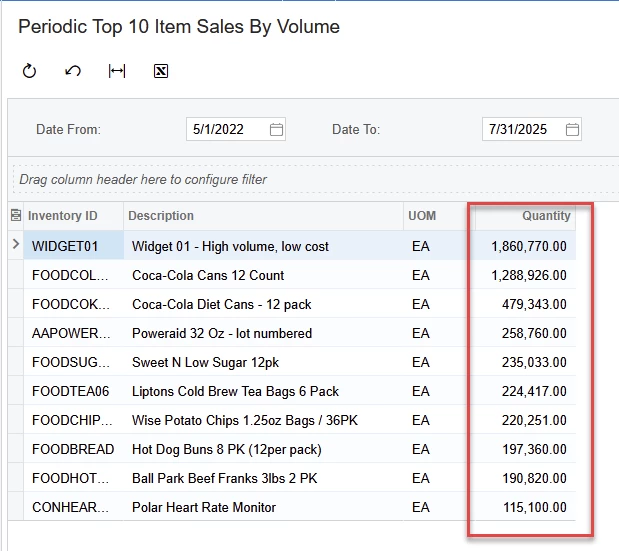
The sum of the quantity is not being sorted correctly. Refer attached screenshots of the scope and the result. I have also attached the GI xml file.

The total quantity column is not arranged in exact descending order, which needs to be corrected.

Any help would be appreciated.

Thanks

4 replies

hkabiri
Acumatica Moderator
Forum|alt.badge.img+8
  • Acumatica Support Team
  • July 1, 2025

@ManishPatel132008 I tested on my 2024R2 with Sales Demo data and I cannot reproduce it. The sorting is as expected:


DipakNilkanth
Pro III
Forum|alt.badge.img+13

Hi ​@ManishPatel132008,

I also tried it, and it’s working fine for me as well.

The only thing I noticed is that the UOMs are different — I’m not sure if that’s related, but it might be affecting the sorting.

Hope, it helps!


Thanks for the prompt responses. Acumatica version in use is 2023 R2 Build 23.207.0025.

@Nilkanth Dipak - The grouping is on the InventoryID and the corresponding quantity is the sum in question here. The UOM is only for display only and is not influencing the scope. On further investigation, I realized that the negative amount is not being calculated correctly using IIf( expr, truePart, falsePart ). The attached screenshot may explain better. For all transactions with D as the quantity should be negated, which is not happening.


Chris Hackett
Community Manager
Forum|alt.badge.img
  • Acumatica Community Manager
  • September 24, 2025

Hi ​@ManishPatel132008 were you able to find a solution? Thank you!