

Solved

Sum into Footer Section from Detail Section

  • Mar 5, 2025 5:04 PM UTC
  • 4 replies
  • 245 views
  • Translate All

Forum|alt.badge.img

Hello,


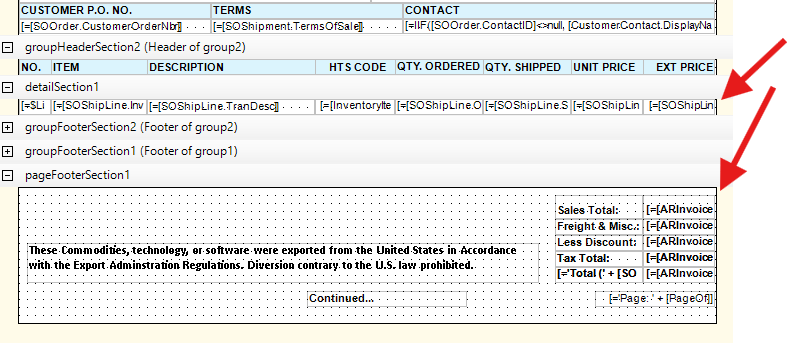
Does anyone know the way to sum a field in the detail section into the foot section based on what is retuned from the SO? I currently am using the SO lines in the detail section, but the total is coming off the invoice record. There are times we need to run this report prior to the invoice being posted, so my total in the footer does not populate until we process the invoice. Any thoughts?



Best answer by vkumar

Hi ​@JReppard 

Please refer to the following two threads, which may be useful.

Regards,


View original

4 replies

Forum|alt.badge.img+4
  • Varsity I
  • Mar 5, 2025 5:10 PM UTC

Hi ​@JReppard , Create a variable in detail section and display the variable in footer. Hope this link will help you.

Reference Link - 


Translate

Forum|alt.badge.img
  • Author
  • Varsity I
  • Mar 5, 2025 5:23 PM UTC

​@arthia98 - Thank you. Thats a start. I have not done any variable expressions yet, so I will have to do some exploring on how to complete that step. Thanks

Translate

miguel80
Semi-Pro III
Forum|alt.badge.img+3
  • Semi-Pro III
  • Mar 5, 2025 5:42 PM UTC

Hi,

Also use the “IsNull” function so that if there’s no invoice it takes the data from your variable:

IsNull([ARInvoice.XXXXX],SUM(SOShipLine.XXXX))

Translate

Forum|alt.badge.img+12
  • Acumatica Support Team
  • Answer
  • Mar 6, 2025 8:03 AM UTC

Hi ​@JReppard 

Please refer to the following two threads, which may be useful.

Regards,


Translate