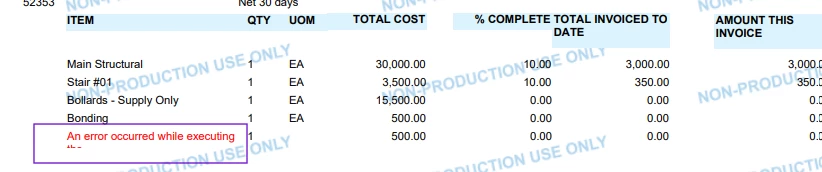
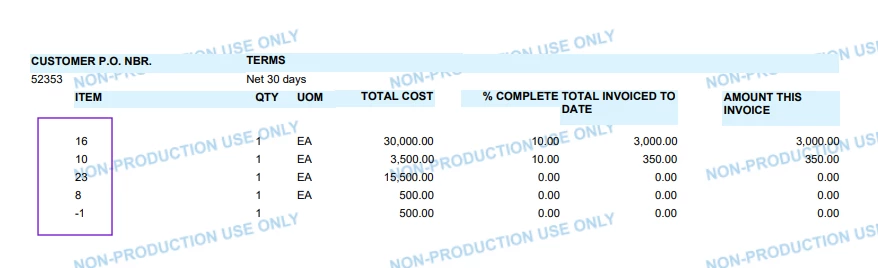
I am getting the following error in report designer.
An error occurred while executing the Substring(Identifier(ARTran.TranDesc), Const(0), BinaryOp - (InStr(Identifier(ARTran.TranDesc), Const(|)), Const(1))) function. Length cannot be less than zero.
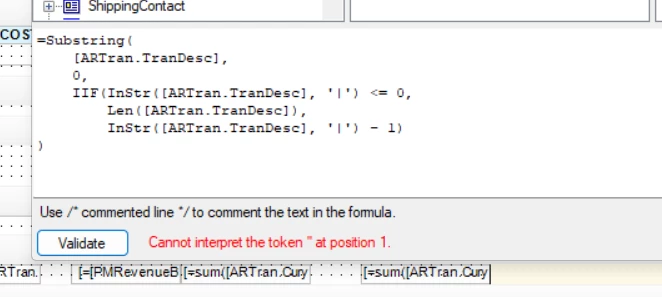
Below is the formula. It works in a GI, but not here.
I am trying to print all characters to the left of “|”, but this fails when there is no “|” in the string.
Best answer by Abhishek Niikam
Hello @jbuddecke71 Can you use formula without IFF(). In one thread someone mentioned that IFF() in Acumatica Report Designer can still evaluate the Substring() side even when the condition should return the other branch, so the guard does not reliably protect you from the bad length. This behavior has been reported with Report Designer expressions where the “true” or “false” expression is evaluated before the final IIf result is chosen.
You can try : =Substring(IsNull([ARTran.TranDesc], ''), 0, InStr(Concat(IsNull([ARTran.TranDesc], ''), '|'), '|'))
This formula should return the entire description if the | character is not present. If the | character exists, it will return only the text before the first occurrence of |. It also handles null or empty values to prevent errors.
Please let me know the results or if you encounter any issues.
@jbuddecke71 As Dipak pointed out your function needs to include a clause of what to do when the | character isn’t present. This is where IIF() functions come into play.
@Dipak Nilkanth Thanks for the response but I got a similar error.
An error occurred while executing the Substring(Identifier(ARTran.TranDesc), Const(0), BinaryOp - (InStr(Identifier(ARTran.TranDesc), Const(|)), Const(1))) function. Length cannot be less than zero
Hello @jbuddecke71 Can you use formula without IFF(). In one thread someone mentioned that IFF() in Acumatica Report Designer can still evaluate the Substring() side even when the condition should return the other branch, so the guard does not reliably protect you from the bad length. This behavior has been reported with Report Designer expressions where the “true” or “false” expression is evaluated before the final IIf result is chosen.
You can try : =Substring(IsNull([ARTran.TranDesc], ''), 0, InStr(Concat(IsNull([ARTran.TranDesc], ''), '|'), '|'))