Question

String function on Attributes not working - InventoryItem

  • June 12, 2026
  • 2 replies
  • 48 views

Forum|alt.badge.img

I am effectively trying to match strings with an IIF statement to create an ‘substitution list’ with a GI. 

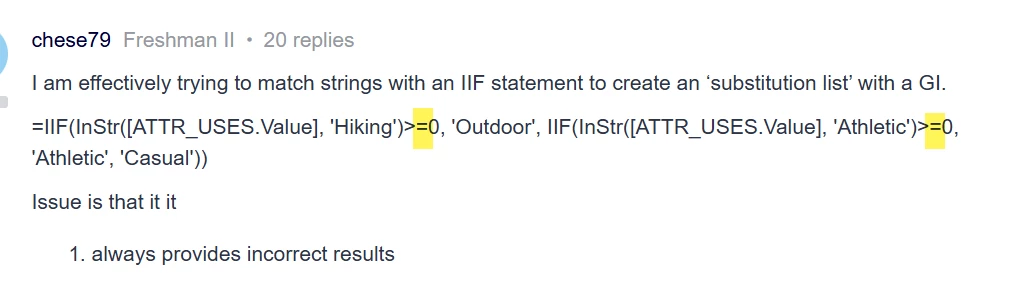
=IIF(InStr([ATTR_USES.Value], 'Hiking')>=0, 'Outdoor', IIF(InStr([ATTR_USES.Value], 'Athletic')>=0, 'Athletic', 'Casual'))

Issue is that it it

  1. always provides incorrect results
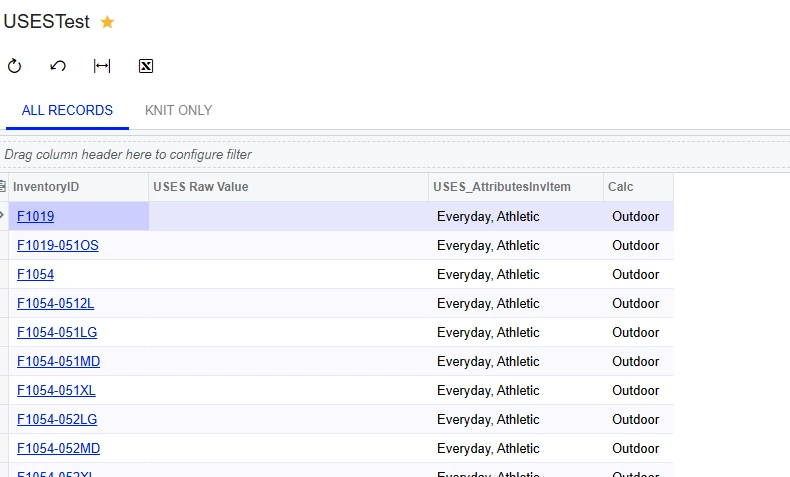
  1. As you can see above, when I join on CSAnswers I don’t get the raw values back? 


Looking for answers on both.


thanks!
 

2 replies

bwhite49
Captain II
Forum|alt.badge.img+12
  • Captain II
  • June 12, 2026

You don’t want the equal signs in your formula. Remove these...


You might find a Switch formula easier to work with in this case rather than repeated IIFs and then use an ISNULL to replace the null values. 

=ISNULL(SWITCH(InStr([ATTR_USES.Value], 'Hiking')>0, ‘Outdoor’, InStr([ATTR_USES.Value], 'Athletic')>0, ‘Athletic’), 'Casual')

Can you share a screenshot of your join to CSAnswers?

After CSAnswers, you will also want to join to the table CSAttributeDetail for combo attributes to access the description field.


Forum|alt.badge.img+2
  • Jr Varsity III
  • June 17, 2026

@chese79 ,
can you pls try like this formula
=IIF(InStr([ATTR_USES.Value], 'Hiking')>0, 'Outdoor', 
  IIF(InStr([ATTR_USES.Value], 'Athletic')>0, 'Athletic', 
    'Casual'))
Below is AI generated response:
 

Missing GIWhere for AttributeID on the join

Looking at your XML, you have a GIWhere filtering ATTR_USES.AttributeID = 'USES', but your join (GIOn) links on noteID = RefNoteID with an Inner Join (JoinType="I").

The raw Value column appearing blank strongly suggests the WHERE condition on AttributeID is being applied before the join resolves correctly, or there's a conflict between the inner join and the WHERE clause filtering it out.

Fix — move the AttributeID filter into the GIOn condition instead of GIWhere:

Field Condition Value
InventoryItem.noteID = ATTR_USES.RefNoteID
ATTR_USES.AttributeID = 'USES' ← add this as a second ON condition

In the GI designer, add a second GIOn line under the same relation:

  • Parent Field: (Expression)
  • Condition: E
  • Child Field: ATTR_USES.AttributeID
  • Value: 'USES'

Then remove the GIWhere row for ATTR_USES.AttributeID. Keeping it in WHERE rather than ON with an inner join can cause the raw value to be filtered out before the result columns are evaluated, which explains the blank USES Raw Value column.