I have been struggling for quite a while to format a stock item label that looks good, and I’m not have much luck in Report Designer.
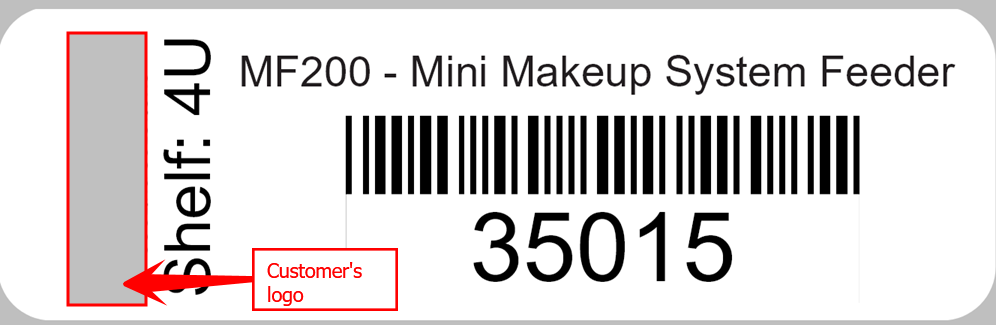
I’m trying to get close to something like this:
This is what the customer is currently using. I think the size is ~1.75x3”
I have tried to recreate this in Report Designer but can’t come close.
Best answer by Yuri Karpenko
@Yuri Karpenko any thoughts?
I agree with Sarah, that we cannot rotate text in the Report Designer. Also, I see how this could be hard to do because of tight spacing between the barcode and the inventory ID - the Report Designer struggles a little but with that. The logo shouldn’t be an issue - just save the file in the appropriate size and upload to the report (don’t use the logo uploaded to the Branches or Companies screen).
Sadly Report Designer doesn’t allow us to rotate text but other than that, you should be able to get a label that is very close to the one you are trying to recreated.
I agree with Sarah, that we cannot rotate text in the Report Designer. Also, I see how this could be hard to do because of tight spacing between the barcode and the inventory ID - the Report Designer struggles a little but with that. The logo shouldn’t be an issue - just save the file in the appropriate size and upload to the report (don’t use the logo uploaded to the Branches or Companies screen).