Answer

SOShipLine.TranDesc - Field not showing accurate value on Pick List (Report Designer)

  • February 6, 2023
  • 2 replies
  • 60 views

Forum|alt.badge.img

On certain items we ship out and include on a Pick List, our teams will modify the description on the Shipments screen.


We want this modified description to appear on the Pick List. I am bringing in the SOShipLine.TranDesc but it still shows the InventoryItem.Descr instead?


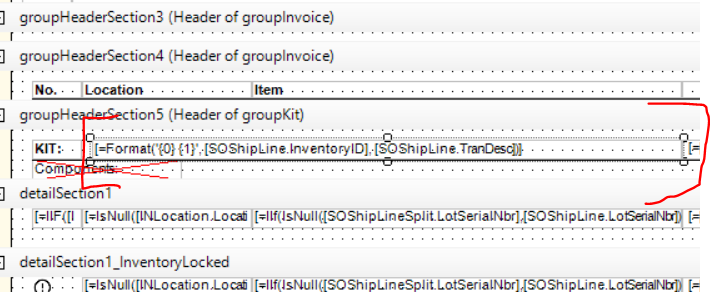
In example below, we have modified the description on the Shipment screen (image A). We then Print Pick List, however the description shown remains the original description associated with the inventory item (image B) - not the description per inventory item on the Shipment. I have modified the Pick List in Report Designer so it displays SOShipLine.TranDesc (image C) - but it still doesn’t show the correct description.


Image A
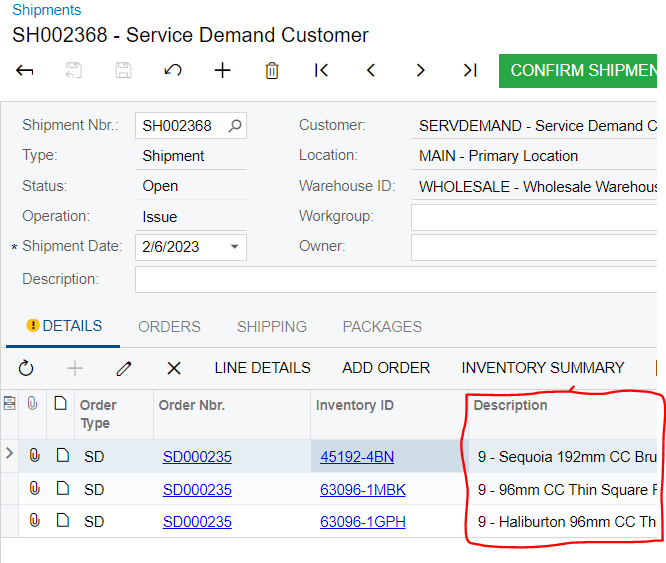
  Image B
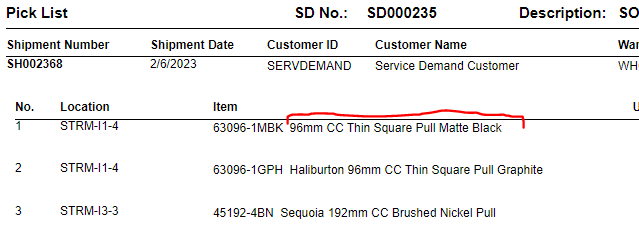
 Image ​​​​​C


Best answer by Naveen Boga

Hi @jwarren  You modified the GroupHeaderSection5, this is related to displaying the KIT items.

If this is not a KIT item, please modify the DetailSection1 → SOShipLine.TranDesc.

I just verified and it is working fine.

2 replies

Naveen Boga
Captain II
Forum|alt.badge.img+19
  • Captain II
  • Answer
  • February 7, 2023

Hi @jwarren  You modified the GroupHeaderSection5, this is related to displaying the KIT items.

If this is not a KIT item, please modify the DetailSection1 → SOShipLine.TranDesc.

I just verified and it is working fine.


Forum|alt.badge.img
  • Author
  • Semi-Pro I
  • February 8, 2023

Hi @jwarren  You modified the GroupHeaderSection5, this is related to displaying the KIT items.

If this is not a KIT item, please modify the DetailSection1 → SOShipLine.TranDesc.

I just verified and it is working fine.

Thanks Naveen.