

Solved

Shipping Contact on Invoice

  • June 2, 2026
  • 3 replies
  • 20 views

Forum|alt.badge.img

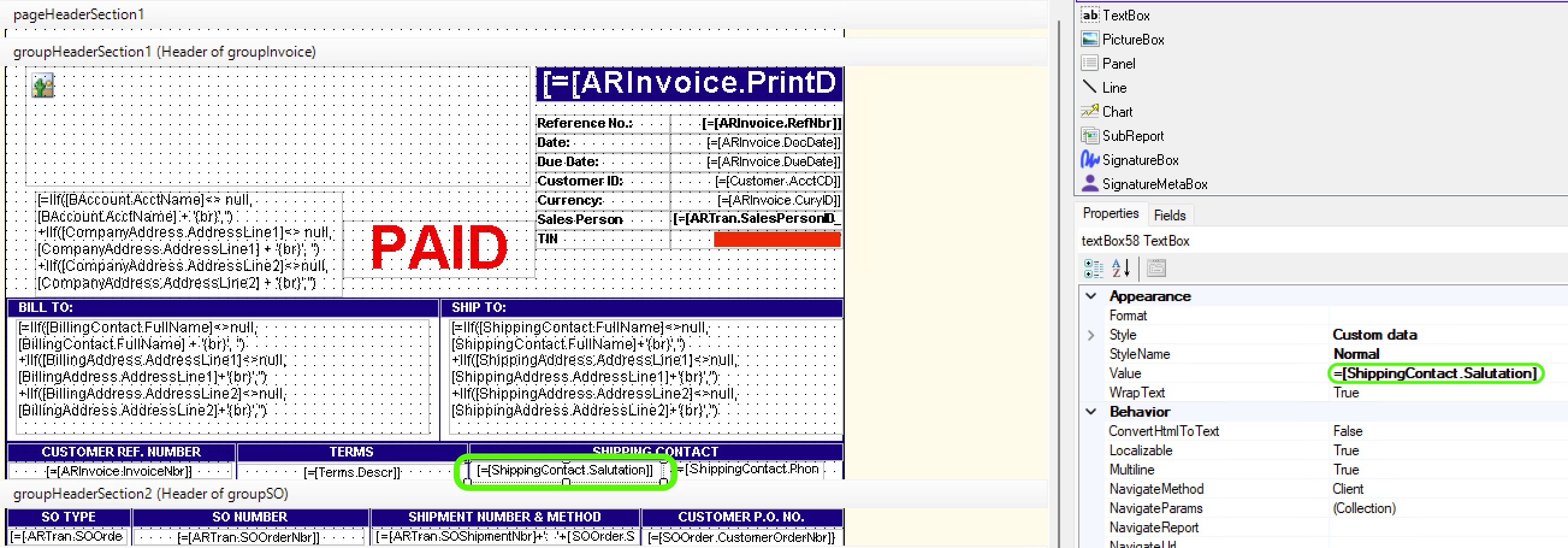
=IIf([Customer.AcctCD] = 'A123', 'John Smith', [ShippingContact.Salutation])

All, we’ve had an issue bugging us for over a year. Long story short -- for customer ‘A123’, we have contact ‘Jane Doe’ appearing as the shipping contact on the invoices. Jane Doe left A123 years ago but still appears on the invoices. I’ve hunted her down in contacts, leads, business/customer accounts, shipping tabs etc and can not find a trace of her.

So I’m trying to “hard code” our invoice -- if Customer = A123, then display value is John Smith (the correct contact); otherwise, just use the usual [ShippingContact.Salutation].

This works for A123 invoices… John Smith now appears! Great!

Now the issue is all non-A123 invoices leaves a <blank> Shipping Contact. :/

Do I need to use a visible expression instead?
 

Best answer by BenjaminCrisman

@swartzfeger Salutation is a deprecated field, switch to ShippingContact.Attention

3 replies

BenjaminCrisman
Acumatica Employee
Forum|alt.badge.img+4
  • Acumatica Support Team
  • Answer
  • June 2, 2026

@swartzfeger Salutation is a deprecated field, switch to ShippingContact.Attention


Forum|alt.badge.img
  • Author
  • Jr Varsity II
  • June 2, 2026

@swartzfeger Salutation is a deprecated field, switch to ShippingContact.Attention

Interesting, thanks for that Benjamin. I changed it and now the shipping contact for that specific customer is blank on the invoice despite having all contacts populated. So at least the ex-employee no longer appears. But the current contact isn’t being picked up.


Forum|alt.badge.img
  • Author
  • Jr Varsity II
  • June 2, 2026

Going to close this… I had to create a second raw text field with the value hard coded to “John Smith” with a visible expression =[Customer.AcctCD] = 'A123'

​​​​​@BenjaminCrisman thanks for the tip on the ShippingContact.Attention!

