

Solved

Shipment confirmation report is showing extra space above item lines.

  • December 22, 2025
  • 3 replies
  • 33 views

First, I tried to eliminate duplication of lines on multi-package shipments by moving the ShipLine fields to a new Group Section as suggested. When that didn’t work, I undid the changes and saved. But now I have all of this space although the height is still 0.16667in.
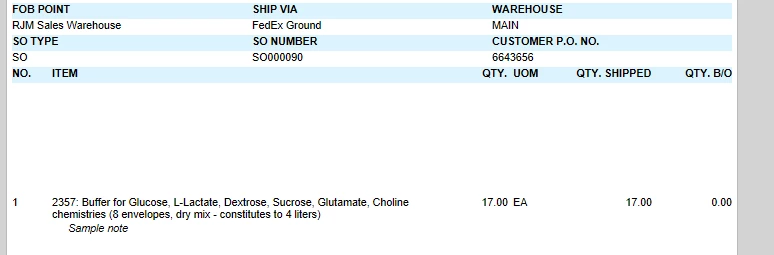
Even publishing the previous version .rpx file to the server doesn’t eliminate the space.

Any help out there?

Best answer by TomValerio

Thank you for your replies, MinushaWeerasuriya76 & Aleksandrsechin.

I changed the height of the DetailSection from 0.16667in to 16px, and the problem resolved.

Tom Valerio

3 replies

Forum|alt.badge.img+1

Have you tried using the out of box version of the report? Let me know the Acumatica version and the report ID and I can provide the out of box .rpx file


Forum|alt.badge.img+3

Hi ​@TomValerio 
When you change a report, it does not override the base one — it simply creates a new version. You can remove it or deactivate it:

Additionally, if you need to adjust your existing customized report to remove extra space, you can attach the report here and I’ll try to help you with that.


  • Author
  • Freshman II
  • Answer
  • December 23, 2025

Thank you for your replies, MinushaWeerasuriya76 & Aleksandrsechin.

I changed the height of the DetailSection from 0.16667in to 16px, and the problem resolved.

Tom Valerio

