
Solved

Set default for Report Designer as Last Period

  • Aug 1, 2024 6:38 PM UTC
  • 3 replies
  • 186 views
  • Translate All

martingaxiola
Varsity I
Forum|alt.badge.img

Good day team,

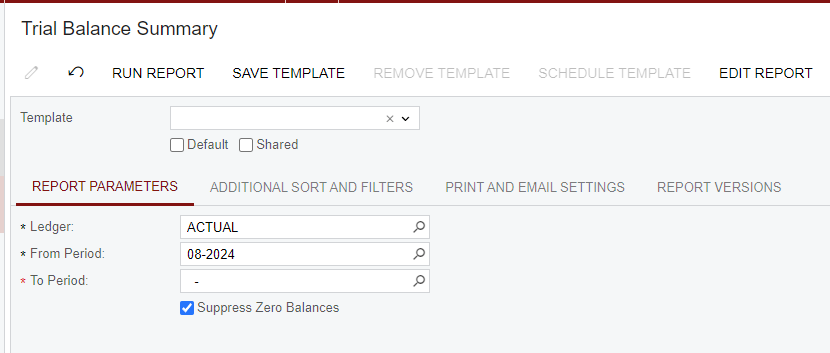
I am trying to set the last period as default on a report designer report (in this case 07-2024) instead of current Period (08-2024), but i am having issues finding how to do it.

The report designer has the From Period Value in the Parameters Tab of the Schema Builder the following formula: =Report.GetDefExt('OrganizationBranchReportParameters.FinPeriodID')

I tried several things, but still no luck. Has somebody find a solution for this?
I appreciate any help in this. 
Best answer by martingaxiola

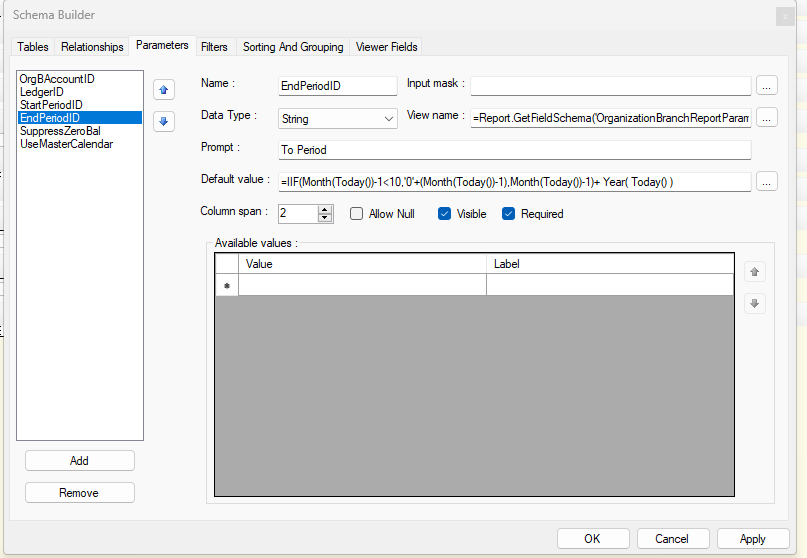
Hola @nhatnghetinh , the last period would be 07-2024, I found it with this formula:

=IIF(Month(Today())-1<10,'0'+(Month(Today())-1),Month(Today())-1)+ Year( Today() )

this was the solution to the issue. 

View original

3 replies

nhatnghetinh
Captain II
Forum|alt.badge.img+15

Hi @martingaxiola 

Let me ask. The current period is 08-2024. What is your last period?


Best Regards,

NNT

Translate

martingaxiola
Varsity I
Forum|alt.badge.img
  • Author
  • Varsity I
  • Answer
  • Aug 2, 2024 5:03 AM UTC

Hola @nhatnghetinh , the last period would be 07-2024, I found it with this formula:

=IIF(Month(Today())-1<10,'0'+(Month(Today())-1),Month(Today())-1)+ Year( Today() )

this was the solution to the issue. 

Translate

Chris Hackett
Community Manager
Forum|alt.badge.img
  • Acumatica Community Manager
  • Aug 2, 2024 5:32 AM UTC

Thank you for sharing your solution with the community @martingaxiola!

Translate