Answer

Sales Order Details by Inventory without Subtotals

  • October 6, 2022
  • 2 replies
  • 82 views

Forum|alt.badge.img+1

Hello everyone,


I think I am just missing some simple setting or way of editing this report, but I cannot get the right results for the Sales Order Details by Inventory Item. (Screen ID: SO611500)
Our client wants to utilize the report without the Subtotals and repeating headers that the report incorporates.
 

I think I tried every setting within the Subsections and moving the data around to other sections but I couldn’t get the correct result.

Does anybody ever edited this report in that way?
Best answer by BenjaminCrisman

Hi @krausef77 ! I believe I was able to accomplish this by making a couple small adjustments to the report.

Here’s what I did:

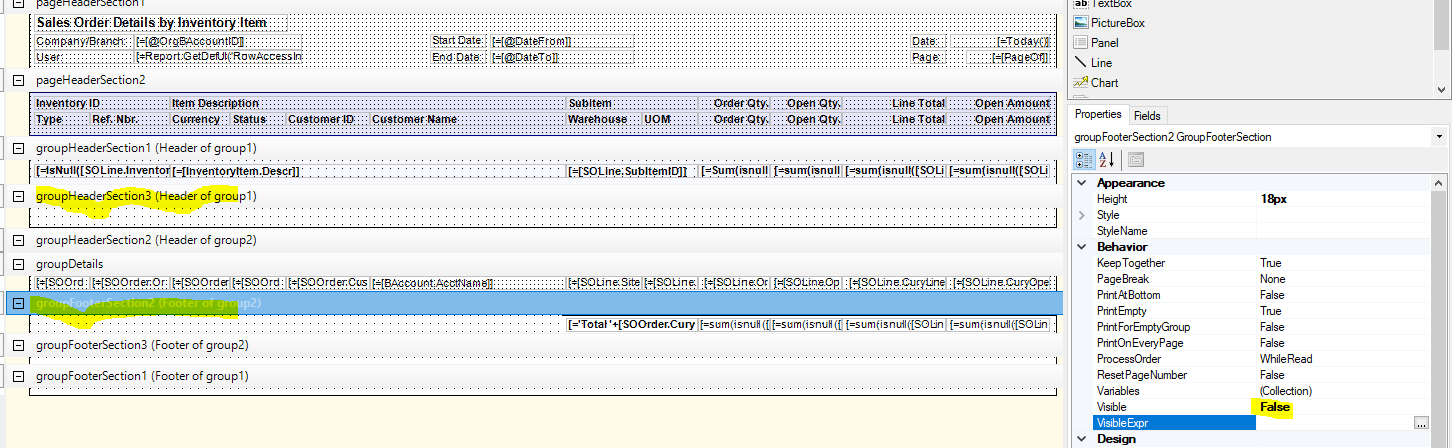
Set these two sections to Visible = False and remove the expression
Highlight all the fields in the section, click and drag them to Page Header

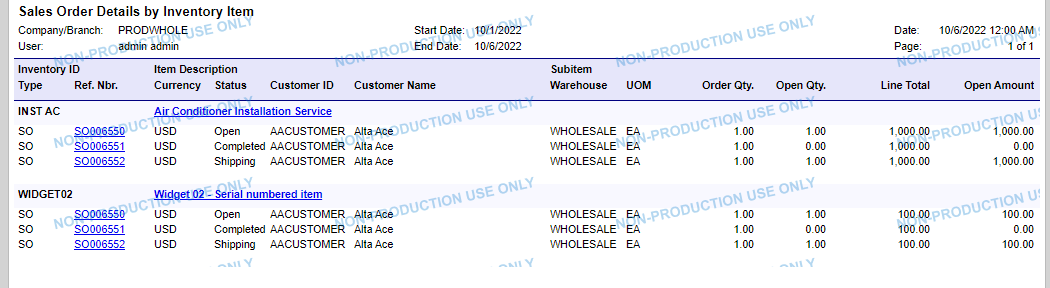
Result:


2 replies

BenjaminCrisman
Acumatica Employee
Forum|alt.badge.img+4
  • Acumatica Support Team
  • Answer
  • October 6, 2022

Hi @krausef77 ! I believe I was able to accomplish this by making a couple small adjustments to the report.

Here’s what I did:

Set these two sections to Visible = False and remove the expression
Highlight all the fields in the section, click and drag them to Page Header

Result:


Forum|alt.badge.img+1
  • Author
  • Semi-Pro II
  • October 6, 2022

Hi @krausef77 ! I believe I was able to accomplish this by making a couple small adjustments to the report.

Here’s what I did:

Set these two sections to Visible = False and remove the expression
Highlight all the fields in the section, click and drag them to Page Header

Result:


This worked, thank you!