


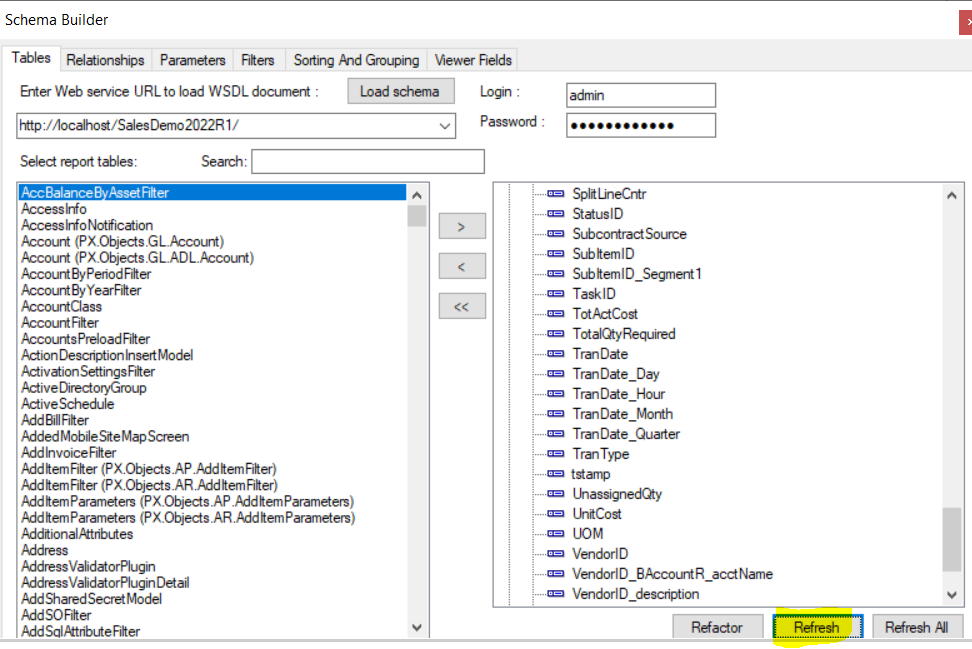
I’m struggling with an issue with the report writer currently. There is a value that exists within Acumatica that I’d like to display (see “Desiredproperty_Values” for its examine element screen) but despite the category of AMProdMatl being populated by my schema builder (see Schema Builder) it does not appear in the list of values I can assign to appear in a text box. it should have all the same properties as the previous value that appears in the field that I’d like to change from (see Currentproperty_Values) so by my understanding when I use the schema builder to populate my report, that value should also be grabbed.
What am I missing here, folks? Why would populating AMProdMatl pull 1 variable but not another?
Solved
Report Writer Struggles - Value appears in Acumatica but I can't insert it into a Report
Best answer by lauraj46
HI
In the Schema Builder, highlight the AMProdMatl table and then click the “Refresh” button. I tested this in demo data and after that the TotalQtyRequired field was available.
Laura




Enter your E-mail address. We'll send you an e-mail with instructions to reset your password.