



Hi, attached is a custom report for production ticket. It works fine when printing for BL order type, but not for RO order type. I am getting the below error, but Trace just keeps on spinning and not giving me any hint. Thoughts please?
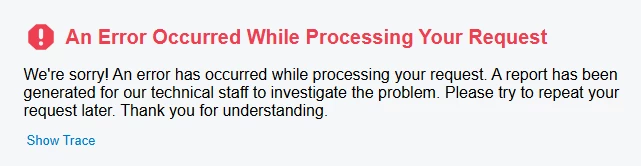
Hi, attached is a custom report for production ticket. It works fine when printing for BL order type, but not for RO order type. I am getting the below error, but Trace just keeps on spinning and not giving me any hint. Thoughts please?
Best answer by Steve Milner
@MarkD the main report is structurally fine. The part that can blow up is the five variables on the operation group footer (RunsReq, RunUnitTimeConverted, RuntimeTotal, TableRowsReq, PredictedRuntime).
Two of them throw on ordinary data. Left(x, Len(x)-2) throws when the run time is shorter than two characters, because the length goes negative. CDec throws when what it's handed isn't a plain number. Dividing by a zero Run Units doesn't throw, it just returns NaN, so that one isn't your crash.
That's why order type matters. It's not the type itself, it's the Run Time and Run Units on the RO operations. Compare one RO operation with one BL operation and you'll see the difference.
Quick confirmation: clear the Value Expression on those five variables and print the RO order. If it prints, you've found it.
Then guard them. IIf only evaluates the branch it takes, so this is safe:
=IIf(Len([AMProdOper.RunUnitTime])<3, 0, CDec(Left([AMProdOper.RunUnitTime], Len([AMProdOper.RunUnitTime])-2)) + Round(CDec(Right([AMProdOper.RunUnitTime],2))/60, 2))
=IIf([AMProdOper.RunUnits]=0, 0, [AMProdOper.QtyRemaining]/[AMProdOper.RunUnits])
If clearing the variables doesn't fix it, the exception is in one of the subreports you didn't attach (RuntimeTable, LotSerial, Qty, SummaryPage, OperationMaterials). Post RuntimeTable.rpx first, it receives those values.
Enter your E-mail address. We'll send you an e-mail with instructions to reset your password.


