

Solved

Report dropping a field on some lines only

  • June 25, 2026
  • 4 replies
  • 26 views

Forum|alt.badge.img+1

Good day Community

I have modified the Journal Transactions GL report in Report Writer to display the VAT code for AR, AT or CA batches. This formula needed to be changed after the upgrade to 2026 R1 t dislay correctly. Old firmula is commented out in the below.

=
Switch( [GLTran.Module] = 'AP', [APTax.TaxID], [GLTran.Module] = 'AR', [ARTax.TaxID],
[GLTran.Module] = 'CA', [CATax.TaxID],
([GLTran.Module] <> 'AP' or [GLTran.Module] <> 'AR' or [GLTran.Module] <> 'CA'),'CheckModule')

/*IIf([GLTran.Module] = 'AP', [APTran.TaxID], IIf([GLTran.Module] = 'AR', [ARTran.TaxID], ''))*/

This appeared to work perfectly but we have discovered that it is dropping the VAT Code from some lines in the report. 
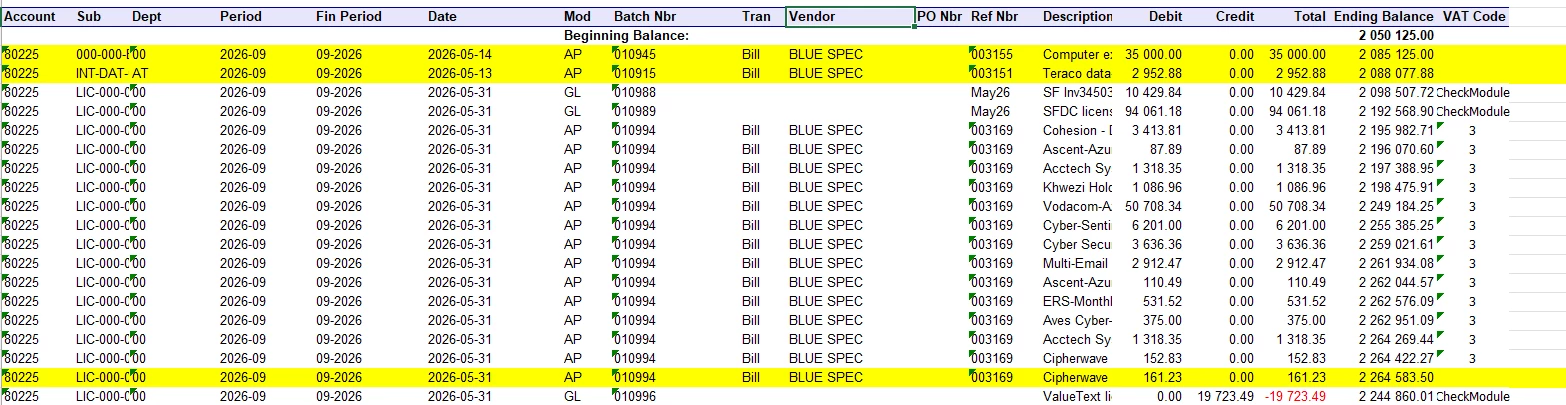
 

Please can you check to see if the formula is correct (is asses validation) and why some of these transactions are missing the VAT code on the report.

Many thanks on advance.
Best answer by lauraj46

Hi ​@BarbaraPietersen23 ,

Thanks for sharing your report.  To display any field on a report you can use the syntax:

=[APTran.TaxCategoryID] (or whatever field you want to display)

This can help to isolate if a problem is with the formula or the underlying data and/or data joins.

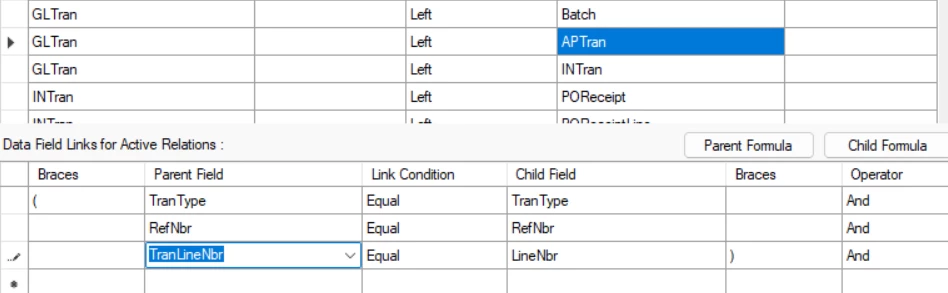
In this case it looks the issue is with your join from GLTran to APTran.  This join should be on GLTran.TranLineNbr = APTran.LineNbr, not GLTran.LineNbr = APTran.LineNbr. The incorrect join is why the report was picking up certain lines only - some line numbers matched between the two tables just by chance.  I didn’t review your joins for the other modules.  Please reply if you are still having issues with those and I can look into it further.

Hope this helps!

Laura

4 replies

lauraj46
Captain II
Forum|alt.badge.img+9
  • Captain II
  • June 26, 2026

Hi ​@BarbaraPietersen23 ,

Have you reviewed the taxes tab of the documents that are appearing blank, to confirm that the TaxID is populated?  You might also add the the field without any formula to your report, for troubleshooting purposes.  If this doesn’t help, please attach your revised report to this thread so we can take a look at the joins.

Side note is that I would use AND instead of OR for clarity in the last condition of your formula, since it should return CheckModule if none of the other modules are a match.  However that is not causing the blanks :)


Forum|alt.badge.img+1

Hi Laura

Thanks so much for your response. Yes, I reviewed the TaxID field. It is populated. In some instances it is only the last line on the document that is not picking up the TaxID.

I am not sure how to add the field without the formula, so here is the formula.

=
Switch( [GLTran.Module] = 'AP', [APTran.TaxCategoryID], [GLTran.Module] = 'AR', [ARTax.TaxID],
[GLTran.Module] = 'CA', [CATax.TaxID],
([GLTran.Module] <> 'AP' or [GLTran.Module] <> 'AR' or [GLTran.Module] <> 'CA'),'CheckModule')

I am also attaching the report so you can see if I have done anythung wlse wrong. You will have to rename it to an .rpx report to open it.

Many thanks for you help.

Barbara 


lauraj46
Captain II
Forum|alt.badge.img+9
  • Captain II
  • Answer
  • June 29, 2026

Hi ​@BarbaraPietersen23 ,

Thanks for sharing your report.  To display any field on a report you can use the syntax:

=[APTran.TaxCategoryID] (or whatever field you want to display)

This can help to isolate if a problem is with the formula or the underlying data and/or data joins.

In this case it looks the issue is with your join from GLTran to APTran.  This join should be on GLTran.TranLineNbr = APTran.LineNbr, not GLTran.LineNbr = APTran.LineNbr. The incorrect join is why the report was picking up certain lines only - some line numbers matched between the two tables just by chance.  I didn’t review your joins for the other modules.  Please reply if you are still having issues with those and I can look into it further.

Hope this helps!

Laura


Forum|alt.badge.img+1

Thank you so much Laura. You saved me hours! 😁

