Answer

report designer versions

  • September 19, 2023
  • 5 replies
  • 547 views

dsimmerly
Pro I
Forum|alt.badge.img+1

are there ‘versions’ of the Report Designer product?

how can you see what version you are running ?

 

Best answer by Kandy Beatty

HI @dsimmerly 

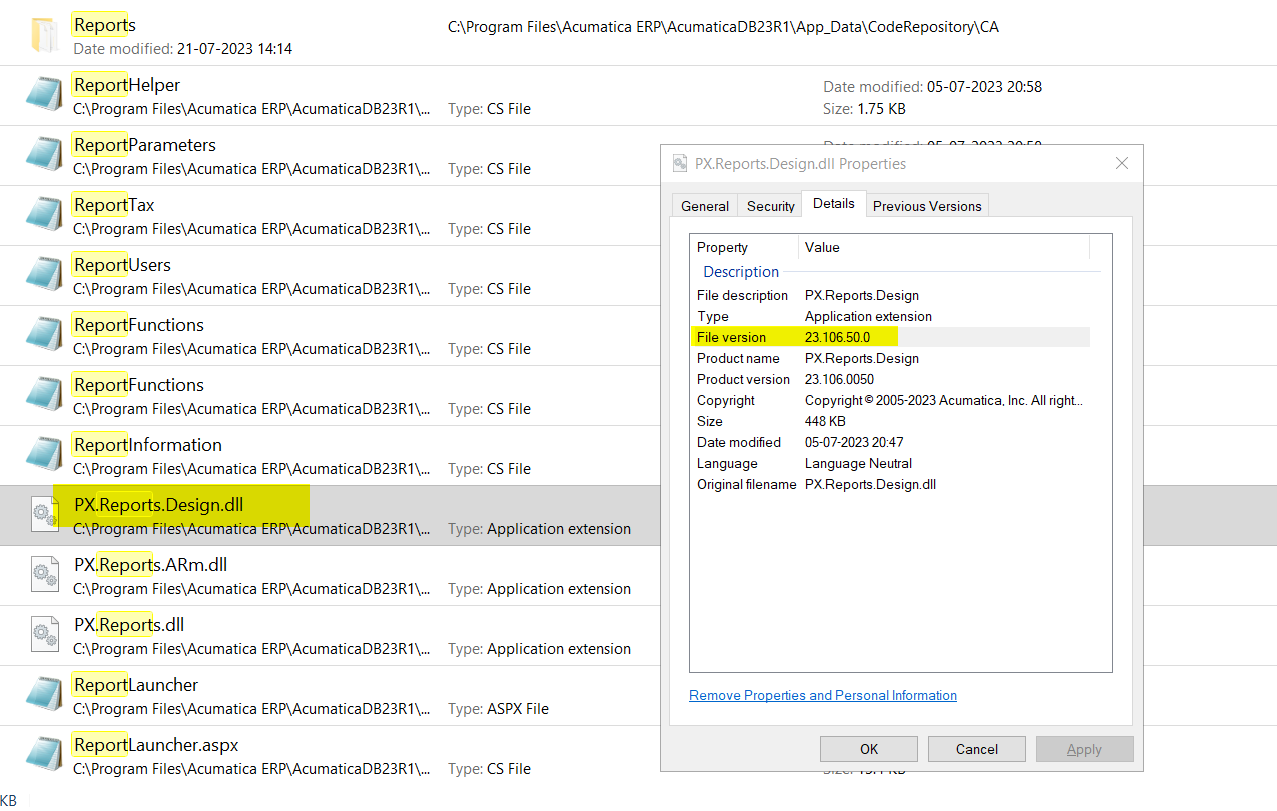
The only way I found to see is to go to the File where the report writer is stored and hover over it and it will give you the File Version:


5 replies

Manikanta Dhulipudi
Captain II
Forum|alt.badge.img+15

Hi @dsimmerly 

Report designer is available based on the Acumatica version.

You can download the report designer and use the smaller version with respective acumatica version you are using.

I believe Acumatica report designer is available till 23R1 Acumatica builds are available belowhttp://acumatica-builds.s3.amazonaws.com/index.html?prefix=


https://www.augforums.com/forums/acumatica-report-designer/acumatica-report-designer-download/


dsimmerly
Pro I
Forum|alt.badge.img+1
  • Author
  • Pro I
  • September 19, 2023

How do I know the version I am running?


Kandy Beatty
Captain II
Forum|alt.badge.img+17
  • Captain II
  • Answer
  • September 19, 2023

HI @dsimmerly 

The only way I found to see is to go to the File where the report writer is stored and hover over it and it will give you the File Version:


Manikanta Dhulipudi
Captain II
Forum|alt.badge.img+15

Hi @dsimmerly 

I search with report designer then the below results popup in local instance, it shows the report designer file name


Manikanta Dhulipudi
Captain II
Forum|alt.badge.img+15

Go to Acumati

HI @dsimmerly 

The only way I found to see is to go to the File where the report writer is stored and hover over it and it will give you the File Version:


Continuation to @kandybeatty49  Go to Bin > Report dll> Detaiils