I have been looking for way as to how we can setup an automation on the Project Cost report (PM633020) where the requirement is that the report should be mailed out on 1st of every month, however the report should have the data for previous month.
So for instance, if a report is auto mailed on 1st of March, it should have the records from 1st Feb - 28th of Feb.
Is this possible in the above mentioned report?, As i could only see the parameter for Project ID.
Regards,
Harshita.
Best answer by KrunalDoshi
Hi @Harry,
I did not find the report you have mentioned, maybe it is custom report.
However, in my opinion you should create a Business Event which triggers by schedule and set subscriber as Email Template. In Email Template, you can attach the report and pass the required parameter for date. You will have modify your Project Cost Report to accept the Date/FinPeriod as a parameter with the default value set. You can use the Date functions to calculate your previous month start and end date.
I did not find the report you have mentioned, maybe it is custom report.
However, in my opinion you should create a Business Event which triggers by schedule and set subscriber as Email Template. In Email Template, you can attach the report and pass the required parameter for date. You will have modify your Project Cost Report to accept the Date/FinPeriod as a parameter with the default value set. You can use the Date functions to calculate your previous month start and end date.
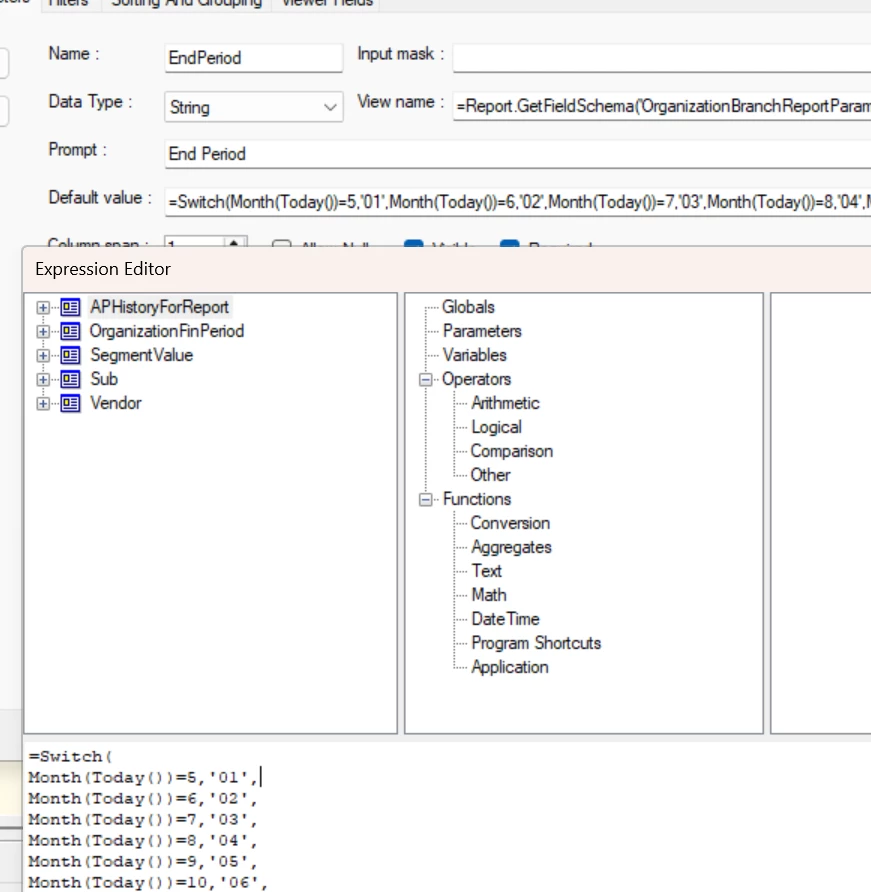
We have a business event that is doing a similar thing where we are exporting and emailing a report in the first week of the month for the prior month and we have a formula in the default value field of the report where we have a formula where we look at the Month(today()) and then use the switch formula to swap the months to get the fiscal period. For this customer, it’s a bit more complex because they also have a non-calendar fiscal month (so Month 5 is period 01). Below is a quick screenshot of what it looks like in report designer.
I think you could likely also use the date add formula to similar effect if you’re looking for actual dates.
Then, because the period is defaulted into the report parameters and is dynamic, we can just attach the report to our business event and it generates fine.
There is a way to automatically trigger the report on the 1st of every month at exactly 12:00 AM. I’ve implemented this setup successfully for a few clients using business events, and it has worked reliably.
I recommend the following approach:
Create a Business Event aligned with your reporting requirement.
Configure the appropriate trigger condition within the event.
Set up an Automation Schedule to run on the 1st of every month at 12:00 AM.
In the Email Template, attach or embed the specific report you want to be sent, ensuring it is mapped correctly to the recipient.