

Solved

QR Code Link Not Working When Adding FA ID to Company URL

  • May 21, 2026
  • 5 replies
  • 30 views

Forum|alt.badge.img

Hi All,

I am currently setting up a QR code that can link directly to a Fixed Asset ID.

At the moment, the QR code works when I use the fixed screen link only, and I can access the FA screen successfully. However, when I concatenate the FA ID field into the link, the QR code no longer works.

Could you please advise if there is any specific configuration required for this? I would like to know if I am missing any setup or if the link format needs to be adjusted.

It works with the screen link only, but it does not work after I add the FA ID field.
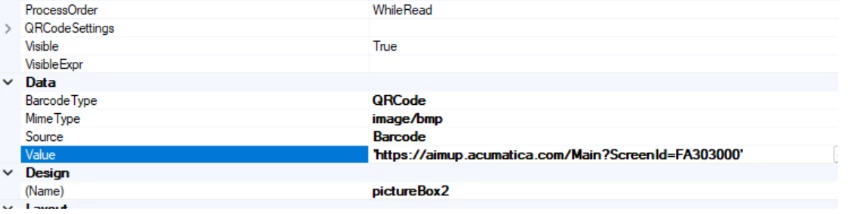
Thank you.

Best answer by rkenna

Hi ​@hthuy24,

Try it without using concat

Try = ‘Https://aimup.acumatica.com/Main?ScreenId=FA303000&AssetCD=’+’(FixedAsset.AssetCD)’

^Make sure I spelled that all right typing it out. You may need to play around with the spacing around the plus sign, but usually quotes ‘ ‘ and plus signs + work better than concat formulas in Report Designer

-RJ

5 replies

rkenna
Captain II
Forum|alt.badge.img+3
  • Captain II
  • Answer
  • May 21, 2026

Hi ​@hthuy24,

Try it without using concat

Try = ‘Https://aimup.acumatica.com/Main?ScreenId=FA303000&AssetCD=’+’(FixedAsset.AssetCD)’

^Make sure I spelled that all right typing it out. You may need to play around with the spacing around the plus sign, but usually quotes ‘ ‘ and plus signs + work better than concat formulas in Report Designer

-RJ


Forum|alt.badge.img
  • Author
  • Jr Varsity II
  • May 22, 2026

Hi ​@hthuy24,

Try it without using concat

Try = ‘Https://aimup.acumatica.com/Main?ScreenId=FA303000&AssetCD=’+’(FixedAsset.AssetCD)’

^Make sure I spelled that all right typing it out. You may need to play around with the spacing around the plus sign, but usually quotes ‘ ‘ and plus signs + work better than concat formulas in Report Designer

-RJ

Thank you RJ for your suggestion. Unfortunately, it still does not work. Do you have any other ideas or recommendations?


rkenna
Captain II
Forum|alt.badge.img+3
  • Captain II
  • May 26, 2026

@hthuy24, something else you could try is an Attribute or a UDF on the actual document itself containing the URL. Then you use that Attribute or UDF as the value for this QR Code in Report Designer.


Forum|alt.badge.img
  • Author
  • Jr Varsity II
  • May 27, 2026

@hthuy24, something else you could try is an Attribute or a UDF on the actual document itself containing the URL. Then you use that Attribute or UDF as the value for this QR Code in Report Designer.

Hi ​@rkenna , thanks for your suggestion. I found out that the issue was that the code size was too small. I can make it work now. 


rkenna
Captain II
Forum|alt.badge.img+3
  • Captain II
  • May 27, 2026

Ah, that will do it! ​@hthuy24 thanks for letting the community know.


Cheers,

RJ


