

Question

Printing Shipment Confirmation with different SOs

  • July 28, 2026
  • 3 replies
  • 18 views

Forum|alt.badge.img

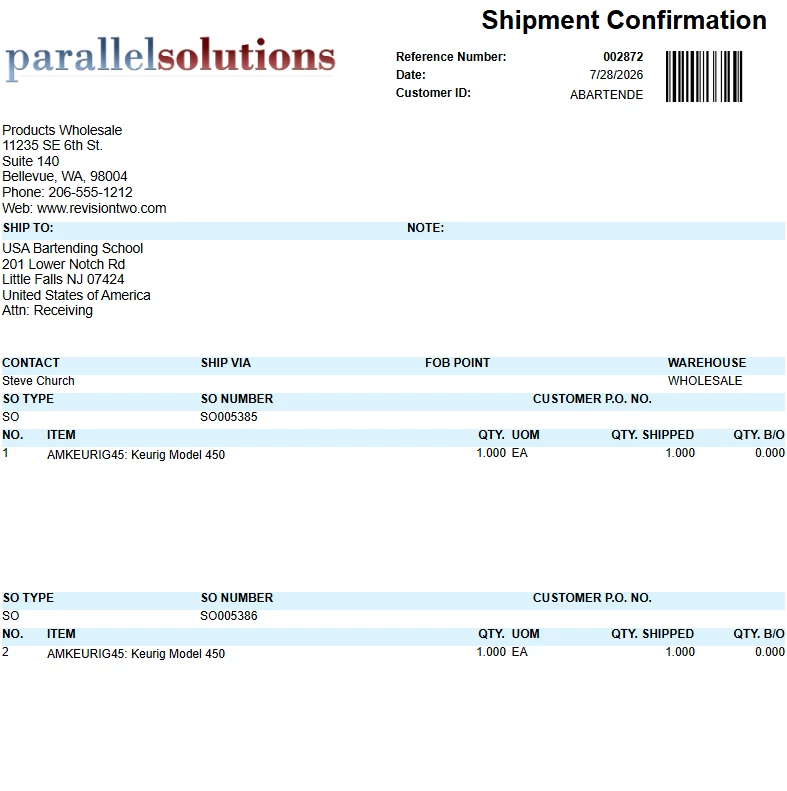
Hi, I created 2 sales orders for the same customer and created 1 shipment and added those 2 SOs. Now, the shipment contains 2 different SO numbers (SO0001 and SO0002). It splits the items up between the 2 orders but fails to reference which items belongs to the SO.

I’ve added a group called groupOrderNbr to show the SO number and customer order number above the detail section. However, I am a bit stuck on making it only visible if there are different SOs in 1 shipment.

I can easily add a column to add the Customer Order No and SO number in the details section, but it looks ugly showing those information on each line item. Do you have any other suggestions or maybe adding the correct visible expression? I’ve attached the rpx. Feel free to modify and play around it.

3 replies

lauraj46
Captain II
Forum|alt.badge.img+9
  • Captain II
  • July 28, 2026

Hi ​@MarkD ,

The standard OOB SO642000.rpx already has this grouping, see screenshot below.  I’ve attached the rpx for your reference.  Hope this helps!


Forum|alt.badge.img
  • Author
  • Varsity I
  • July 28, 2026

Thanks ​@lauraj46 - I’ve tried different visible expression to ONLY make that group visible when there are different SOs in the shipment, but can’t make it work. Thoughts please?


lauraj46
Captain II
Forum|alt.badge.img+9
  • Captain II
  • July 28, 2026

Hi ​@MarkD ,

Understood.  Try this in your visibility condition:

=[SOShipment.OrderCntr]>1

Hope this helps!

Laura
