Answer

Please help with custom Row Style field

  • October 3, 2025
  • 2 replies
  • 81 views


SM208000 - Generic Inquiry

At Generic Inquiry screen we have field “Row Style” which helps us creating GI styles due to our template. 
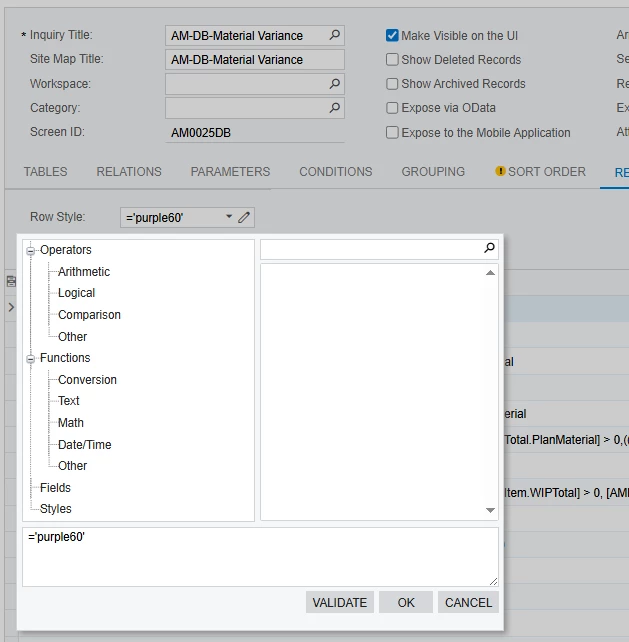
 

I want to create a similar field that, instead of affecting the GI, applies to my custom table. I’ve managed to copy the field and its smart panel, and I even made it possible to select fields from my table. However, when I click OK, the style is not applied to the table.

Is it possible to implement this functionality? If so, how can I do it?

More details on what I have done:
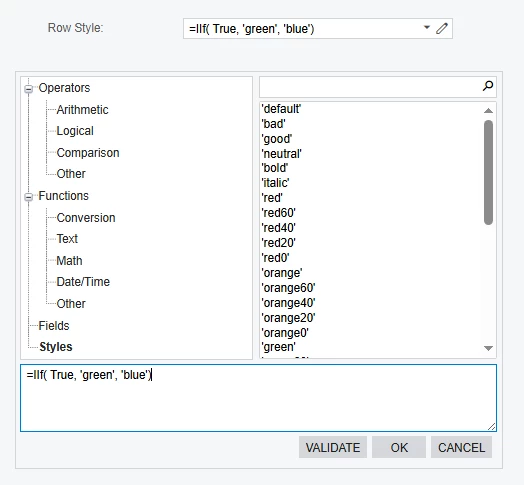
 

The field and smart panel are similar to those on the Generic Inquiry screen. I copied the DAC field, its definition in the ASPX file, and also added my own method in the ASPX.cs file.


DAC field:

        #region RowStyleFormula

public abstract class rowStyleFormula : BqlType<IBqlString, string>.Field<rowStyleFormula> {}
[PXDBString]
[PXUIField(DisplayName = "Row Style")]
public string RowStyleFormula { get; set; }

#endregion

Aspx:

<pxa:PXFormulaCombo ID="edRowStyleFormula" runat="server" DataField="RowStyleFormula" EditButton="True"
FieldsAutoRefresh="True" FieldsRootAutoRefresh="true" LastNodeName="Fields" IsInternalVisible="false"
IsExternalVisible="false" OnRootFieldsNeeded="edRowStyle_RootFieldsNeeded" CommitChanges="true"
SkinID="GI" IsStylesVisible="True">
</pxa:PXFormulaCombo>

Aspx.cs file has this method as at SM208000 screen:

  protected void edRowStyle_RootFieldsNeeded(object sender, PXCallBackEventArgs e)
{
MyGraphMaint graph = this.ds.DataGraph as MyGraphMaint;
if (graph != null)
{
String[] fields = graph.GetAllFields();
String[] parameters = graph.GetAllParameters();

e.Result = string.Join(";", parameters.Concat(fields));
}
}


I also implemented GetAllFields() and GetAllParameters(bool inBrackets = true) in the graph:

        public string[] GetAllFields()
{
var list = new List<string>();

foreach (PXCache cache in this.Caches.Values)
{
foreach (string field in cache.Fields)
{
list.Add($"[{cache.GetItemType().Name}.{field}]");
}
}

list.Sort();
return list.ToArray();
}

public string[] GetAllParameters(bool inBrackets = true)
{
var list = new List<string>();

return list.ToArray();
}

I haven’t fully implemented the GetAllParameters() method because I don’t completely understand what it does or its purpose. However, as far as I understand, it only affects the output in the Fields section of the smart panel, which I have already handled satisfactorily.
 

When I click the OK button, nothing happens. The style is saved to the database if I try to save the screen, but the table itself does not change in any way. Thank you in advance.

Best answer by darylbowman

I’m actually impressed you got as far as you did. I had an awful time trying to implement a formula builder.

The field that you now have is only saving a text string to the database. You would have to implement a formula parser in order to process the formula into a usable value, and THEN implement that value in some way. It’s not a small undertaking.

I don’t know how Acumatica is using their formula value or even if it’s possible to see that. However, I have implemented a formula parser myself. You can read about it here.

Then, once you have an actual value returning from the formula parser, you could use that value to set a style on your grid, something like this:

public override void Initialize()
{
Page page = HttpContext.Current?.Handler as PXPage;
if (page != null)
{
page.Load += Page_Load;
}
}

private void Page_Load(object sender, EventArgs e)
{
Page page = (Page)sender;
PXStyle rowStyle = new PXStyle();
rowStyle.BackColor = System.Drawing.Color.FromArgb(232, 252, 255);
page.Header.StyleSheet.CreateStyleRule(rowStyle, page, ".CssCurrentRowStyle");

PX.Web.UI.PXGrid grdStyleByLine = (PX.Web.UI.PXGrid)ControlHelper.FindControl("grid", page);
if (grdStyleByLine != null)
{
grdStyleByLine.RowDataBound += (object grdsender, PXGridRowEventArgs erdb) =>
{
var data = erdb.Row.DataItem as PX.Objects.SO.SOLine;
if (data == null) { return; }

erdb.Row.Style.CssClass = data.CuryUnitPrice <= 0M ? "red20" : "black20";
};
}
}


2 replies

darylbowman
Captain II
Forum|alt.badge.img+15
  • Answer
  • October 3, 2025

I’m actually impressed you got as far as you did. I had an awful time trying to implement a formula builder.

The field that you now have is only saving a text string to the database. You would have to implement a formula parser in order to process the formula into a usable value, and THEN implement that value in some way. It’s not a small undertaking.

I don’t know how Acumatica is using their formula value or even if it’s possible to see that. However, I have implemented a formula parser myself. You can read about it here.

Then, once you have an actual value returning from the formula parser, you could use that value to set a style on your grid, something like this:

public override void Initialize()
{
Page page = HttpContext.Current?.Handler as PXPage;
if (page != null)
{
page.Load += Page_Load;
}
}

private void Page_Load(object sender, EventArgs e)
{
Page page = (Page)sender;
PXStyle rowStyle = new PXStyle();
rowStyle.BackColor = System.Drawing.Color.FromArgb(232, 252, 255);
page.Header.StyleSheet.CreateStyleRule(rowStyle, page, ".CssCurrentRowStyle");

PX.Web.UI.PXGrid grdStyleByLine = (PX.Web.UI.PXGrid)ControlHelper.FindControl("grid", page);
if (grdStyleByLine != null)
{
grdStyleByLine.RowDataBound += (object grdsender, PXGridRowEventArgs erdb) =>
{
var data = erdb.Row.DataItem as PX.Objects.SO.SOLine;
if (data == null) { return; }

erdb.Row.Style.CssClass = data.CuryUnitPrice <= 0M ? "red20" : "black20";
};
}
}


I’m actually impressed you got as far as you did. I had an awful time trying to implement a formula builder.

The field that you now have is only saving a text string to the database. You would have to implement a formula parser in order to process the formula into a usable value, and THEN implement that value in some way. It’s not a small undertaking.

I don’t know how Acumatica is using their formula value or even if it’s possible to see that. However, I have implemented a formula parser myself. You can read about it here.

Then, once you have an actual value returning from the formula parser, you could use that value to set a style on your grid, something like this:

public override void Initialize()
{
Page page = HttpContext.Current?.Handler as PXPage;
if (page != null)
{
page.Load += Page_Load;
}
}

private void Page_Load(object sender, EventArgs e)
{
Page page = (Page)sender;
PXStyle rowStyle = new PXStyle();
rowStyle.BackColor = System.Drawing.Color.FromArgb(232, 252, 255);
page.Header.StyleSheet.CreateStyleRule(rowStyle, page, ".CssCurrentRowStyle");

PX.Web.UI.PXGrid grdStyleByLine = (PX.Web.UI.PXGrid)ControlHelper.FindControl("grid", page);
if (grdStyleByLine != null)
{
grdStyleByLine.RowDataBound += (object grdsender, PXGridRowEventArgs erdb) =>
{
var data = erdb.Row.DataItem as PX.Objects.SO.SOLine;
if (data == null) { return; }

erdb.Row.Style.CssClass = data.CuryUnitPrice <= 0M ? "red20" : "black20";
};
}
}


Thanks for the detailed explanation and the example code. Everything is working as expected and helped clarify the process.
