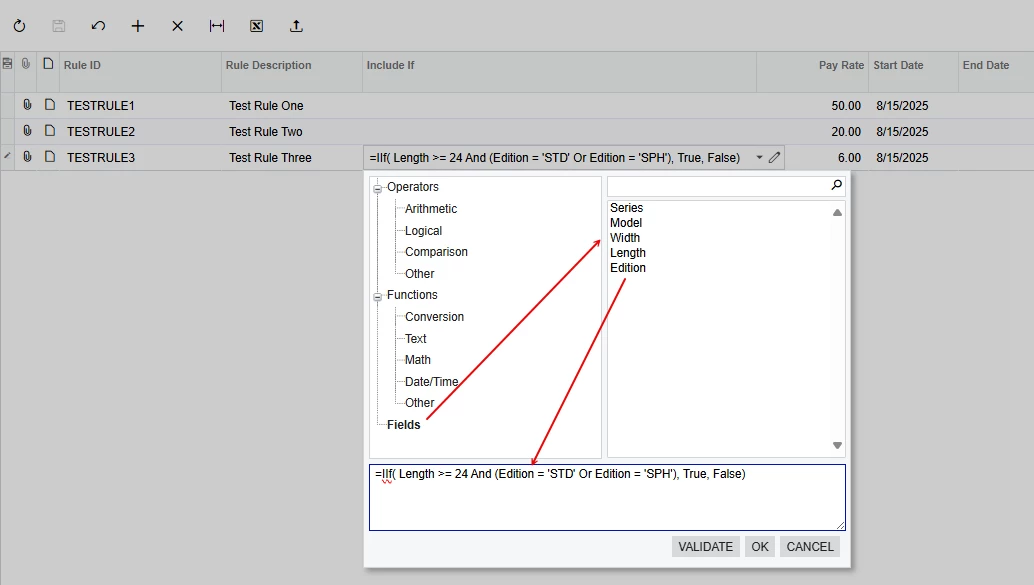
I’ve been wanting to post a Community ‘how-to’ for how to do this for a while now, so thanks for asking this. There is NO documentation for how to do this that I could find when I did it.
Here’s a brief summary: Acumatica has a core processor that should evaluate the formula for you. You can create an extension of the processor to do extra things, like include special parameters like @rate in the PM module.
This is the most simplistic processor I was able to come up with:
using PX.Common.Parser;
using PX.Data;
using System;
using System.Collections.Generic;

namespace SomeNamespace
{
    /// <summary>
    /// Enum representing different object types in the expression evaluation
    /// </summary>
    public enum DXObjectType
    {
        Address,
        Contact,
        BAccount,
        PREmployeeAttribute
    }

    /// <summary>
    /// Interface for evaluating formulas against data rows
    /// </summary>
    public interface IFormulaEvaluator<T> where T : class, IBqlTable, new()
    {
        object Evaluate(DXObjectType objectName, string fieldName, string attribute, T row);
    }

    /// <summary>
    /// Simplified formula parser for password generation from employee data.
    /// Supports field references like: BAccount.AcctCD, Address.PostalCode, Contact.LastName
    /// </summary>
    public class DXSimpleFormulaParser<T> where T : class, IBqlTable, new()
    {
        private readonly IFormulaEvaluator<T> _evaluator;

        public DXSimpleFormulaParser(IFormulaEvaluator<T> evaluator)
        {
            _evaluator = evaluator ?? throw new ArgumentNullException(nameof(evaluator));
        }

        /// <summary>
        /// Parses and evaluates a formula against a data row
        /// </summary>
        public object Evaluate(string formula, T row)
        {
            if (string.IsNullOrEmpty(formula))
                return null;

            // Remove leading '=' if present
            if (formula.StartsWith("="))
                formula = formula.Substring(1);

            // For now, we'll use the existing parser for complex expressions
            // but we could replace this with a simpler implementation if needed
            var parser = new DXSimpleExpressionParser<T>(_evaluator, formula);
            var node = parser.ParseExpression();

            // Create a simple data navigator with just the single row
            var navigator = new DXSimpleDataNavigator<T>(_evaluator, row);
            node.Bind(navigator);

            return node.Eval(row);
        }
    }

    /// <summary>
    /// Minimal expression parser that only handles what's needed for password formulas
    /// </summary>
    internal class DXSimpleExpressionParser<T> : ExpressionParser where T : class, IBqlTable, new()
    {
        private readonly IFormulaEvaluator<T> _evaluator;

        public DXSimpleExpressionParser(IFormulaEvaluator<T> evaluator, string text) : base(text)
        {
            _evaluator = evaluator;
        }

        /// <summary>
        /// Public wrapper for the protected Parse method
        /// </summary>
        public ExpressionNode ParseExpression() => base.Parse();

        protected override ParserContext CreateContext() =>
            new DXSimpleExpressionContext<T>(_evaluator);

        protected override NameNode CreateNameNode(ExpressionNode node, string tokenString) =>
            new DXSimpleNameNode<T>(node, tokenString, Context);

        protected override void ValidateName(NameNode node, string tokenString)
        {
            // No validation needed for our use case
        }

        protected override bool IsAggregate(string nodeName) => false; // We don't use aggregates

        protected override AggregateNode CreateAggregateNode(string name, string dataField) =>
            throw new NotSupportedException("Aggregates are not supported in password formulas");

        protected override FunctionNode CreateFunctionNode(ExpressionNode node, string name) =>
            new DXSimpleFunctionNode(node, name, Context);
    }

    /// <summary>
    /// Simplified context that only evaluates field values
    /// </summary>
    internal class DXSimpleExpressionContext<T> : ExpressionContext where T : class, IBqlTable, new()
    {
        private readonly IFormulaEvaluator<T> _evaluator;

        public DXSimpleExpressionContext(IFormulaEvaluator<T> evaluator)
        {
            _evaluator = evaluator;
        }

        public object Evaluate(DXObjectType objectType, string fieldName, bool isAttribute, T row)
        {
            return _evaluator.Evaluate(
                objectType,
                isAttribute ? null : fieldName,
                isAttribute ? fieldName : null,
                row);
        }
    }

    /// <summary>
    /// Simplified name node that parses field references
    /// </summary>
    internal class DXSimpleNameNode<T> : NameNode where T : class, IBqlTable, new()
    {
        public DXObjectType ObjectType { get; }
        public string FieldName { get; }
        public bool IsAttribute { get; }

        public DXSimpleNameNode(ExpressionNode node, string tokenString, ParserContext context)
            : base(node, tokenString, context)
        {
            // Parse the field reference (e.g., "BAccount.AcctCD" or "Contact.LastName")
            var parts = Name.Split('.');

            if (parts.Length >= 2)
            {
                // Try to parse the object type
                if (Enum.TryParse<DXObjectType>(parts[0], true, out var objType))
                {
                    ObjectType = objType;

                    // Check if it's an attribute reference
                    if (parts.Length == 3)
                    {
                        IsAttribute = true;
                        FieldName = parts[2].Trim('[', ']').Trim();
                    }
                    else if (parts[1].EndsWith("_Attributes"))
                    {
                        // Format: BAccount.FieldName_Attributes
                        IsAttribute = true;
                        FieldName = parts[1].Substring(0, parts[1].Length - 11);
                    }
                    else
                    {
                        // Regular field
                        FieldName = parts[1];
                    }
                }
                else
                {
                    // Default to BAccount if object type not recognized
                    ObjectType = DXObjectType.BAccount;
                    FieldName = Name;
                }
            }
            else
            {
                // Single field name defaults to BAccount
                ObjectType = DXObjectType.BAccount;
                FieldName = Name;
            }
        }

        public override object Eval(object row)
        {
            var context = (DXSimpleExpressionContext<T>)this.context;
            return context.Evaluate(ObjectType, FieldName, IsAttribute, (T)row);
        }
    }

    /// <summary>
    /// Basic function node - can be extended if functions are needed
    /// </summary>
    internal class DXSimpleFunctionNode : FunctionNode
    {
        public DXSimpleFunctionNode(ExpressionNode node, string name, ParserContext context)
            : base(node, name, context)
        { }
    }

    /// <summary>
    /// Simplified data navigator for single-row evaluation
    /// </summary>
    public class DXSimpleDataNavigator<T> : PX.Reports.Data.IDataNavigator where T : class, IBqlTable, new()
    {
        private readonly IFormulaEvaluator<T> _evaluator;
        private readonly T _row;

        public DXSimpleDataNavigator(IFormulaEvaluator<T> evaluator, T row)
        {
            _evaluator = evaluator;
            _row = row;
        }

        public object GetValue(object dataItem, string dataField, ref string format, bool valueOnly = false)
        {
            // Reuse the same parsing logic from DXSimpleNameNode
            var tempNode = new DXSimpleNameNode<T>(null, dataField, null);
            return _evaluator.Evaluate(
                tempNode.ObjectType,
                tempNode.IsAttribute ? null : tempNode.FieldName,
                tempNode.IsAttribute ? tempNode.FieldName : null,
                (T)dataItem);
        }

        // Minimal implementation of other interface members
        public void Clear() { }
        public void Refresh() { }
        public object Current => _row;
        public PX.Reports.Data.IDataNavigator GetChildNavigator(object record) => null;
        public object GetItem(object dataItem, string dataField)
        {
            string format = string.Empty;
            return GetValue(dataItem, dataField, ref format);
        }
        public System.Collections.IList GetList() => new List<T> { _row };
        public bool MoveNext() => false;
        public void Reset() { }
        public PX.Reports.Data.ReportSelectArguments SelectArguments => null;
        public object this[string dataField]
        {
            get
            {
                string format = string.Empty;
                return GetValue(_row, dataField, ref format);
            }
        }
        public string CurrentlyProcessingParam { get; set; }
        public int[] GetFieldSegments(string field) => new int[0];
        public object Clone() => new DXSimpleDataNavigator<T>(_evaluator, _row);
    }
}
The first piece that you’ll need to change to fit your needs is the first section from the previous block:
public enum DXObjectType
{
    Address,
    Contact,
    BAccount,
    PREmployeeAttribute
}
This should contain names of the types of DACs that you’ll be adding to your formula editor and will inform the evaluator where to get the info for them.
Next, you’ll need to create a graph extension (or use an existing one) which implements IFormulaEvaluator:
public class DXPRPayChecksAndAdjustmentsExt : PXGraphExtension<PRPayChecksAndAdjustments>, IFormulaEvaluator<BAccount>
{
    #region Interface Implementation

    public virtual object Evaluate(DXObjectType objectName, string fieldName, string attribute, BAccount row)
    {
        switch (objectName)
        {
            case DXObjectType.BAccount:
                BAccount account = row;
                if (account is object)
                {
                    if (attribute != null) // TODO : Implement attributes
                        throw new NotImplementedException();
                    else
                        return ConvertFromExtValue(Base.Caches[typeof(BAccount)].GetValueExt(account, fieldName));
                }
                break;

            case DXObjectType.Address:
                Address address = Address.PK.Find(Base, row.DefAddressID);
                if (address is object)
                    return ConvertFromExtValue(Base.Caches[typeof(Address)].GetValueExt(address, fieldName));
                break;

            default:
                break;
        }

        return null;
    }

    #endregion

    private object ConvertFromExtValue(object extValue)
    {
        if (extValue is PXFieldState fieldState)
            return fieldState.Value;
        else
            return extValue;
    }
You’ll need to edit the above section to contain ‘cases’ for the options in your DXObjectType enum. This is where you write the logic for the evaluator to get the database records for this type. You’ll notice in this example, the BAccount type can be gotten from the cache of the current graph, but the Address needs to be selected.
Lastly, you need to use the evaluator to evaluate the formula:
protected virtual string UseFormula()
{
    // Get the formula from the field
    string formula = dacExt?.UsrYourFormulaField;

    if (string.IsNullOrEmpty(formula))
        throw new PXException("Formula is null");

    try
    {
        // Use the simplified parser
        var parser = new DXSimpleFormulaParser<BAccount>(this);
        var result = parser.Evaluate(formula, bAccount);

        return result?.ToString() ?? string.Empty;
    }
    catch (Exception ex)
    {
        throw new PXException("Formula could not be evaluated");
    }
}
Here, I’m using the value as-is. You should be able to attempt to convert it to a bool and use it as you need.
If I missed anything obvious, let me know.