Question

Pivot Table - Hyperlinks and Drilldowns

  • February 23, 2026
  • 6 replies
  • 39 views

Forum|alt.badge.img

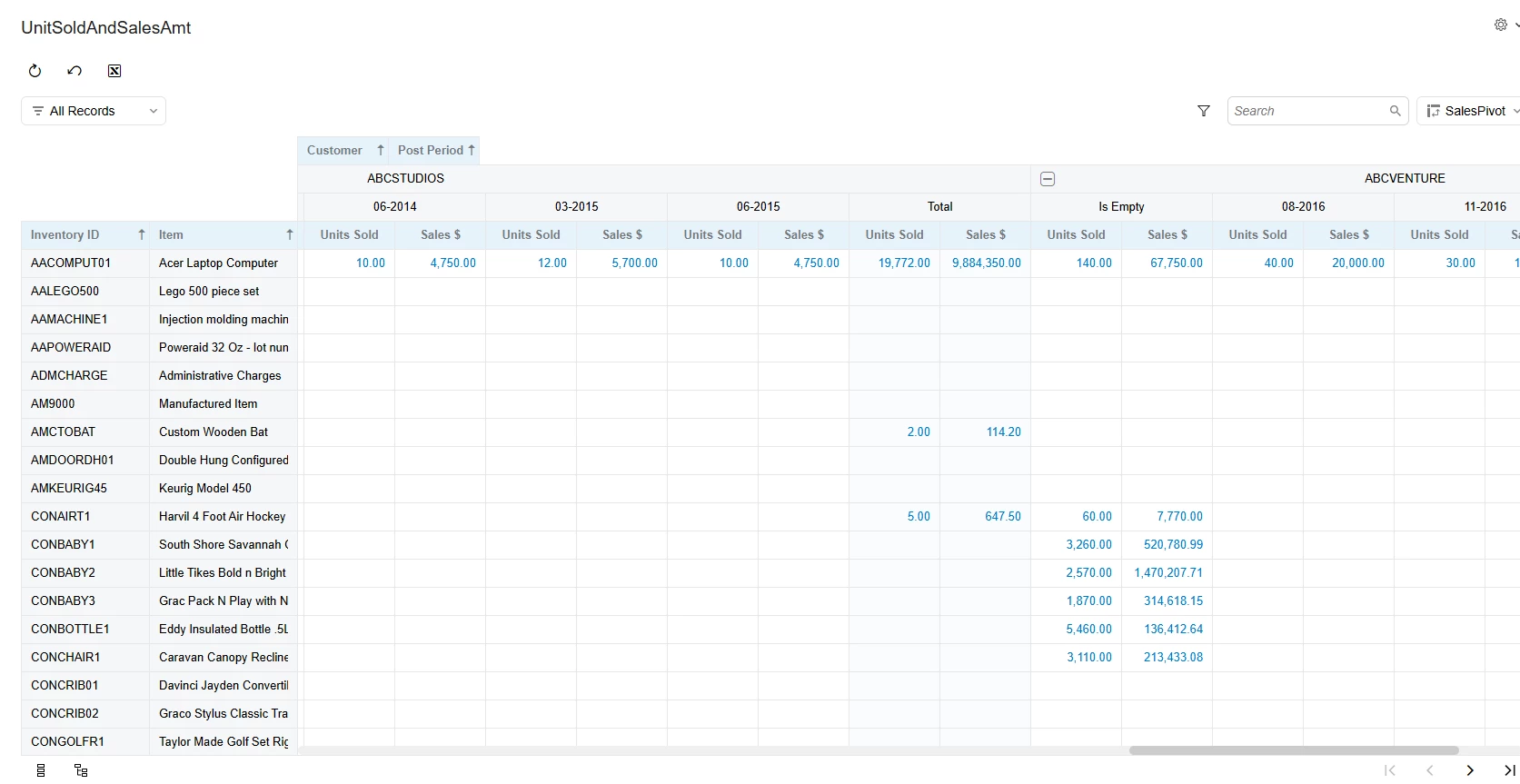
I have a pivot table that shows units sold and sales $. When I click the hyperlink value for units or dollars, I get an error message saying ‘Invalid Column Name’ and it then references one of the columns in my data source - which is a Generic Inquiry.

What I’m trying to see is if I can customize where these hyperlinks link to - and create my own drilldown tab. I’ve looked around on this community and prior questions like this have either no answer or mentioned you can’t customize the hyperlinks.

Hoping things have changed since and maybe there’s a solution?

thanks all!

Joseph

6 replies

WillH
Semi-Pro I
Forum|alt.badge.img+4
  • Semi-Pro I
  • February 23, 2026

@JHuang  what version of Acumatica are you in?  It might affect feature availability.

And do you have a simple version of your GI & Pivot you could share?  Or a mockup of what you’re hoping to achieve?


Forum|alt.badge.img
  • Author
  • Freshman I
  • February 24, 2026

Hi ​@WillH 

Using 2025 R2. 


Pivot table looks like this: The redacted columns are the warehouse columns. To the right are the units, sales $ and margin % by period. All data is correct. What doesn’t work is if I click a sales $ amount or units sold amount. I get the error.

Note: One of my other sources in this query is a GI. 

Joseph


WillH
Semi-Pro I
Forum|alt.badge.img+4
  • Semi-Pro I
  • March 2, 2026

Hi ​@JHuang 
Someone else might have enough familiarity with this kind of problem to make a suggestion.

My very quick testing hasn’t reproduced your issue in my demo database, so unless you can provide the definition for your Generic Inquiry & Pivot Table, I’m unlikely to be able to provide much more help, sorry.

You might find that if the issue is “calculated” fields in the GI then you may be able to to get some improvement/changed behavior by changing either the Object or Schema  fields for the line to better reflect where you want Acumatica to try to open.  

You may also find that changing the Caption in the Generic Inquiry to match an actual column name allows it to link through successfully.

Otherwise, talk to your VAR and provide them with full information of your error and they’ll probably be able to assist.


Forum|alt.badge.img
  • Author
  • Freshman I
  • March 2, 2026

Hi ​@WillH 

Looks like it was the generic inquiry I was using as the source data. Apparently Acumatica cannot populate the drilldown report on its own when a generic inquiry is used.

I fixed it by flipping the set up so that the sales data - which Acumatica shows in the table as hyperlinks - is in the regular inquiry and the inventory data is being pulled from a separate GI.

thanks

Joseph


KrunalDoshi
Freshman II
Forum|alt.badge.img
  • Freshman II
  • March 2, 2026

Hi ​@JHuang,

I have tried to create the similar GI and Pivot based on your issue in the post. However, I am not able to reproduce the issue. I am successfully able to drill down on any hyperlink to view particular group of records from the pivot. I would suggest try the GI without any formula or remove any group by if possible and check if it works. Also, as per Acumatica, pivot works only with one GI, if you have multiple GIs then it will not work. Check below link.

Pivot Tables: General Information

I have uploaded the GI for your reference. Let me know if this helps or if there is anything missing, you can upload the GI you have created. I can review the same and can better suggest the solution.


Forum|alt.badge.img
  • Author
  • Freshman I
  • March 2, 2026

Thanks ​@KrunalDoshi