Answer

parameter issuse

  • October 8, 2025
  • 8 replies
  • 55 views

Forum|alt.badge.img

So i am build this report in the report designer.

On this report the data type of {SOPackegeDetailEx.CustomRefNbr1} is a ‘string’.

For some reason it's not working in the ‘sting’ mode but the moment I change the data type to “integer” it works.

I check the data source of the data and it is “string”.

I am not sure what i am doing wrong.
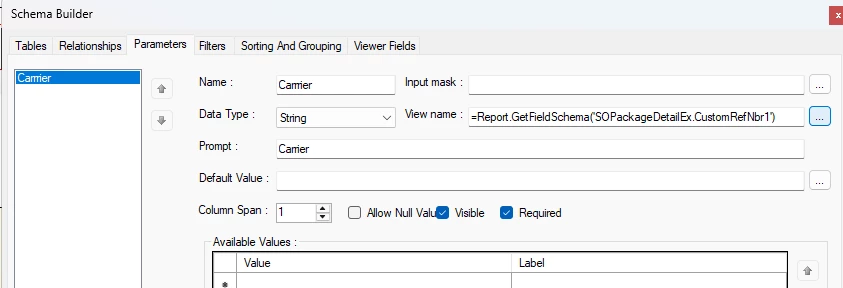
this is the data source.


Best answer by bwhite49

That looks good too.

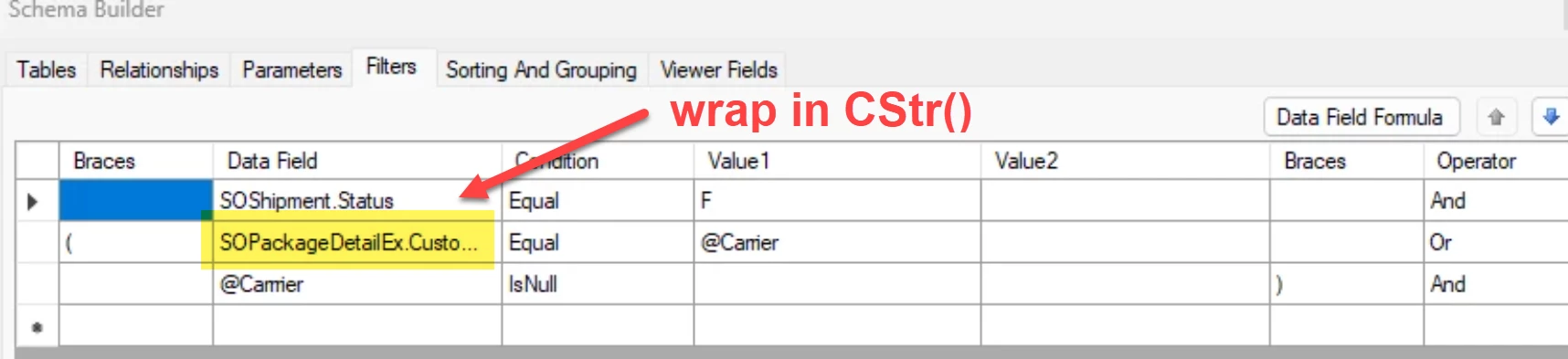
I would try this and see if it fixes the issue. Wrap the field in CStr() in the filters tab.


If this does not work, then you will need to create a support ticket with Acumatica. It looks like you have everything setup OK.

8 replies

bwhite49
Captain II
Forum|alt.badge.img+11
  • Captain II
  • October 8, 2025

What are you trying to accomplish here? You don’t really need to have anything in view name field. I don’t think you can add a lookup for that field, so I don’t think it’s doing anything good.


Forum|alt.badge.img+8
  • Captain II
  • October 9, 2025

@SandyA 


By using GetFieldSchema(), you are essentially making the parameter act as if it was the regular field and is usually done for selector fields which have multiple fields displayed.


You should just use =[SOPackegeDetailEx.CustomRefNbr1]


Forum|alt.badge.img
  • Author
  • Freshman II
  • October 9, 2025

@bwhite49 ,I am trying to add a parameter to this field 

The parameter only works when I use integers, but the data type is string


Forum|alt.badge.img
  • Author
  • Freshman II
  • October 9, 2025

@aiwan, I took away the GetFieldSchema(), and its still acting the same.


bwhite49
Captain II
Forum|alt.badge.img+11
  • Captain II
  • October 9, 2025

What does the conditions tab look like in report designer? If the view name field is null or uses field formatting as ​@aiwan mentioned, then what you have looks correct on this tab.


Forum|alt.badge.img
  • Author
  • Freshman II
  • October 9, 2025

this is the condition tab


bwhite49
Captain II
Forum|alt.badge.img+11
  • Captain II
  • Answer
  • October 9, 2025

That looks good too.

I would try this and see if it fixes the issue. Wrap the field in CStr() in the filters tab.


If this does not work, then you will need to create a support ticket with Acumatica. It looks like you have everything setup OK.


Forum|alt.badge.img
  • Author
  • Freshman II
  • October 9, 2025

@bwhite49, thanks but it not work either. 

Guess, I will have to make a ticket for this.