

Answer

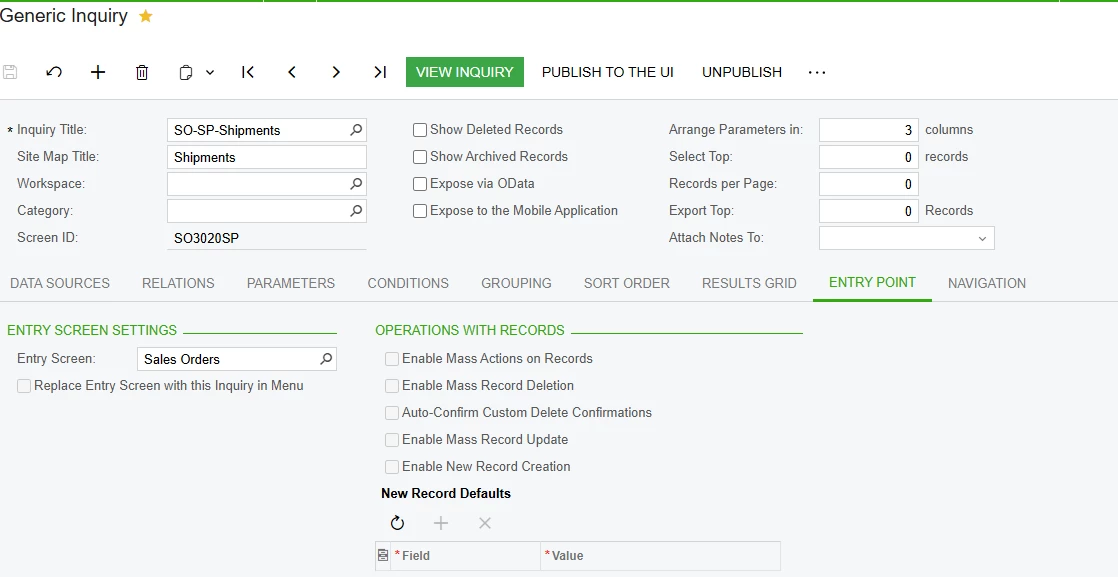
my entry point in GI is not working

  • March 4, 2025
  • 2 replies
  • 80 views

Forum|alt.badge.img

all the check mark place have been gray out.

how do i get it working
 

Best answer by BenjaminCrisman

@SandyA The checkmarks are dependent on the GI being a substitute screen for another screen. Right now on the left-hand side of the image there is Entry Screen Settings and the value is Sales Orders, but there is already a Sales Orders primary list, SO3020PL. Unless you want to change the current primary list with this one, it won’t work, needs to be tied to an actual screen and on the screen called ‘Lists as Entry Points’ you can specify which GIs you want to use as substitute screens.

2 replies

BenjaminCrisman
Acumatica Employee
Forum|alt.badge.img+4
  • Acumatica Support Team
  • Answer
  • March 4, 2025

@SandyA The checkmarks are dependent on the GI being a substitute screen for another screen. Right now on the left-hand side of the image there is Entry Screen Settings and the value is Sales Orders, but there is already a Sales Orders primary list, SO3020PL. Unless you want to change the current primary list with this one, it won’t work, needs to be tied to an actual screen and on the screen called ‘Lists as Entry Points’ you can specify which GIs you want to use as substitute screens.


Forum|alt.badge.img
  • Author
  • Freshman II
  • March 4, 2025

@BenjaminCrisman thank i got it now

