Solved

Multi-year date range summing

  • April 8, 2026
  • 14 replies
  • 95 views

Forum|alt.badge.img

Hi all,

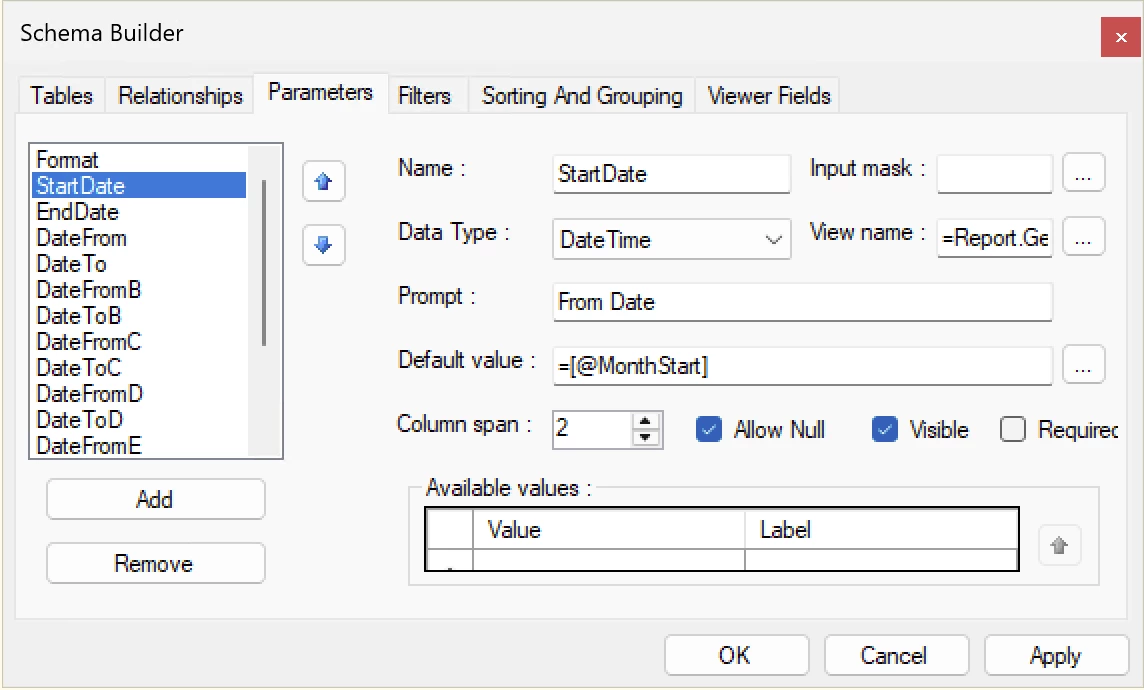
I have a simple report that has a parameter date range, StartDate (defaults to @MonthStart) and EndDate (defaults to @Today). This reports sums the total of orders for that range:

=sum([ARTran.NetSalesAmount])


The filter is a simple range like this:

(ARTran.TranDate >= @StartDate and ARTran.TranDate <= @EndDate)


But now I’ve been tasked to turn this into a 6 year range… essentially, A-F date ranges.

I thought I could use something like this for the other ranges to pull the numbers:

=Sum(
IIf(
[ARTran.TranDate] >= DateAdd(@StartDate, 'y', -1) AND
[ARTran.TranDate] <= DateAdd(@EndDate, 'y', -1),
[ARTran.NetSalesAmount],
0
)
)

But nothing pulls… and I realized it’s because my primary filter is still set to >=@StartDate and <=@EndDate.

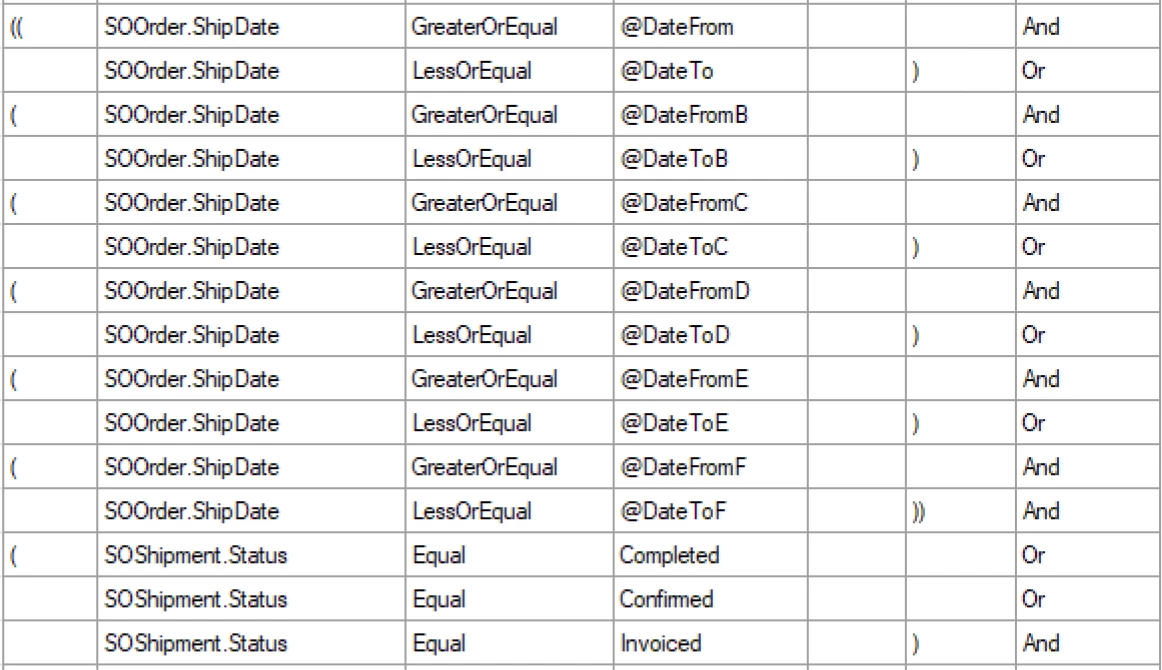
At this point I’m just confused. I’d prefer to just have one data range parameter and then base the other 5 off the primary (-1 year, -2 year, etc). But it might be simpler to just have 6 date range parameters and wire that up (which I’m unsure how to do lol).

I could set up filters to handle ranges A, B etc, but then how do I put those ranges into the appropriate buckets (summed total fields)?

I’ll post some screenshots of my misguided attempts. 

Any help is appreciated!


Best answer by WillH

@lauraj46  - I think your last comment here was slightly inaccurate.

The problem is likely:

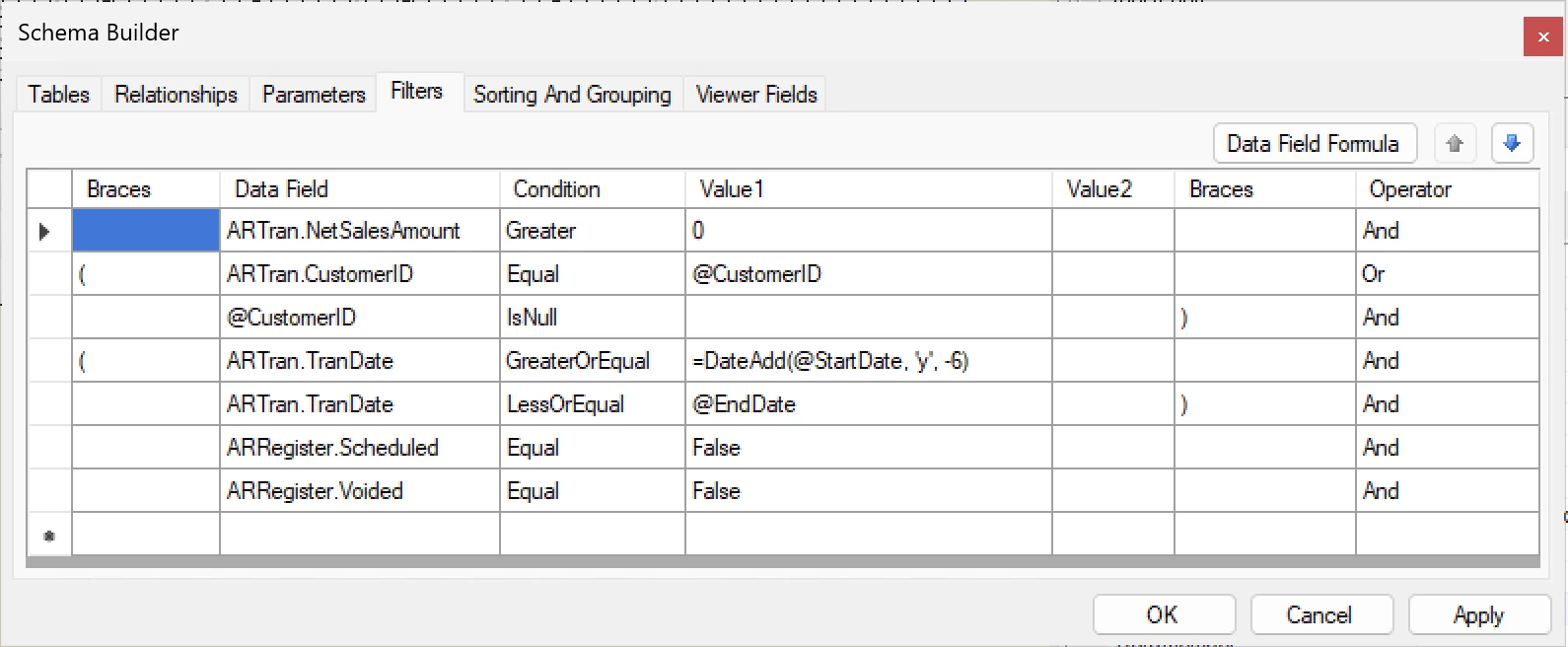
ARTran.TranDate GreaterOrEqual @StartDate-2160


This should be replaced, as I think you intended to say:
=DateAdd(@StartDate, ‘y’, -6)

or use the parameter @DateFromF 

(If this Parameter was being calculated by Formula already)

Looking more like:

ARTran.TranDate GreaterOrEqual =DateAdd(@StartDate, ‘y’, -6)


@swartzfeger  - If you’re having problems, try simplifying the query back to @StartDate & @EndDate (Without the -) to confirm that the above is the issue, or use @DateFromF

14 replies

lauraj46
Captain II
Forum|alt.badge.img+9
  • Captain II
  • April 8, 2026

Hi ​@swartzfeger ,

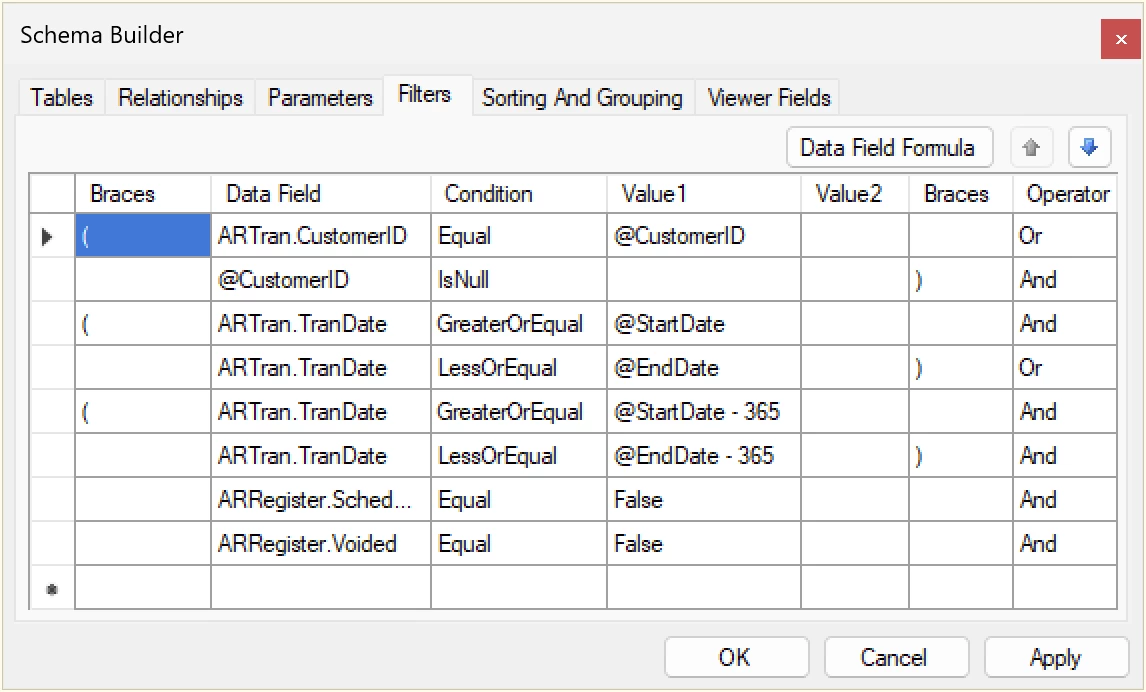
You are on the right track.  You don’t need the OR in the conditions since you can just expand the range something like this:

ARTran.TranDate >= @StartDate - 2190 and

ARTran.TranDate<=@EndDate

Then the formulas for each period should work just the way that you have them written.  

Give that a try and let us know how it goes.

Laura


Forum|alt.badge.img
  • Author
  • Jr Varsity II
  • April 9, 2026

Hi ​@swartzfeger ,

You are on the right track.  You don’t need the OR in the conditions since you can just expand the range something like this:

ARTran.TranDate >= @StartDate - 2190 and

ARTran.TranDate<=@EndDate

Then the formulas for each period should work just the way that you have them written.  

Give that a try and let us know how it goes.

Laura

Hi Laura that helps a lot! I’m only having two issues now:
1. When I select a CustomerID from a parameter field, it still returns all customers

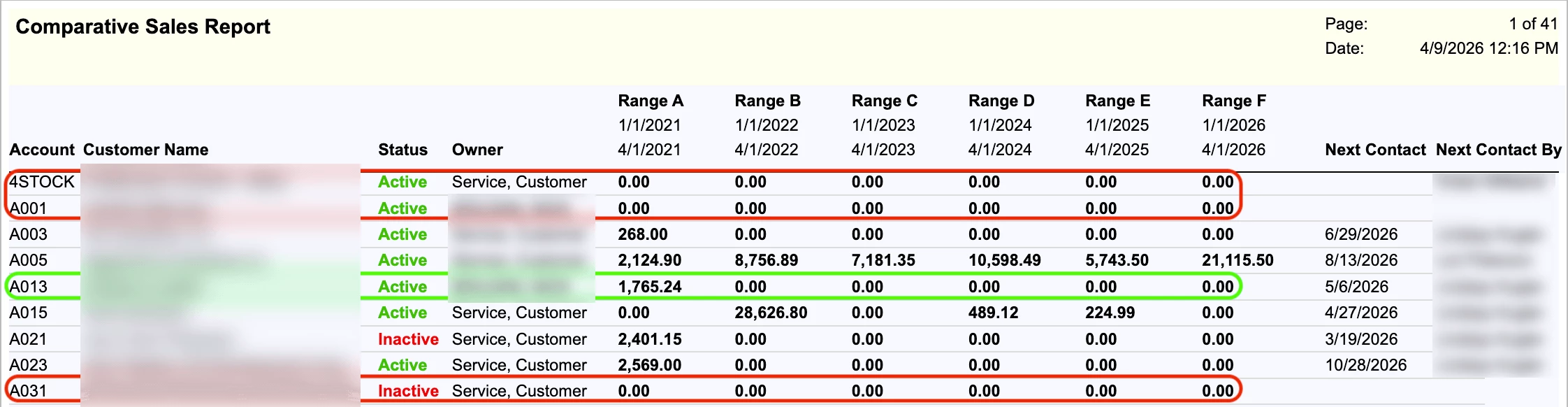
2. It returns rows even if there are no values… I only want to date ranges with a positive sum total (greater than > 0). So I think I would need some type of visibility expression if that there are no values in any of the date range, do not display the row for the BAccountID.

I’ve highlighted examples below -- some rows are all 0.00… those should not display at all. But if I a customer has even one sale in one date range, I want the row displayed.


Forum|alt.badge.img
  • Author
  • Jr Varsity II
  • April 9, 2026

Hi ​@swartzfeger ,

You are on the right track.  You don’t need the OR in the conditions since you can just expand the range something like this:

ARTran.TranDate >= @StartDate - 2190 and

ARTran.TranDate<=@EndDate

Then the formulas for each period should work just the way that you have them written.  

Give that a try and let us know how it goes.

Laura

Sorry I think I forgot to add my .rpx in my first response.


lauraj46
Captain II
Forum|alt.badge.img+9
  • Captain II
  • April 9, 2026

Hi ​@swartzfeger ,

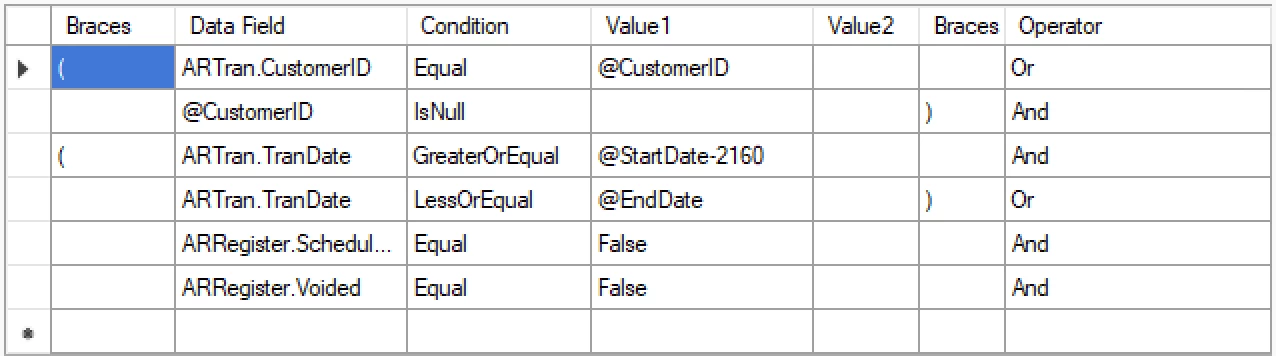
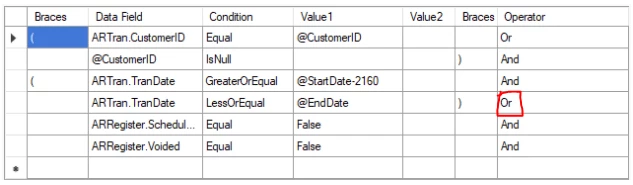
The OR condition in the screenshot below should be changed to AND.  As written currently, the order of operations on the Boolean logic means that either the CustomerID and TranDate conditions are true OR the ARRegister criteria are true. 

This change should resolve your first issue and possible the the second as well.  If there are $0 transactions in the date range and you want to exclude those lines in the schema then you could add another condition in the schema: AND ARTran.Amount Greater 0.  The report will only display group footers if there is at least one detail record. You could use a visibility condition, but the condition in the schema is more efficient since it will retrieve less data.

Hope this helps!

Laura


Forum|alt.badge.img
  • Author
  • Jr Varsity II
  • April 9, 2026

Hi ​@swartzfeger ,

The OR condition in the screenshot below should be changed to AND.  As written currently, the order of operations on the Boolean logic means that either the CustomerID and TranDate conditions are true OR the ARRegister criteria are true. 

This change should resolve your first issue and possible the the second as well.  If there are $0 transactions in the date range and you want to exclude those lines in the schema then you could add another condition in the schema: AND ARTran.Amount Greater 0.  The report will only display group footers if there is at least one detail record. You could use a visibility condition, but the condition in the schema is more efficient since it will retrieve less data.

Hope this helps!

Laura

I thought so too -- it makes no sense -- but when I change it to and, I get a completely blank page.

I’ve even gone so far as to delete the ARRegister.* altogether and same thing -- I get a blank page with a header:


lauraj46
Captain II
Forum|alt.badge.img+9
  • Captain II
  • April 9, 2026

Hi ​@swartzfeger ,

The boolean operator should definitely be AND to get correct results in this scenario.  I think the problem is with the formula for the end date.  It should be =DateAdd(@enddate, ‘d’, -2160) or you could use =DateAdd(@enddate, ‘y’, -6).  To enter the formula click the ‘Data Field Formula’ button and it will take you to the formula editor.

Hope that helps!

Laura


WillH
Semi-Pro I
Forum|alt.badge.img+4
  • Semi-Pro I
  • Answer
  • April 10, 2026

@lauraj46  - I think your last comment here was slightly inaccurate.

The problem is likely:

ARTran.TranDate GreaterOrEqual @StartDate-2160


This should be replaced, as I think you intended to say:
=DateAdd(@StartDate, ‘y’, -6)

or use the parameter @DateFromF 

(If this Parameter was being calculated by Formula already)

Looking more like:

ARTran.TranDate GreaterOrEqual =DateAdd(@StartDate, ‘y’, -6)


@swartzfeger  - If you’re having problems, try simplifying the query back to @StartDate & @EndDate (Without the -) to confirm that the above is the issue, or use @DateFromF


lauraj46
Captain II
Forum|alt.badge.img+9
  • Captain II
  • April 10, 2026

@lauraj46  - I think your last comment here was slightly inaccurate.

The problem is likely:

ARTran.TranDate GreaterOrEqual @StartDate-2160


This should be replaced, as I think you intended to say:
=DateAdd(@StartDate, ‘y’, -6)

or use the parameter @DateFromF 

(If this Parameter was being calculated by Formula already)

Looking more like:

ARTran.TranDate GreaterOrEqual =DateAdd(@StartDate, ‘y’, -6)


@swartzfeger  - If you’re having problems, try simplifying the query back to @StartDate & @EndDate (Without the -) to confirm that the above is the issue, or use @DateFromF

Absolutely, thanks ​@WillH 


Forum|alt.badge.img
  • Author
  • Jr Varsity II
  • April 10, 2026

That was it! It did didn’t like the @StartDate-2160, switching to =DateAdd(@StartDate, ‘y’, -6) fixed the issue (and now makes sense why changing the operator to ‘OR’ at least allowed some data through.

The minor issue I’m still having is $0 sales rows, even with adding greater than >0 in the filter and in the summed field:

=Sum(
IIf(
[ARTran.TranDate] >= @StartDate AND [ARTran.TranDate] <= @EndDate AND [ARTran.NetSalesAmount] > 0,
[ARTran.NetSalesAmount],
0
)
)

Maybe it’s because the summed fields are in a header and not a footer? I have 0 skills and made a frankenstein out of an existing report so this is a hatchet job lol.


Forum|alt.badge.img
  • Author
  • Jr Varsity II
  • April 10, 2026

@lauraj46  - I think your last comment here was slightly inaccurate.

The problem is likely:

ARTran.TranDate GreaterOrEqual @StartDate-2160


This should be replaced, as I think you intended to say:
=DateAdd(@StartDate, ‘y’, -6)

or use the parameter @DateFromF 

(If this Parameter was being calculated by Formula already)

Looking more like:

ARTran.TranDate GreaterOrEqual =DateAdd(@StartDate, ‘y’, -6)


@swartzfeger  - If you’re having problems, try simplifying the query back to @StartDate & @EndDate (Without the -) to confirm that the above is the issue, or use @DateFromF

Absolutely, thanks ​@WillH 

And Laura sorry for being a pain, you’ve been super helpful -- I have one other annoying issue -- I’ve only modified existing reports, I’ve never created a new one.

I’ve added this ‘new’ report to the site map but when I search for it, it doesn’t appear in the search results. I’ve reset the cache and tried a few other things to no avail.

This report was based on AR672000, so I incremented it by 5 and named/saved it like this in the site map:
 

AR.67.20.05, ~/Frames/ReportLauncher.aspx?ID=AR6720005.rpx, etc

Maybe it’s case sensitive because I see that it’s saved lower case as ar6720005.rpx in Report Designer.


lauraj46
Captain II
Forum|alt.badge.img+9
  • Captain II
  • April 10, 2026

@lauraj46  - I think your last comment here was slightly inaccurate.

The problem is likely:

ARTran.TranDate GreaterOrEqual @StartDate-2160


This should be replaced, as I think you intended to say:
=DateAdd(@StartDate, ‘y’, -6)

or use the parameter @DateFromF 

(If this Parameter was being calculated by Formula already)

Looking more like:

ARTran.TranDate GreaterOrEqual =DateAdd(@StartDate, ‘y’, -6)


@swartzfeger  - If you’re having problems, try simplifying the query back to @StartDate & @EndDate (Without the -) to confirm that the above is the issue, or use @DateFromF

Absolutely, thanks ​@WillH 

And Laura sorry for being a pain, you’ve been super helpful -- I have one other annoying issue -- I’ve only modified existing reports, I’ve never created a new one.

I’ve added this ‘new’ report to the site map but when I search for it, it doesn’t appear in the search results. I’ve reset the cache and tried a few other things to no avail.

This report was based on AR672000, so I incremented it by 5 and named/saved it like this in the site map:
 

AR.67.20.05, ~/Frames/ReportLauncher.aspx?ID=AR6720005.rpx, etc

Maybe it’s case sensitive because I see that it’s saved lower case as ar6720005.rpx in Report Designer.

Hi ​@swartzfeger ,

No worries!  After you add the report to the site map you will need to assign access rights.  You should be able to do this  on Access Rights by Screen.  Expand either the Receivables or Sales Orders branches in the tree and then left on the new report name to view and edit the permissions.  Grant rights to whichever roles should have access, and be sure to save.  Usually after that you will need to refresh the browser and then it should appear in the search.

Hope this helps!

Laura


lauraj46
Captain II
Forum|alt.badge.img+9
  • Captain II
  • April 10, 2026

Hi ​@swartzfeger 

That was it! It did didn’t like the @StartDate-2160, switching to =DateAdd(@StartDate, ‘y’, -6) fixed the issue (and now makes sense why changing the operator to ‘OR’ at least allowed some data through.

The minor issue I’m still having is $0 sales rows, even with adding greater than >0 in the filter and in the summed field:

=Sum(
IIf(
[ARTran.TranDate] >= @StartDate AND [ARTran.TranDate] <= @EndDate AND [ARTran.NetSalesAmount] > 0,
[ARTran.NetSalesAmount],
0
)
)

Maybe it’s because the summed fields are in a header and not a footer? I have 0 skills and made a frankenstein out of an existing report so this is a hatchet job lol.


Interesting.  You could add a visibility condition, but since you are already filtering on only transactions that are >$0, the sum should also be non-zero.  I would suggest unhiding the Detail section and adding some fields there to debug.  Give this a try and let us know what you find.

Hope this helps!

Laura


WillH
Semi-Pro I
Forum|alt.badge.img+4
  • Semi-Pro I
  • April 12, 2026

Laura’s advice for debugging is exactly what I would do if troubleshooting.


References for Report Designer - 
S150 - https://openuni.acumatica.com/courses/reporting/s150-reporting-report-designer/
Visible Expressions mentioned on pages 18-19


Laura gave an excellent answer to someone here: 

I realized after I wrote this that it was also to you a few years back, I’ve kept the link incase anyone else is trying to learn from this post.


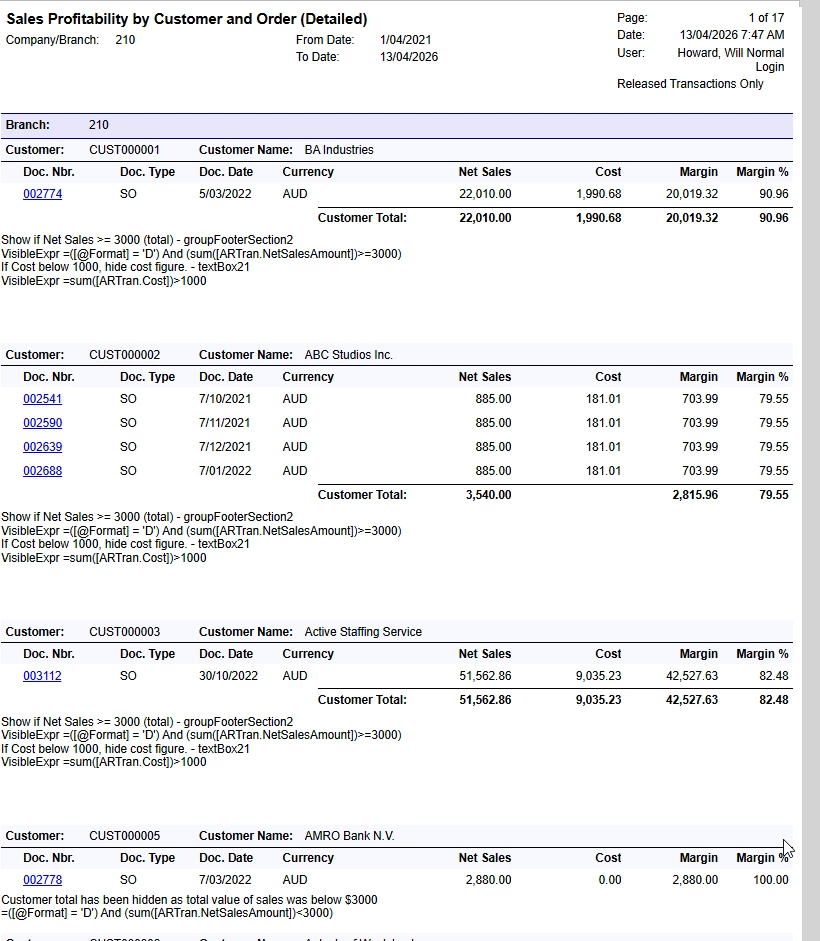
I had a quick hack at AR672000 to give some representative formulas for VisibleExpr.
 

Formula options:

By setting the VisibleExpr you can show different things.

/*Show if Net Sales >= 3000 (total) - groupFooterSection2 */
=([@Format] = 'D') And (sum([ARTran.NetSalesAmount])>=3000)
/*If Cost below 1000, hide cost figure. - textBox21 */
=sum([ARTran.Cost])>1000
/*Show if Net Sales < 3000 (total) - groupFooterSection6 */
=([@Format] = 'D') And (sum([ARTran.NetSalesAmount])<3000)

I’ve kept the ([@Format] = 'D') sections to mirror existing formula
Very quick example screenshot with demo formula:


Attached a copy, for playing with.


Special case - Sum() <> $0

The only other thing I normally caution is that Sum() can sometimes behave unpredictably if you’re trying to compare to $0. This comes down to the way floats are handled, if I’m comparing to 0 I’d usually wrap the Sum in a Round()

/* Example - safe comparison of money amounts, the explicit rounding removes any chance for float errors. (General problem with computer math.) */
=( Round( sum([ARTran.NetSalesAmount]),2) <> 0 )


Forum|alt.badge.img
  • Author
  • Jr Varsity II
  • April 13, 2026

Laura’s advice for debugging is exactly what I would do if troubleshooting.


References for Report Designer - 
S150 - https://openuni.acumatica.com/courses/reporting/s150-reporting-report-designer/
Visible Expressions mentioned on pages 18-19


Laura gave an excellent answer to someone here: 

I realized after I wrote this that it was also to you a few years back, I’ve kept the link incase anyone else is trying to learn from this post.


I had a quick hack at AR672000 to give some representative formulas for VisibleExpr.
 

Formula options:

By setting the VisibleExpr you can show different things.


This is a gold mine, thanks so much for this Will!