

Solved

Modern UI issue with attributes used as parameters in RPX

  • June 22, 2026
  • 6 replies
  • 50 views

Forum|alt.badge.img

Hello Community!!

In classic UI, We used to have an attribute (InventoryItem.PAM0000151_Attributes) as a parameter, so that user would be able to filter the results in the report by this parameter. In classic UI the user could view the parameter as a drop down field:
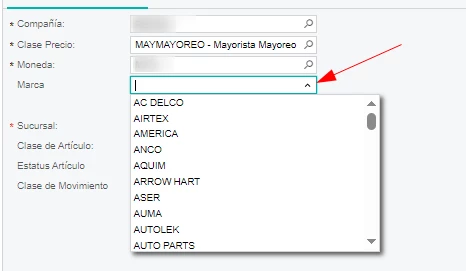
Now with modern UI, the parameter won’t show up.

This is how the parameter is set in the report designer:
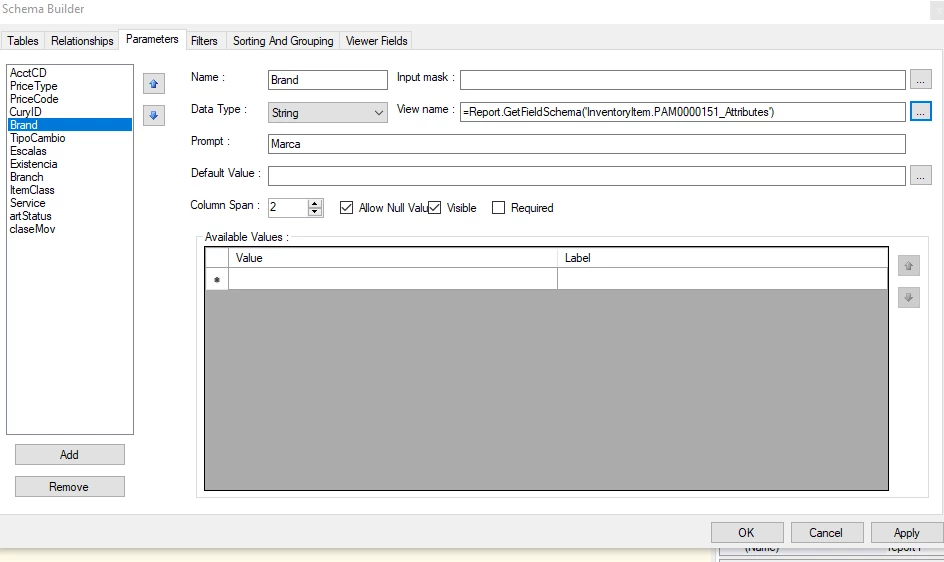
Any help is really appreciated.

Best answer by albertobello83

Thank you all for your answers. I confirmed with Acumatica. This is a known issue that will be fixed for 26R2.

The work around is to use the particular report in classic mode.

6 replies

mohammadnawaz51
Jr Varsity III
Forum|alt.badge.img+6

@albertobello83 Can you check the below information.


Forum|alt.badge.img
  • Author
  • Jr Varsity II
  • June 22, 2026

Thank you ​@mohammadnawaz51, The difference in my case is that the values of the dropdown come dynamically  from  product’s attributes values. 


dgodsill97
Varsity I
Forum|alt.badge.img+6
  • Varsity I
  • June 23, 2026

Did you refresh schema?  Sometimes it seems an attribute does not appear in the schema and refreshing the schema may fix it?


Forum|alt.badge.img
  • Author
  • Jr Varsity II
  • June 24, 2026

Did you refresh schema?  Sometimes it seems an attribute does not appear in the schema and refreshing the schema may fix it?

Thanks ​@dgodsill97. I refreshed the schema. But the attribute parameter won’t show.


dgodsill97
Varsity I
Forum|alt.badge.img+6
  • Varsity I
  • June 24, 2026

Sometimes it takes a few tries because you are using a client and it needs to pull it from the web site. Make sure to do the Load Schema first before the refresh.


Forum|alt.badge.img
  • Author
  • Jr Varsity II
  • Answer
  • June 30, 2026

Thank you all for your answers. I confirmed with Acumatica. This is a known issue that will be fixed for 26R2.

The work around is to use the particular report in classic mode.

