Solved

Master Pack Barcodes in Report Designer

  • March 24, 2026
  • 2 replies
  • 33 views

Forum|alt.badge.img

Hello,

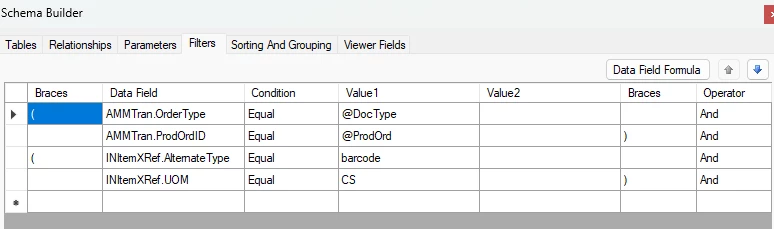
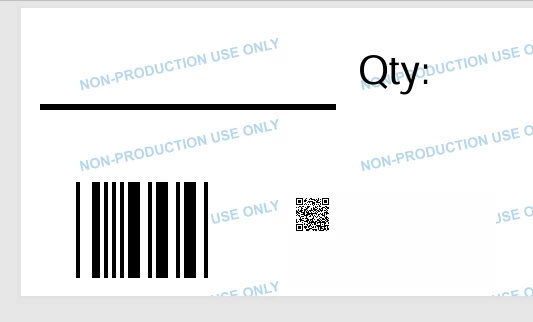
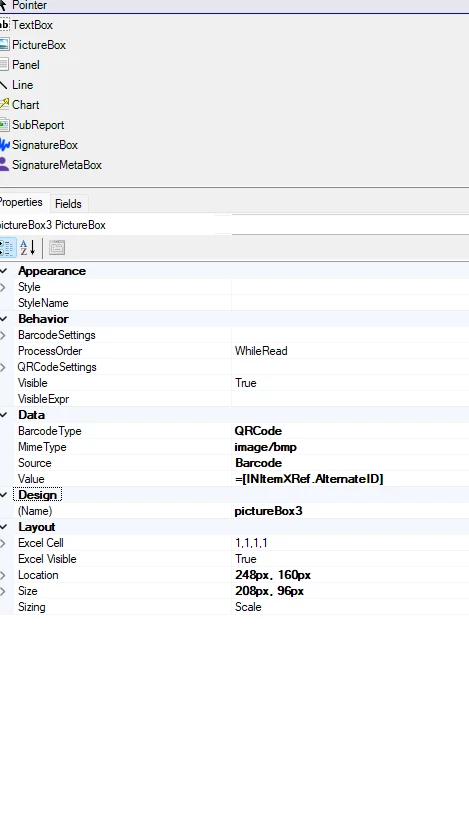
We sale our items both singularly and in master packs. I have identified and converted the qty of EA into CS (master pack). I have created a custom label that prints out master pack barcodes but am having troubles in report designer for barcode selection. Each stock item has 2 barcodes, one with the UOM of EA and one with the UOM of CS. I want this report to only show CS barcodes, so I used a filter to only show barcodes that have a CS as a UOM, but it is not displaying any data with this filter. Any ideas how to display on the barcodes with CS as the UOM? 
 

Best answer by jhalling52

Hi ​@ChantellBeaty,

What does the join look like from the Parent table to the INItemXRef table? 

You could add an additional condition on the join where the UOM equals ‘CS’.  This way the report only pulls in INItemXRef records with the UOM CS. 

2 replies

jhalling52
Jr Varsity I
Forum|alt.badge.img
  • Jr Varsity I
  • Answer
  • March 24, 2026

Hi ​@ChantellBeaty,

What does the join look like from the Parent table to the INItemXRef table? 

You could add an additional condition on the join where the UOM equals ‘CS’.  This way the report only pulls in INItemXRef records with the UOM CS. 


Forum|alt.badge.img
  • Author
  • Jr Varsity II
  • March 24, 2026

Hi ​@ChantellBeaty,

What does the join look like from the Parent table to the INItemXRef table? 

You could add an additional condition on the join where the UOM equals ‘CS’.  This way the report only pulls in INItemXRef records with the UOM CS. 

Thank you! The join this way worked. I removed the filters and joined the UOM =’CS’