

Answer

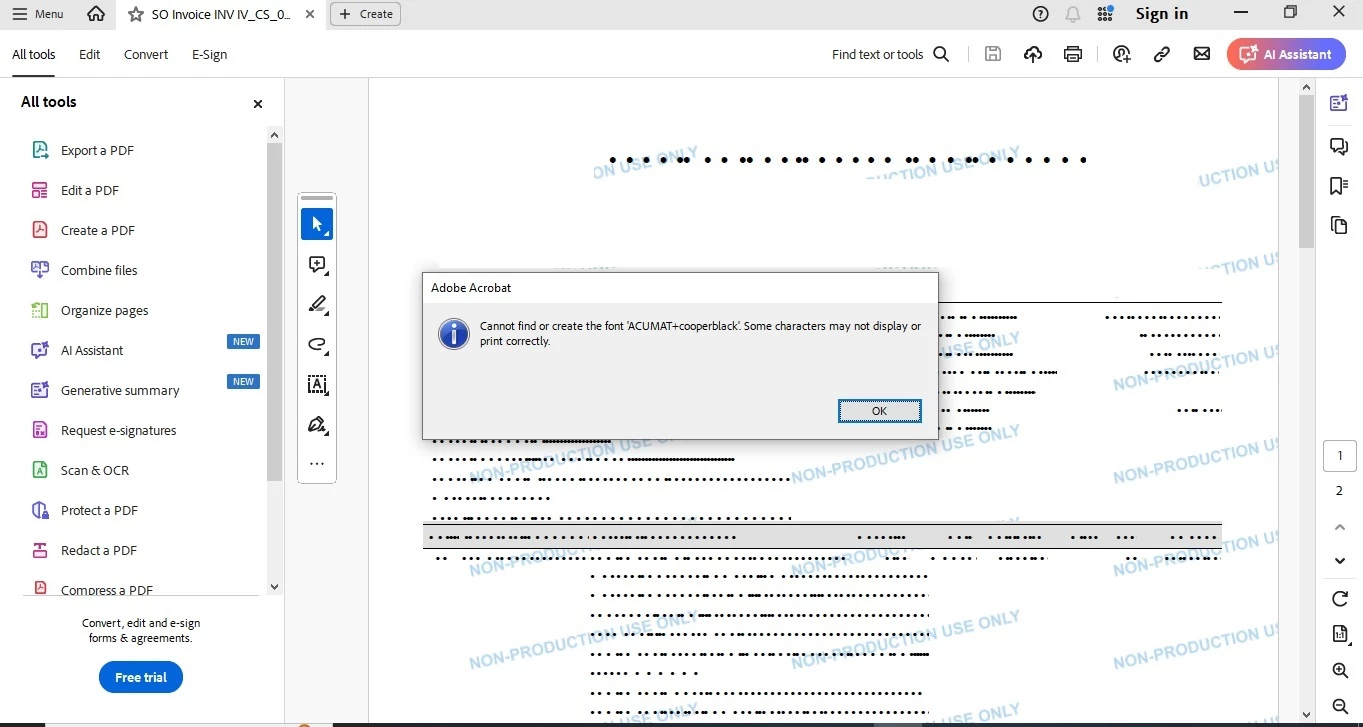
Issue in report output PDF file (Characters get blackout)

  • August 8, 2024
  • 2 replies
  • 124 views

Forum|alt.badge.img

Hi,


We are using Cooper Black and Calibri font in report, whenever we preview the report it shows up fine also the output PDF file works fine in all the browser but when we tries to open the PDF in Acrobat Reader (Adobe) it throws an error “Can not find or create font ‘ACUMAT+Cooper Black’. Some characters may not display or printed correctly” with inappropriate output (Attached screenshot for reference).

However we tried opening other file having same font and it works fine, it also works with other report output.

Kindly help to rectify this issue.
.

Best answer by BenjaminCrisman

@suchit39 I’ve seen this issue before and it has to do with some characters of the selected font used in the report are not available on the machine rendering the report.

In the previous instances I saw this it had to do with single quote and double quotation marks.

This will be fixed at some point in a future build, but the substitution for characters not supported isn’t working correctly as I understand, so instead it makes all the black dots.

You can either switch the font to a different font, try embedding the font, or take out the unsupported characters to get around the issue

2 replies

nhatnghetinh
Captain II
Forum|alt.badge.img+11
  • Captain II
  • August 8, 2024

Hi @suchit39 

Please try to open this PDF file with Google Chrome.


Best Regards,

NNT


BenjaminCrisman
Acumatica Employee
Forum|alt.badge.img+4
  • Acumatica Support Team
  • Answer
  • August 8, 2024

@suchit39 I’ve seen this issue before and it has to do with some characters of the selected font used in the report are not available on the machine rendering the report.

In the previous instances I saw this it had to do with single quote and double quotation marks.

This will be fixed at some point in a future build, but the substitution for characters not supported isn’t working correctly as I understand, so instead it makes all the black dots.

You can either switch the font to a different font, try embedding the font, or take out the unsupported characters to get around the issue


