Question

Is there a "Dashboard Reference" for the predefined (out-of-the-box) dashboards?

  • September 23, 2026
  • 3 replies
  • 36 views

Forum|alt.badge.img+6

For reports, Acumatica provides a Report Reference that lists each predefined report, the module it belongs to, and what it is used for. Is there an equivalent document for the dashboards that ship with Acumatica ERP?

3 replies

nhatnghetinh
Captain II
Forum|alt.badge.img+13
  • Captain II
  • September 23, 2026

Hi ​@ray20 

I haven't seen any Acumatica documentation that provides a "Dashboard Reference" similar to the Acumatica Report Reference Guide. Since there aren't many built-in dashboards in Acumatica, my approach to understanding them is to open the dashboards I'm interested in, examine how they function, and then modify them to suit our specific needs.

Best Regards,

NNT


Steve Milner
Varsity III
Forum|alt.badge.img+4
  • Varsity III
  • September 23, 2026

@ray20 I haven't found one either, including in the 2026 R1 help. NNT's approach of opening them up is the right one, and the dashboard form makes it quicker.

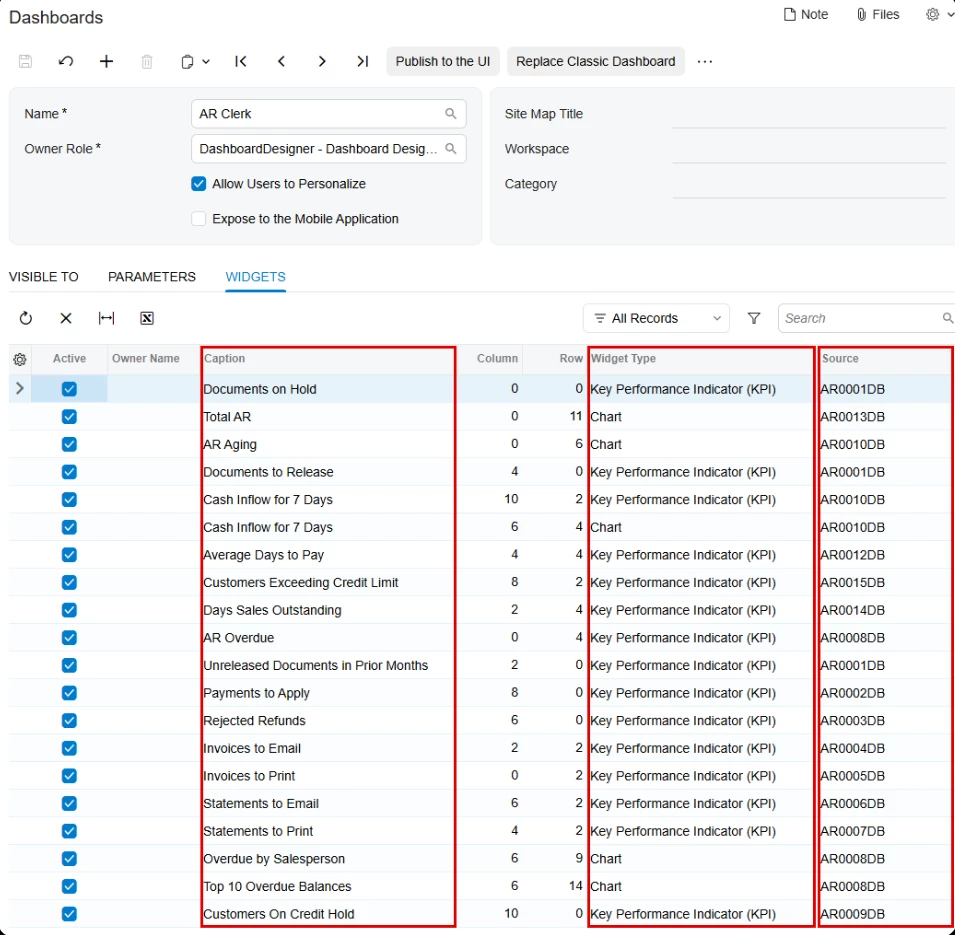
Open Dashboards (SM208610) and click the Name lookup. It lists every dashboard in your instance. Pick one and go to the Widgets tab. Each widget shows its caption, its widget type and a Source column. For inquiry-based widgets, Source is the screen ID of the generic inquiry feeding it. AR Clerk, for example, draws on 14 separate AR inquiries. Classic Dashboards (SM208600) has the same tab for Classic UI dashboards.

In a 2026 R1 build the shipped dashboards fall into two groups. The first is standalone dashboards, mostly built around a role: AP Clerk, AR Clerk, Controller, Sales Manager, Shipping Clerk, Purchasing Manager, Receiving Clerk, Warehouse Manager, three Payroll views (Operational, Personal, Executive), five Manufacturing dashboards such as Production Manager and Engineering, plus Commerce Sync Monitoring, two Amazon dashboards and HubSpot Sync.

The rest carry "-SP-" in the name. Nearly all of them are side panels that open beside list screens like Customers, Business Accounts, Contacts, Opportunities, Cases, Sales Orders and Purchase Orders. To see which list uses which, open that list's inquiry in Generic Inquiry (SM208000) and check the Navigation tab for targets set to Side Panel.


valentynbeznosiuk
Jr Varsity III
Forum|alt.badge.img+4

Hi ​@ray20 , following up on this one.

There's still no official Dashboard Reference, so with AI's help, I put together a community version for 2026 R1 on Beacon: https://beacon.acumatica.com/reader/shared/d1fcb29f-5245-42e0-b4d8-65f1fd7808d1/root.

It lists every predefined dashboard by module, with screen IDs, where each one is published, and every widget with its data source. More details here: