Answer

Is it possible to add “all status” in the dropdown filter of generic inquiry?

  • November 13, 2022
  • 3 replies
  • 365 views

I have made a new inquiry about payment screen and I want to add an option to show all status as well as each status filter in this inquiry. Is it possible to add “all status” in the dropdown filter of generic inquiry?


Best answer by BenjaminCrisman

Hi @nurul74! There isn’t a way to add all status unfortunately, and once a status is selected from this dropdown there isn’t a quick way to clear it, as it can’t be blanked out by using backspace.

Seems like there could be a functionality improvement there to either allow for deleting or having a blank option to select.

The best option then would be to just have it as a default quick filter:
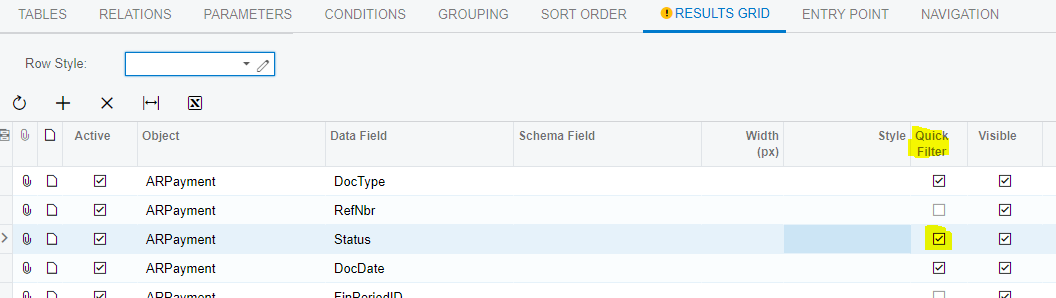
Then it would appear like this whenever the GI loads:
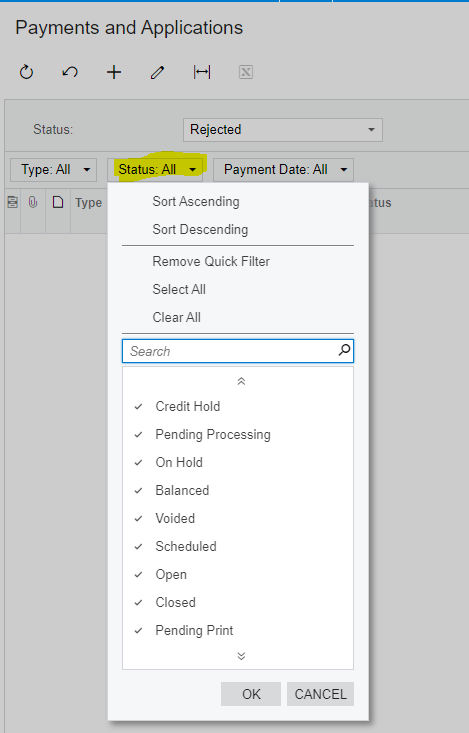
It may not be ideal, but anything more complex seems like a waste of time since the quick filter is essentially the same thing and is already there.

Might be worth submitting a case for a change request and also making a product enhancement idea:

https://community.acumatica.com/ideas

3 replies

BenjaminCrisman
Acumatica Employee
Forum|alt.badge.img+4
  • Acumatica Support Team
  • Answer
  • November 13, 2022

Hi @nurul74! There isn’t a way to add all status unfortunately, and once a status is selected from this dropdown there isn’t a quick way to clear it, as it can’t be blanked out by using backspace.

Seems like there could be a functionality improvement there to either allow for deleting or having a blank option to select.

The best option then would be to just have it as a default quick filter:

Then it would appear like this whenever the GI loads:

It may not be ideal, but anything more complex seems like a waste of time since the quick filter is essentially the same thing and is already there.

Might be worth submitting a case for a change request and also making a product enhancement idea:

https://community.acumatica.com/ideas


  • Author
  • Freshman I
  • November 15, 2022

Hi @nurul74! There isn’t a way to add all status unfortunately, and once a status is selected from this dropdown there isn’t a quick way to clear it, as it can’t be blanked out by using backspace.

Seems like there could be a functionality improvement there to either allow for deleting or having a blank option to select.

The best option then would be to just have it as a default quick filter:

Then it would appear like this whenever the GI loads:

It may not be ideal, but anything more complex seems like a waste of time since the quick filter is essentially the same thing and is already there.

Might be worth submitting a case for a change request and also making a product enhancement idea:

https://community.acumatica.com/ideas

I know the quick filter in result grid is hidden by default but how to show it? Is it the same as defining default value of a field in parameter?


BenjaminCrisman
Acumatica Employee
Forum|alt.badge.img+4
  • Acumatica Support Team
  • November 15, 2022

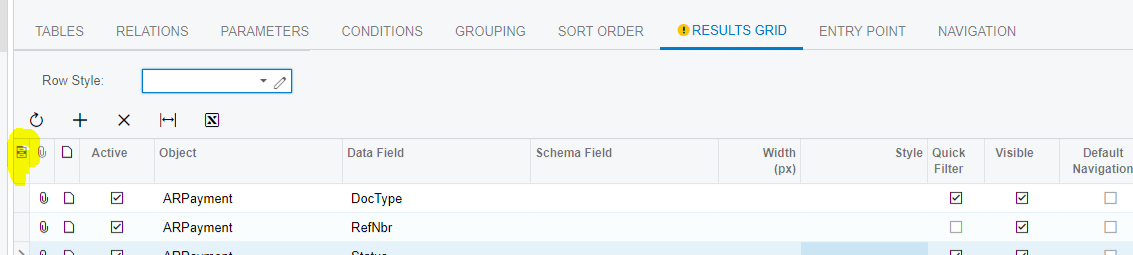
@nurul74 The quick filter is in the column configurator: