


I’m getting this error when attempting to export a GI to an excel file using the Excel export button. Any idea how to avoid getting this error AND get my Excel file?
Solved
I'm getting this error "inMemory Couldn't download - No File"
Best answer by Manikanta Dhulipudi
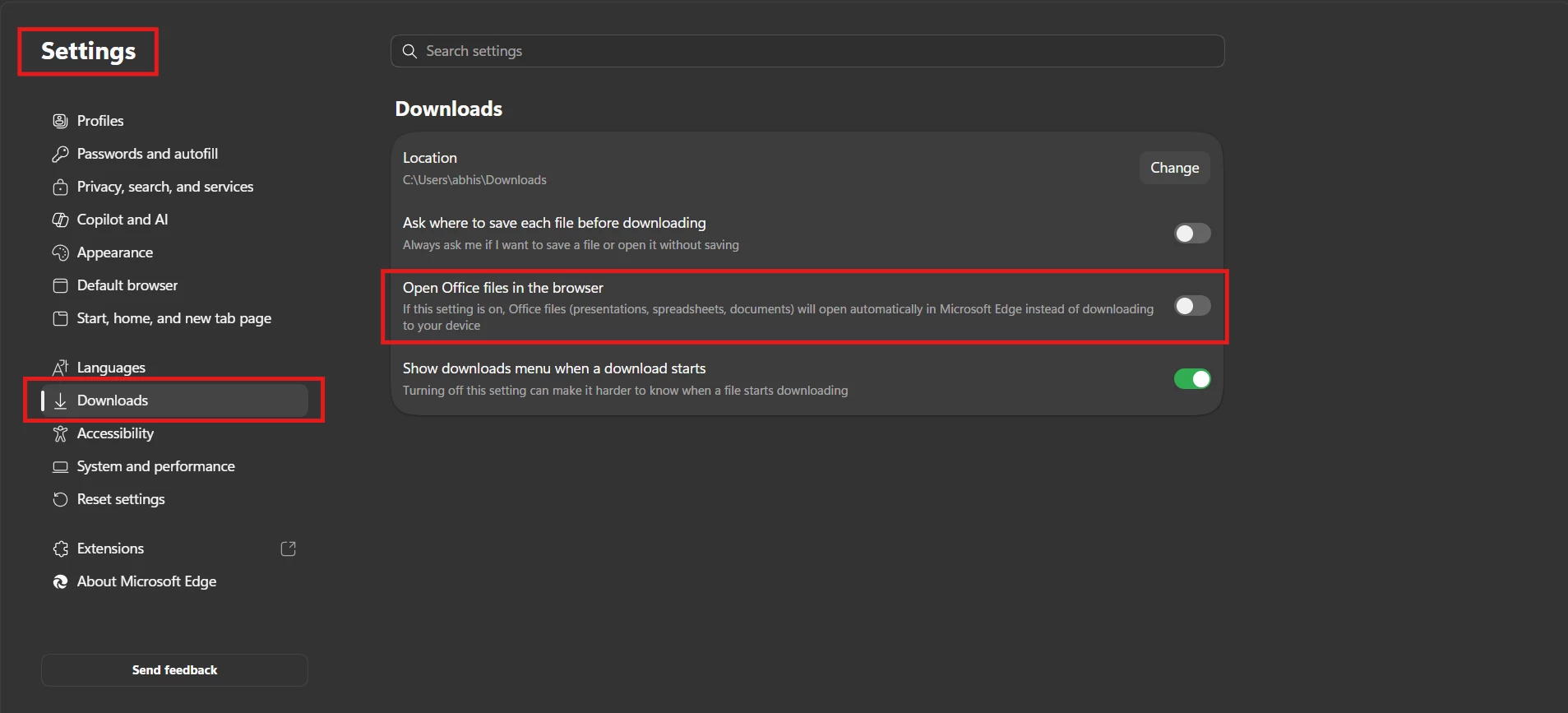
Identified that if the following feature is enabled in Microsoft Edge, it can prevent Acumatica from exporting data to Excel when using the Modern UI.
The issue occurs when exporting data from any grid screen. Instead of downloading the Excel file, the export may fail and display a message such as "inMemory" or "Couldn't download - No file."
To resolve the issue, please disable the setting shown below in Microsoft Edge. Once it is disabled, the Export to Excel functionality should work normally again.
Please refer to the screenshot below for the specific setting.






Enter your E-mail address. We'll send you an e-mail with instructions to reset your password.