Question

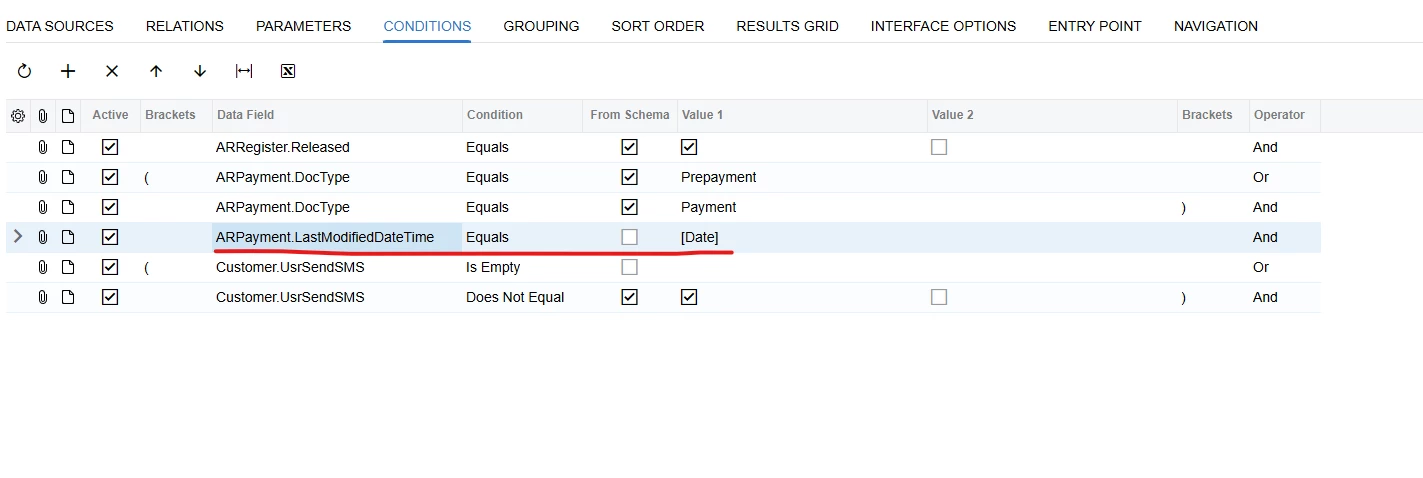
I cannot filter in ARPayment.LastModifiedDateTime in generic inquiry

  • February 11, 2026
  • 4 replies
  • 35 views

Forum|alt.badge.img

I checked the data for the date I filtered, and it has records. However, when I try to filter by parameter, nothing shows up.

4 replies

lauraj46
Captain II
Forum|alt.badge.img+9
  • Captain II
  • February 11, 2026

Hi ​@vannakheng ,

The LastModifiedDateTime field includes a timestamp, whereas the Date parameter is only the date.  That's why they will never be equal. 

Your results may also be affected by time localization.  DateTime fields are stored in Acumatica in UTC.  To convert the Date parameter to UTC for comparison purposes you can use the formula: =[Date]-Now()+NowUTC()

Try these two two conditions in your GI:

ARPayment.LastModifiedDateTime  >= [Date] - Now()+NowUTC()

ARPayment.LastModifiedDateTime < DateAdd([Date], 'd', 1) - Now()+NowUTC()

Hope this helps!

Laura


nhatnghetinh
Captain II
Forum|alt.badge.img+13
  • Captain II
  • February 11, 2026

Hi ​@vannakheng 

+ Cause:
ARPayment.LastModifiedDateTime is a DateTime field (includes time), but your parameter is a Date (time = 00:00:00).
Using Equals will not return records unless the time matches exactly midnight.

Example: On the screen, you select DateTime as: 2/11/2026 => the actual result is DateTime = 2026-02-11 00:00:00


+ Solution: Do not use Equals.
=> Use a date range instead. 

Example: LastModifiedDateTime >= [DateTime]


Best Regards,

NNT


aryanjadhav50
Jr Varsity I
Forum|alt.badge.img
  • Jr Varsity I
  • February 11, 2026

Hi ​@vannakheng 
The issue occurs because LastModifiedDateTime includes both date and time, while your Date parameter contains only the date. Since DateTime fields in Acumatica are stored in UTC, a direct comparison will not work and the values will never match exactly.

Convert the Date parameter to UTC before comparing it.
Use these two conditions in your GI:

ARPayment.LastModifiedDateTime >= [Date] - Now() + NowUTC()

ARPayment.LastModifiedDateTime < DateAdd([Date], 'd', 1) - Now() + NowUTC()

Please Let me know if there is any specific condition.


aryanjadhav50
Jr Varsity I
Forum|alt.badge.img
  • Jr Varsity I
  • February 17, 2026

Hi ​@vannakheng 
The issue occurs because LastModifiedDateTime includes both date and time, while your Date parameter contains only the date. Since DateTime fields in Acumatica are stored in UTC, a direct comparison will not work and the values will never match exactly.

Convert the Date parameter to UTC before comparing it.
Use these two conditions in your GI:

ARPayment.LastModifiedDateTime >= [Date] - Now() + NowUTC()

ARPayment.LastModifiedDateTime < DateAdd([Date], 'd', 1) - Now() + NowUTC()

Please Let me know if there is any specific condition.

Hi ​@vannakheng 
Is your Ishu resolved or not?




