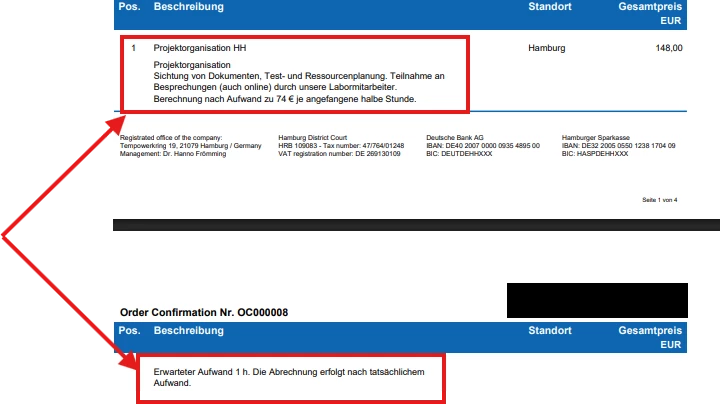
Hello everyone, does anyone know how I can move the position directly to the second page instead of splitting it across two pages? The "keep together" option is set to true, and both "can split" and "can shrink" are set to false, but it still splits.
Does anyone have any idea?
Best regards pantea
Best answer by DrewNisley
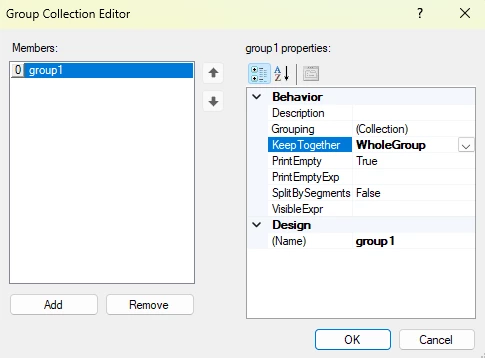
What I would suggest is to add a blank group right outside the detail lines and then go into the Group Collection Editor and specify KeepTogether to whole group for that blank group. You shouldn’t need to group by anything, but if it doesn’t work, try grouping by SOLine.LineNbr
What I would suggest is to add a blank group right outside the detail lines and then go into the Group Collection Editor and specify KeepTogether to whole group for that blank group. You shouldn’t need to group by anything, but if it doesn’t work, try grouping by SOLine.LineNbr
can someone explain how I can automatically move the detail lines to the next page when they reach the bottom of the current page? I have already enabled “Keep Together,” set both “Can Split” and “Can Shrink” to false, and activated “Page Break Before,” but the bars still remain at the bottom of the page. This also causes the page footer to overlap or disappear.
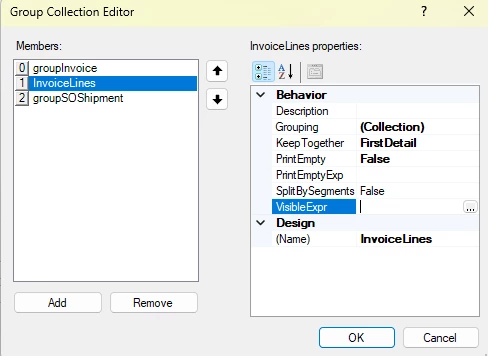
@PanteaShahrian Sorry for the delay, could you try and change the settings on the InvoiceLines to FirstDetail instead of WholeGroup? I wasn’t able to test it properly, but I think that should work for you.