Question

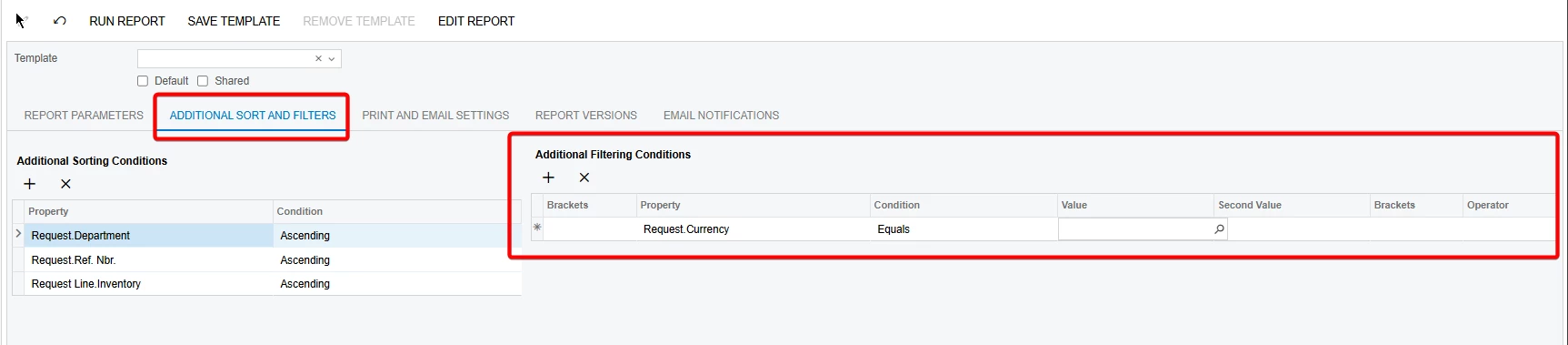
how to edit additional sort and filters in Acumatica report screen?

  • June 19, 2026
  • 2 replies
  • 44 views

Forum|alt.badge.img

Hi all,

Is there a way for us to edit or remove additional sort and filter values in the report screen via a customization?

my goal is to add a filter to the list of values shown under the value selector based on Organization ID. im unable to find where this is originated from


any help would be greatly appreciated.

Thank You.
r.manathungage@e-analytics.com

2 replies

lauraj46
Captain II
Forum|alt.badge.img+9
  • Captain II
  • June 26, 2026

Hi ​@RManathungage94 ,

In the Behavior > ViewerFieldsMode property of the report you can select from the following settings:

MergeWithUsed (default): With this setting, on the Additional Sort and Filters tab of the report form, the user can select any of the following as the properties of filtering and sorting conditions: any data fields used in the text boxes, any data fields used in the sorting and filtering conditions of the report, and any data fields listed on the Viewer Fields tab of the Schema Builder.

OnlySpecified: With this setting, on the Additional Sort and Filters tab of the report form, the user can select only the data fields specified on the Viewer Fields tab of the Schema Builder.

Hope this helps!

Laura 


Forum|alt.badge.img

Hi ​@lauraj46 

Thank you for your support. It worked and the issue has been resolved.

I appreciate your help.

Best regards,