Solved

How can we abort or terminate Queries that are executed on launch of GI

  • June 20, 2022
  • 6 replies
  • 977 views
  • Translate All

On the system monitor screen,

In the “Running Processes” tab we see reports, but not GIs that are launched.

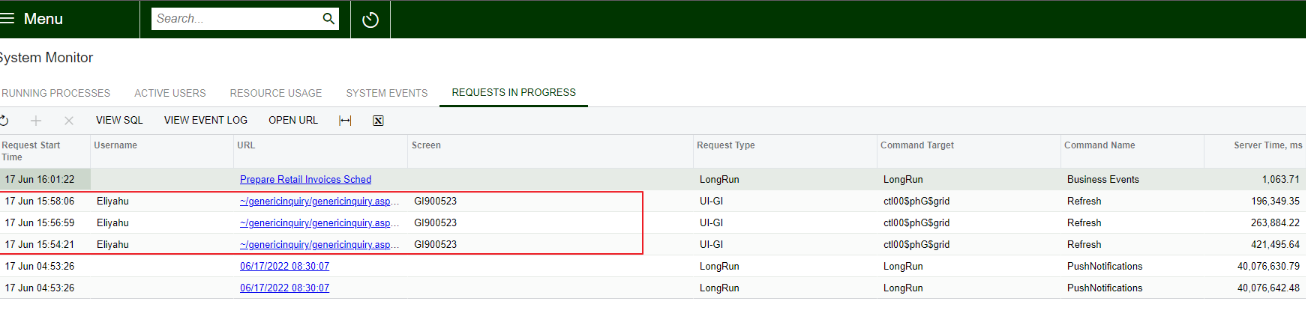
In “Requests in progress” tab we see GI queries, but there is no button/action to abort the query, That is taking longer time to execute .


Best answer by Kandy Beatty

HI @prasannaa 

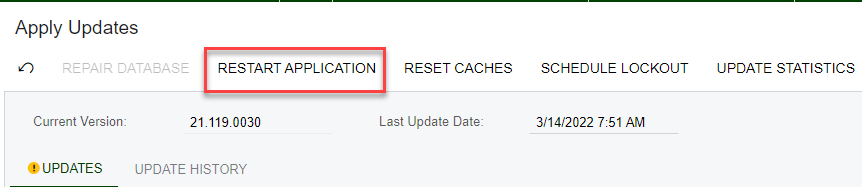
You can Restart the Application and that will stop these processes. Go to System Management > Apply Updates. I would suggest only doing this if everyone is out of the system or you can do it during off hours. 


View original

6 replies

Kandy Beatty
Captain II
Forum|alt.badge.img+18

HI @prasannaa 

You can Restart the Application and that will stop these processes. Go to System Management > Apply Updates. I would suggest only doing this if everyone is out of the system or you can do it during off hours. 


Translate

Forum|alt.badge.img+1
  • March 11, 2024

Is there anyway to kill specific processes? Restarting the entire app and killing all active user sessions is not ideal.
 

Translate

gpeterson
Freshman I

I have found a number of times where trying to cancel/abort processes doesn’t work, and I then have to restart the application anyways. What’s the point of having the option to cancel/abort if it doesn’t work? Curious if others have run into similar issues. 

Translate

jwright
Jr Varsity III
Forum|alt.badge.img+2
  • Jr Varsity III
  • July 8, 2024

@gpeterson I agree. I created an idea for this. End specific processes | Community (acumatica.com)

Translate

jwright
Jr Varsity III
Forum|alt.badge.img+2
  • Jr Varsity III
  • July 8, 2024

@Ellie upvote this idea: End specific processes | Community (acumatica.com)

Translate

Forum|alt.badge.img+1
  • July 8, 2024

Voted!

Translate