Solved

Hide Purchase order Totals in header Via access rights

  • November 26, 2024
  • 5 replies
  • 128 views
  • Translate All

joshmcgrew
Jr Varsity III
Forum|alt.badge.img

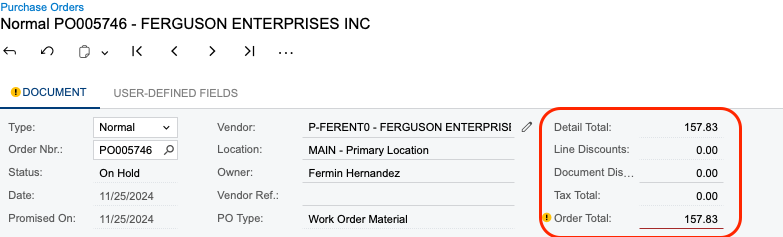
I have been hunting for the access right that would hide the attached image totals on purchase orders in the header for a view only user that we do not want to allow to see cost of material. I am having a hard time locating the correct access right for this to revoke. Can anyone point me in the right direction?
 

Best answer by MichaelShirk

Oh, sorry about that! 
I didn’t see that those weren’t under the Document node.
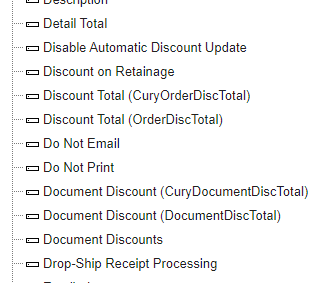
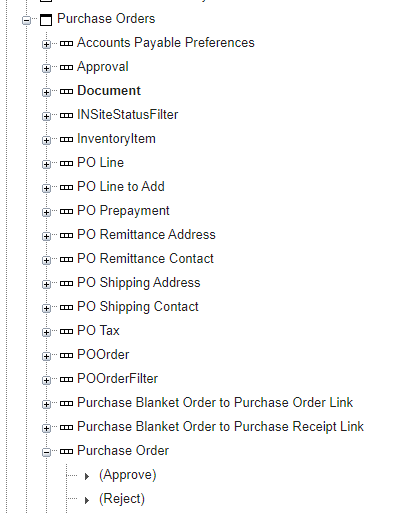
Here you go. They’re under the Purchase Orders » Purchase Order node. 


View original

5 replies

MichaelShirk
Captain II
Forum|alt.badge.img+8

Hey ​@joshmcgrew 
Have you seen this post?
I left a detailed answer here on field level access rights.

How to Grant Field Permissions Based on User Roles in Acumatica? | Community

Hope this helps!

Translate

MichaelShirk
Captain II
Forum|alt.badge.img+8

If you are asking about where to find these fields to adjust their access rights.

  1. Make sure you have the “Administrator” role. 
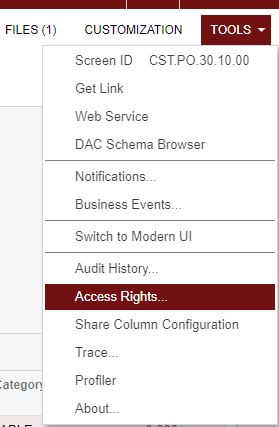
  2. On the Purchase Orders screen, click “Tools » Access Rights”. This will open “Access Rights by Screen. 
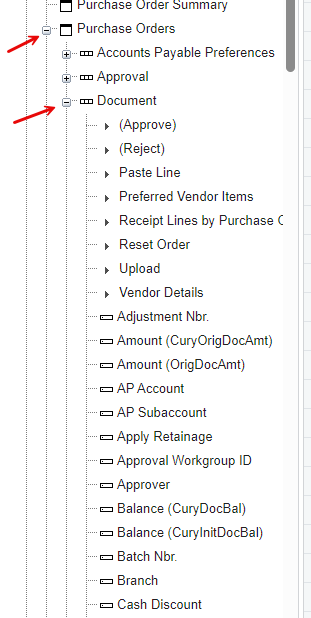
  3. Expand the “Document” node of the “Purchase Orders” node.
  4. Here you will find the Actions and Fields from the Purchase Order header section and you can use the details from the link I shared on how to hide those.
Translate

joshmcgrew
Jr Varsity III
Forum|alt.badge.img
  • Author
  • Jr Varsity III
  • November 26, 2024

​@MichaelShirk I was more so looking to see if someone knew the specific field that I need to revoke for that on purchase orders. I have been able to limit all other access as needed just having a hard time locating that specific field. But thank you thats very detailed and I’ll save it for sure. 

Translate

MichaelShirk
Captain II
Forum|alt.badge.img+8

Oh, sorry about that! 
I didn’t see that those weren’t under the Document node.
Here you go. They’re under the Purchase Orders » Purchase Order node. 


Translate

joshmcgrew
Jr Varsity III
Forum|alt.badge.img
  • Author
  • Jr Varsity III
  • November 26, 2024

​@MichaelShirk  Thanks! That did It! 

Translate