

Question

Hide column in parameter zoom screen

  • January 10, 2025
  • 3 replies
  • 69 views
  • Translate All

Forum|alt.badge.img

Hi,


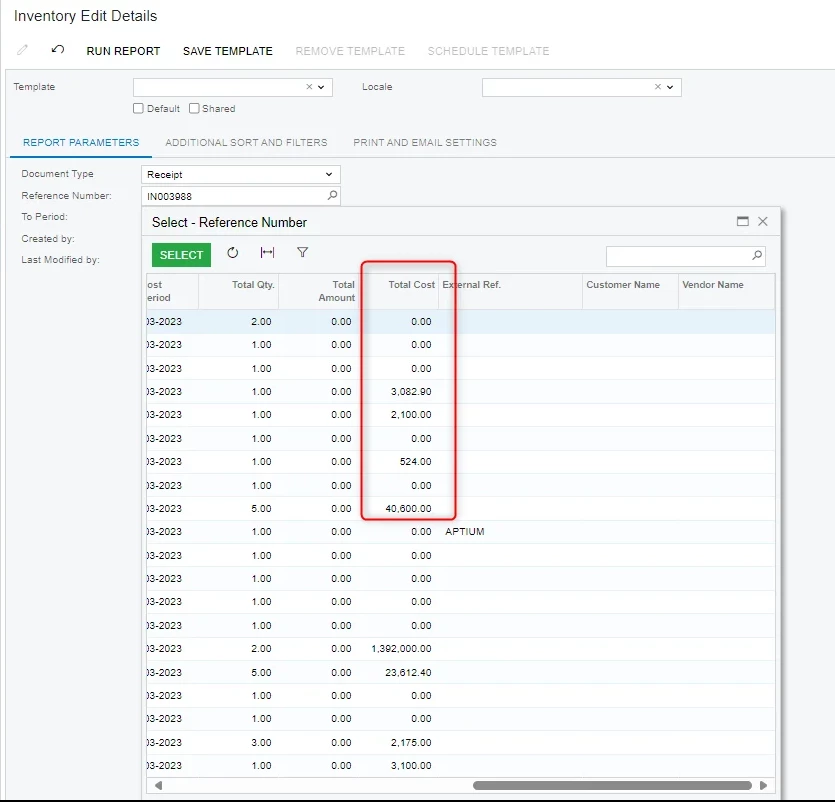
We have report called inventory edit details, which has different parameter. For one of the parameter field in the zoom screen we want to hide a column from the users, can anyone suggest is it feasible or not and how can we achieve this?

Refer the below screenshot where highlighted column needs to be hide from the users.


3 replies

nhatnghetinh
Captain II
Forum|alt.badge.img+14

Hi ​@suchit39 

For Reports you cannot hide a column from the users. Our solution is to create another similar report and remove the columns that you want users to not see. Then you assign permissions to which reports you want the user to be allowed to use.


Best Regards,

NNT

Translate

nhatnghetinh
Captain II
Forum|alt.badge.img+14

Hi ​@suchit39 

Please try using the Access Rights to prevent Users from seeing the field (eg Total Cost) that you want to hide on the report. If users do not see the field on the screen then users will not see that field on the parameter of report.


Regards,

NNT

Translate

BenjaminCrisman
Acumatica Employee
Forum|alt.badge.img+4

​@suchit39 Unfortunately if users need to see the Total Cost on the actual form, then the only way to hide it would be to customize the selector which is displaying the field.

Translate



