Solved

Generic Inquiry Percentage Calculation not calculating correctly.

  • June 6, 2023
  • 9 replies
  • 626 views
  • Translate All

We have created a GI and we are calculating values in the Results Grid to come up with a Percentage Complete.  Formula is (ActualAmount / RevisedAmount)*100.   This should give us a Percentage Result.

However,  The Calculation results are inconsistent.

For Example, the Actual Amount is 2400 and the Revised Amount is 4800.  The Percentage Result is coming back at 100.  It should be 50%.

Another Example, The Actual Amount is 52716 and the Revised Amount is 138000.  The percentage Result is coming back as 76%  it should be 38%.

But then in another line example the calculation is correct.  The Actual amount is 7992 and the Revised Amount is 14800 and the resulting percentage is 54% and this is correct.

We can not figure out why this calculation is incorrect and inconsistent.

here is the actual line in the results grid.

=CInt(IIF([BudgetRevenue.CuryRevisedAmount]=0,0  , ([BudgetRevenue.CuryActualAmount])/[BudgetRevenue.CuryRevisedAmount]*100))

Best answer by darylbowman

Try

=CInt(IIF([BudgetRevenue.CuryRevisedAmount]=0, 0, CDec([BudgetRevenue.CuryActualAmount])/[BudgetRevenue.CuryRevisedAmount]*100))


View original

9 replies

darylbowman
Captain II
Forum|alt.badge.img+17

Try

=CInt(IIF([BudgetRevenue.CuryRevisedAmount]=0, 0, CDec([BudgetRevenue.CuryActualAmount])/[BudgetRevenue.CuryRevisedAmount]*100))

 

Translate

This seems to have cleaned up most of the data issues, except for the first example 52716/138000  should be 38% but result is 76% & the 2400/4800 is still showing 100%.   However,  in many other lines, this did fix the calculation issues.    What does the CDec part do?

Translate

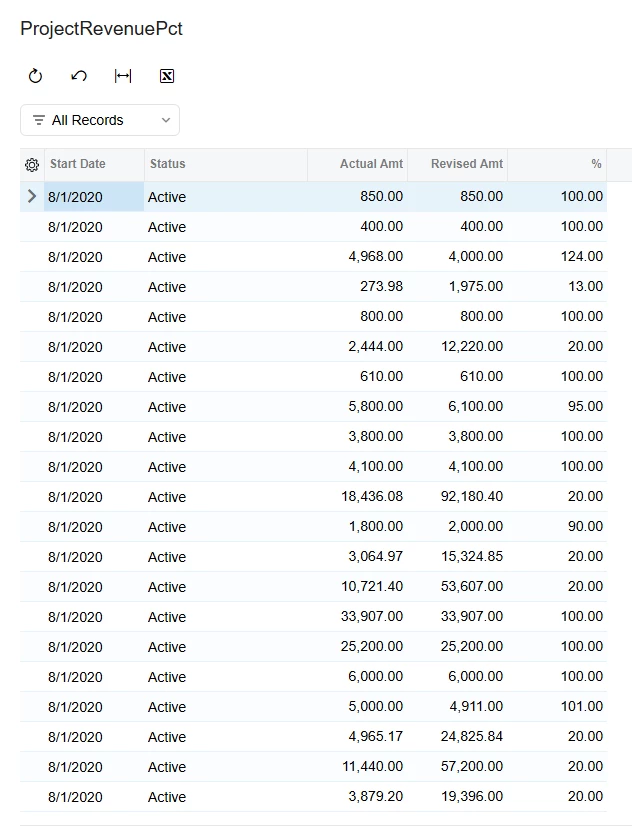
As you can see from the data below,  with the changes recommended by Daryl, most of the calculations are correct.  However, Line number 1 is incorrect (highlighted).   The calculation is Project Actual Amount / Project Budget amount.  This should be 38%   I have no clue how it is getting to 76% in this example.

This is formula in the results grid.   Revised Amount = Project Actual Amount (the caption was changed to make more sense to the users)

=CInt(IIF([BudgetRevenue.CuryRevisedAmount]=0, 0, CDec([BudgetRevenue.CuryActualAmount])/[BudgetRevenue.CuryRevisedAmount]*100))


Translate

darylbowman
Captain II
Forum|alt.badge.img+17

I can’t explain why one row would be behaving differently. I did notice that 38.2 (which is the correct result) is half of 76.4 (which I’m assuming is the rounded result you’re seeing.


CDec converts the amount to a decimal. The reason this works is because in code, dividing an integer by an integer will always result in an integer. Converting one to a decimal will result in the answer being a decimal, therefore not rounded prematurely.

Translate

Thanks for the help!  I appreciate it.

Translate

Forum|alt.badge.img

I encountered a very odd scenario today where CDec() was rounding a converted string to the nearest integer. CDbl() was working fine and is enough precision for our needs. In my case, I was curious if there was an issue with commas or decimal points.

The only way I can manufacture your results is by performing the operation twice with comma splits, but I think it’s worth noting that the row below, which also has an extra digit compared to other rows, is a factor of two too small.
My only takeaway has been to use CDbl() instead of CDec(), but I haven’t been able to find anyone else with the same issue.
I hope no one else stumbles across bugs like this, but just in case!

-Aaron

Translate

Forum|alt.badge.img+1

This seems like a hack that hasn’t be resolved for years.

Someone on another thread suggested having global schema fields that can be used to format anything without having to add a table to the query that isn’t used.


Translate

darylbowman
Captain II
Forum|alt.badge.img+17


...having global schema fields that can be used to format anything...

I love that idea


Translate

KrunalDoshi
Pro I
Forum|alt.badge.img+9

Hi ​@scottspencer82,

I do not think you need CDec for CuryActualAmount as it is already a decimal field. I would recommend the parenthesis around the division and then multiply it with 100 for percentage. I have modified the formula as below. Hope that helps.

=CInt(IIF([BudgetRevenue.CuryRevisedAmount]=0, 0, ([BudgetRevenue.CuryActualAmount]/[BudgetRevenue.CuryRevisedAmount])*100))


Translate