Solved

General Inquries: Need to enable pop-up navigation to CATran.OrigRefNbr

  • July 15, 2021
  • 5 replies
  • 228 views
  • Translate All

kboyko43
Freshman I
Forum|alt.badge.img

Hello Community, 


I’m trying to create a Generic Inquiry which would closely mirror CA303000 - Cash Account Details.  One thing I noticed is that PX.Objects.CA.CATran.OrigRefNbr is not typically a navigable field (you cannot just click it and it would bring you to the transaction).  I suspect this is because there are multipe modules which have their own unique Reference number (AP Check, AR check, etc etc).


Does anyone know how to replicate the one-click navigation using a combination of Transaction type and Reference Number?


Thank you,

Kirill
Best answer by Naveen Boga

Hi @kboyko43  This is very good question. You can upload this as an IDEA in our forum.

In the standard Acumatica GI, I don’t think we can navigate to multiple screens from single column with different type of transactions. But if we go with the coding i.e.“Custom Inquiry” screen this is pretty simple.


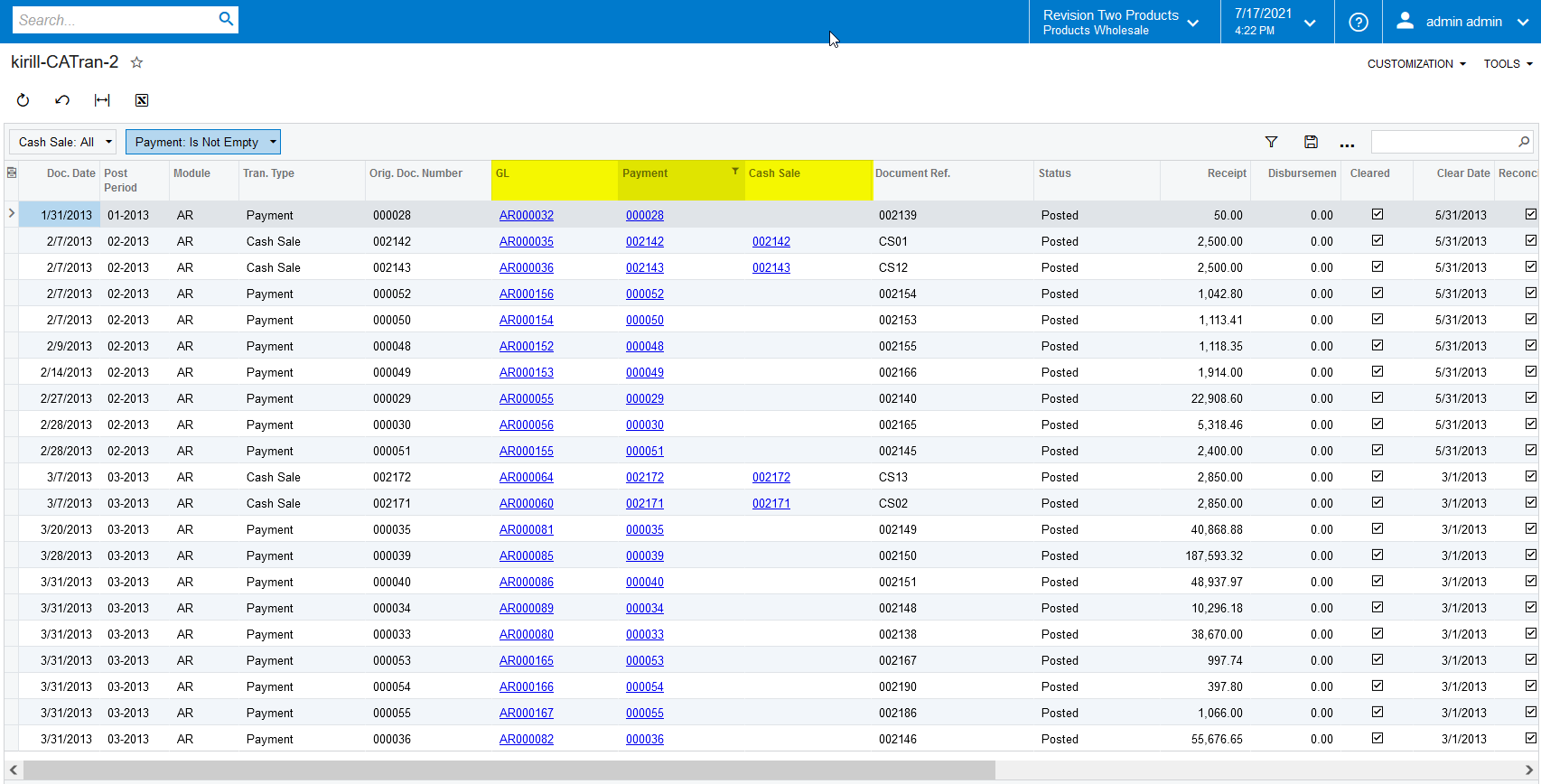
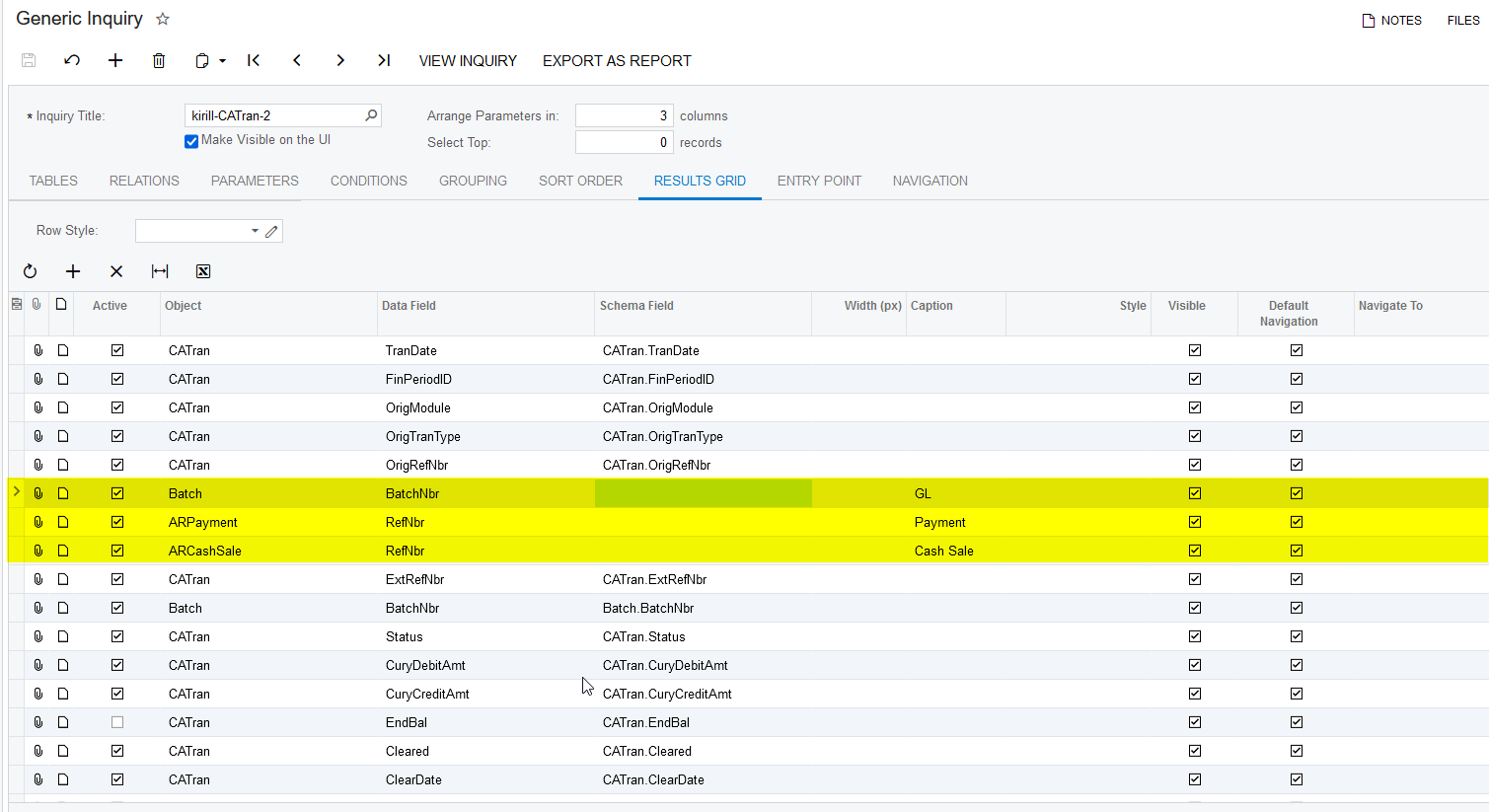
I’m NOT sure if this can help you, in standard Acumatica GI, as an alternative we can have multiple columns like (GL, Payments, and Cash Sales etc.) just like below, from there we can navigate to the respective screen.

Please find the screenshots for reference.


View original

5 replies

Naveen Boga
Captain II
Forum|alt.badge.img+20

Hi @kboyko43 Can you please share your generic inquiry. I can take look and help you out If I can.

Translate

kboyko43
Freshman I
Forum|alt.badge.img
  • Author
  • Freshman I
  • July 16, 2021

@Naveen B here you go, attaching the XML document

Translate

Naveen Boga
Captain II
Forum|alt.badge.img+20

Hi @kboyko43  This is very good question. You can upload this as an IDEA in our forum.

In the standard Acumatica GI, I don’t think we can navigate to multiple screens from single column with different type of transactions. But if we go with the coding i.e.“Custom Inquiry” screen this is pretty simple.


I’m NOT sure if this can help you, in standard Acumatica GI, as an alternative we can have multiple columns like (GL, Payments, and Cash Sales etc.) just like below, from there we can navigate to the respective screen.

Please find the screenshots for reference.


Translate

kboyko43
Freshman I
Forum|alt.badge.img
  • Author
  • Freshman I
  • July 18, 2021

thank you @Naveen B! this worked as a good workaround.  will raise an Idea as well.

Translate

Naveen Boga
Captain II
Forum|alt.badge.img+20

Great..I'm glad that I helped you on this.

Translate