Answer

Formula - Report Designer to pull field

  • October 31, 2025
  • 3 replies
  • 46 views

Forum|alt.badge.img

Hi All


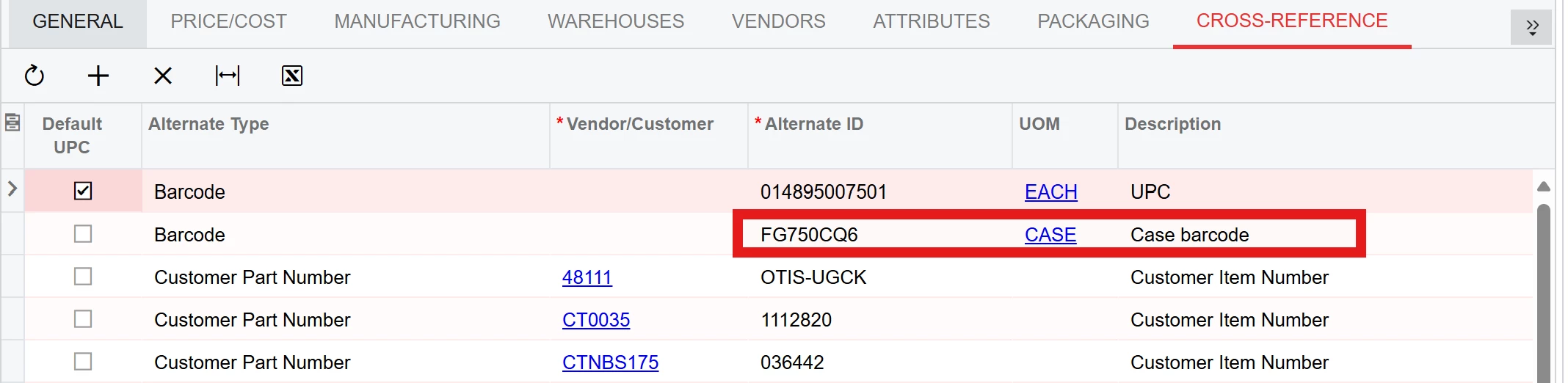
I am working on a report in report designer and need to pull the below line only into the report for the field I am setting up. Since there are many values in the Cross Reference section, does anyone have a suggestion on how to write it so only the one line pulls and nothing more? 


Best answer by Zalman

Hi there,

In the Relations section, try adding the following conditions:

  • InventoryID = InventoryID

  • AlternateType = 'BAR'

  • UOM = 'CASE'

If your items may have more than one “CASE” UOM, you can also include an additional condition such as Descr = [the specific value you consistently use] to ensure only the correct line is pulled.

3 replies

Forum|alt.badge.img+1
  • Jr Varsity I
  • Answer
  • October 31, 2025

Hi there,

In the Relations section, try adding the following conditions:

  • InventoryID = InventoryID

  • AlternateType = 'BAR'

  • UOM = 'CASE'

If your items may have more than one “CASE” UOM, you can also include an additional condition such as Descr = [the specific value you consistently use] to ensure only the correct line is pulled.


Forum|alt.badge.img
  • Author
  • Varsity I
  • October 31, 2025

@Zalman Thank you much - Good Advice. Why do I get the “DELETED”? I try it as noted and continues to move to the DELETED value. Thanks


Forum|alt.badge.img+3

Try using the Child Formula button above for this purpose.